GPT Image 2.5 Flare & Sunburst가 EvoLink에 출시되었습니다GPT Image 2.5 체험하기

커뮤니티 프롬프트 모음

Nano Banana 2.1 프롬프트 모음

나노 바나나(Nano Banana) 2.1 프롬프트와 이미지 편집 예시를 출처와 함께 살펴보세요. 원문을 복사하고 참조 이미지 조건을 확인한 뒤 EvoLink 통합 API로 이용할 수 있습니다.

완전한 프롬프트 15개확인 가능한 지시 69개불완전한 일부 텍스트 3개

2026년 10월 7일에 수집한 커뮤니티 예시입니다. 원문을 그대로 보존했습니다. EvoLink가 개별 예시를 재현 검증한 것은 아니며, 비교 자료에는 다른 모델의 결과가 포함될 수 있습니다.

나노 바나나 2.1 프롬프트 모음

완전한 프롬프트부터 살펴보고 작업, 필요한 이미지, 불완전한 텍스트로 필터링하세요. 이 목록과 별개로 중복을 제외한 편집 지시 58개를 아래 워크플로 2개에 모았습니다.

표시 15 / 29

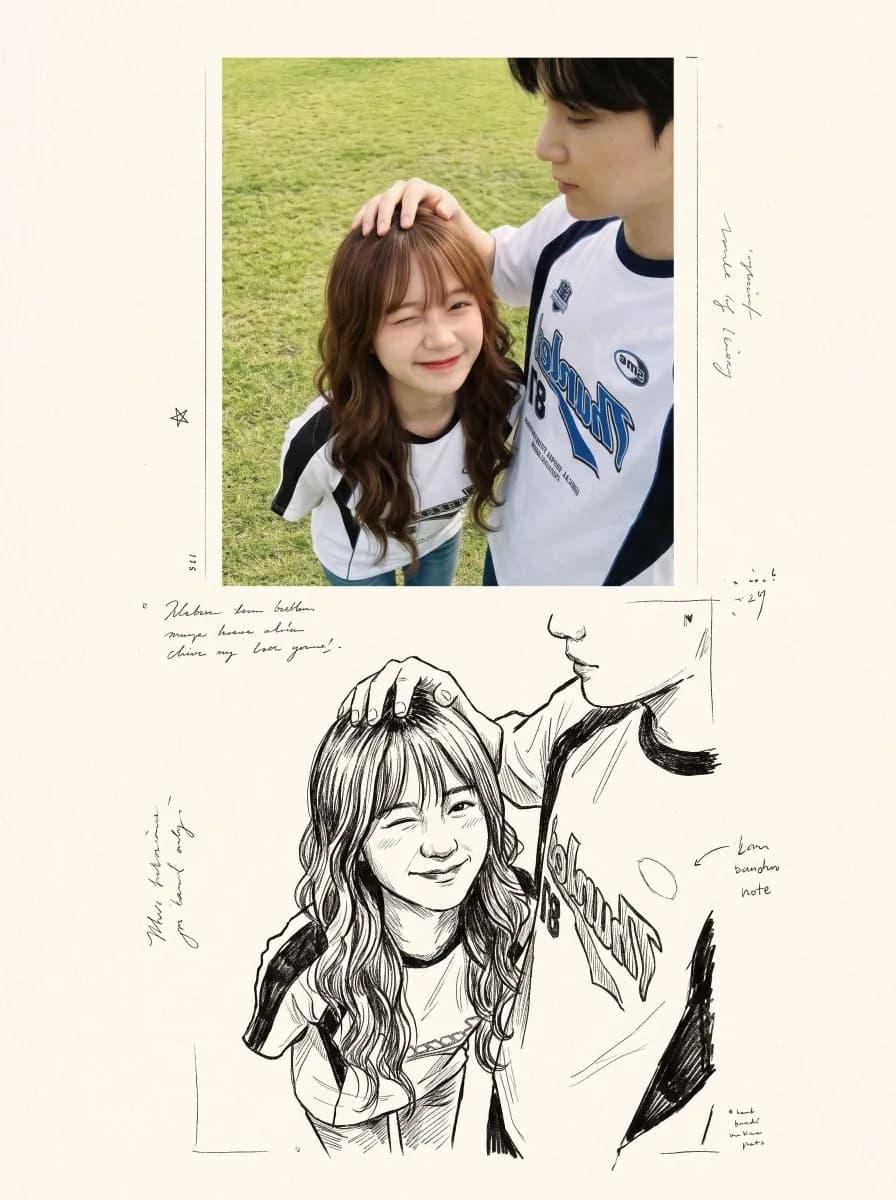
사진을 먹그림 추억 앨범으로 변환 — 원본 게시물의 이미지·영상
원본 게시물의 이미지·영상
완전한 프롬프트

사진을 먹그림 추억 앨범으로 변환

그래픽 디자인·텍스트 · @Just_sharon7

필요한 입력: 원본 인물 사진 필요

프롬프트 원문 보기

Create a nostalgic, magazine-inspired photo-and-illustration artbook spread using the reference image as the visual foundation. Maintain the original subjects, identities, poses, expressions, wardrobe, framing, and emotional tone without altering their recognizable appearance. Design the composition as two vertically flowing interpretations of the same moment. In the upper portion, recreate the reference as an intimate cinematic photograph. Use gentle natural light, realistic skin and fabric textures, muted authentic colors, delicate analog film grain, soft background separation, and shallow depth of field. The image should feel spontaneous and personal, like a quiet memory captured on film rather than a staged portrait. In the lower portion, reinterpret that identical moment as a raw black-and-white ink drawing printed on warm ivory sketchbook paper. Preserve the characters, pose, proportions, and composition while replacing photographic detail with expressive hand-drawn linework, irregular pen strokes, loose cross-hatching, unfinished contours, and restrained shading. Allow small imperfections so the illustration feels genuinely handmade rather than digitally traced. Blend both sections naturally so the photograph appears to dissolve into the drawing, creating the impression of a memory gradually becoming an illustration. Surround the lower artwork with restrained editorial design elements: a small numbered chapter heading, a brief poetic handwritten annotation, tiny archival or documentary notes, and subtle typographic details. Keep all typography secondary to the imagery. Use generous cream-toned negative space, tactile paper grain, faint printing imperfections, understated vintage publishing details, and an elegant minimalist layout inspired by contemporary photography journals and Japanese visual diaries. Overall mood: nostalgic, intimate, poetic, cinematic, handcrafted, sophisticated, and emotionally warm. Maintain realistic anatomy, natural body proportions, recognizable faces, believable hands, and consistent clothing throughout both versions. High-detail editorial finish, cohesive photo-to-sketch transition, no branding, no logos, and no watermark.
출처 및 작성자
이스탄불 물가의 음식 노점 — 원본 게시물의 이미지·영상
원본 게시물의 이미지·영상
완전한 프롬프트

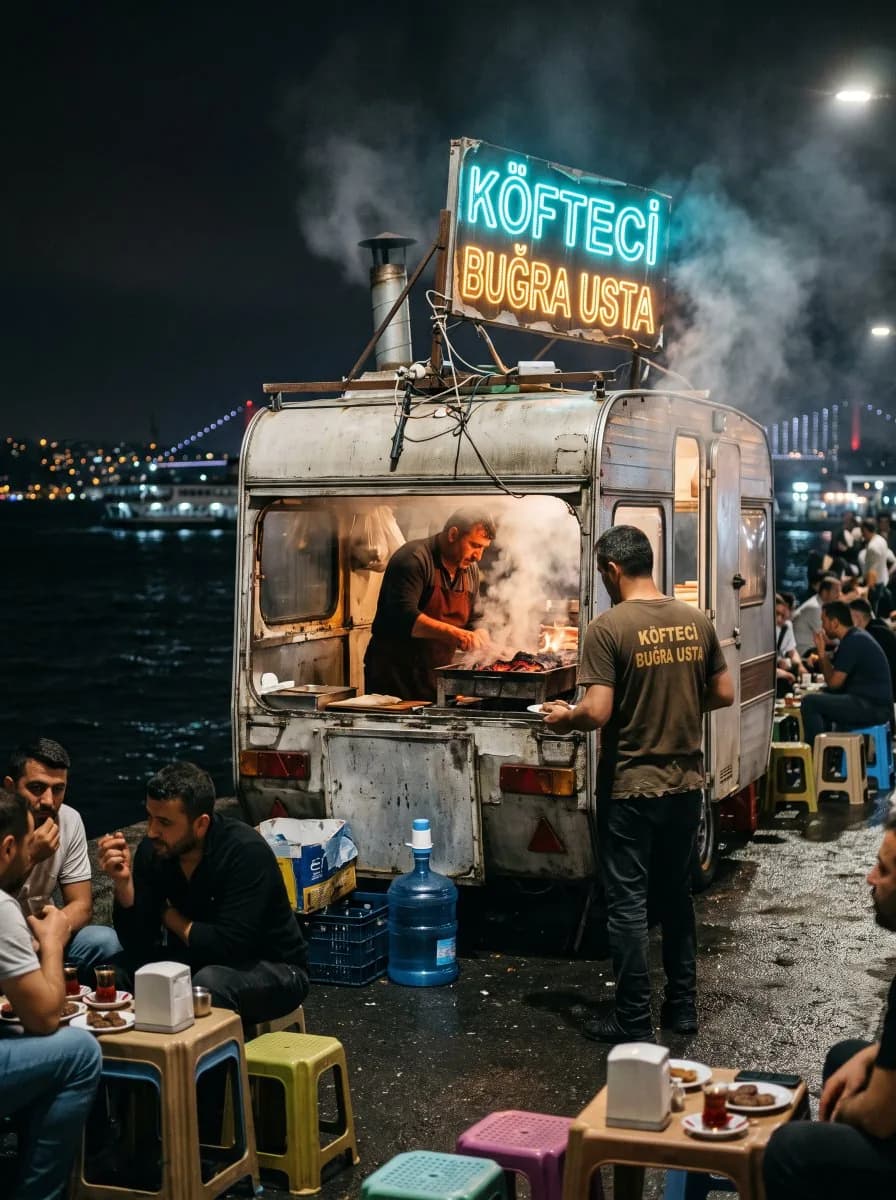
이스탄불 물가의 음식 노점

사진·인물 사진 · @ozansihay

필요한 입력: 참조 이미지 불필요

프롬프트 원문 보기

Ultra-realistic night street photograph on the Istanbul Bosphorus waterfront. A tiny makeshift caravan food stall, slightly battered metal sides, steam rising. Hand-painted neon-style rickety sign reading “Köfteci Buğra Usta” in Turkish, glowing uneven cyan and warm amber, wires and brackets visibly DIY. Inside the open caravan, the usta grilling köfte over charcoal, orange ember glow on his face and apron. One waiter in a simple dark shirt stands in front of the stall; the same “Köfteci Buğra Usta” lettering is printed on the back of his shirt. Plastic stools and small low tables outside, a few locals eating, soft conversation. A plastic water jug (damacana) near the counter. Behind them, dark Bosphorus water with distant city lights and a faint ferry silhouette. Wet asphalt reflections, streetlamp spill, shallow depth of field, natural film grain, shot on 35mm f/1.8, candid documentary look, no CGI look, no text errors on signs.

출처 및 작성자
빈티지 실크스크린 등대 — 원본 게시물의 이미지·영상
원본 게시물의 이미지·영상
완전한 프롬프트

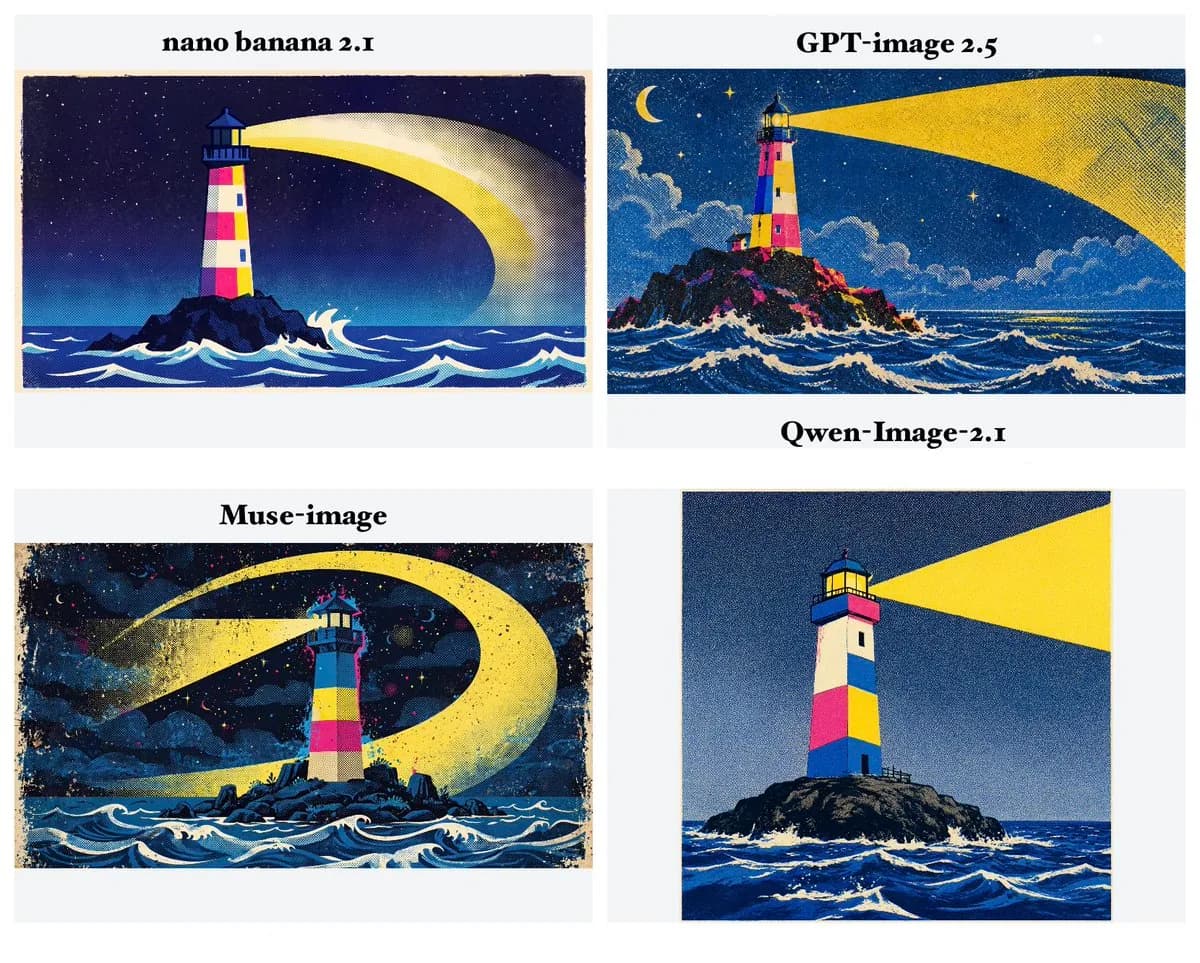
빈티지 실크스크린 등대

일러스트·예술 · @hakmgpt

필요한 입력: 참조 이미지 불필요

프롬프트 원문 보기

A spectacular vintage screen-print illustration of a tall colorful lighthouse standing alone on a dark rocky island in a vast nighttime ocean. The lighthouse has geometric blocks of cream, hot pink, yellow and cobalt blue, with a dark blue roof. Its powerful yellow beam sweeps across the sky in a huge curved arc. Deep blue ocean with stylized white waves fills the bottom of the image. Dense halftone dots cover every surface, with rough paper texture and imperfect ink registration. Limited retro CMYK palette, flat graphic shapes, 1970s children's storybook screen-print aesthetic, mysterious and magical atmosphere, no text, 16:9.

출처 및 작성자
의상·헤어·배경 변경 — 원본 게시물의 이미지·영상
원본 게시물의 이미지·영상
완전한 프롬프트

의상·헤어·배경 변경

이미지 편집 · @OriSilver

필요한 입력: 원본 이미지 필요

프롬프트 원문 보기

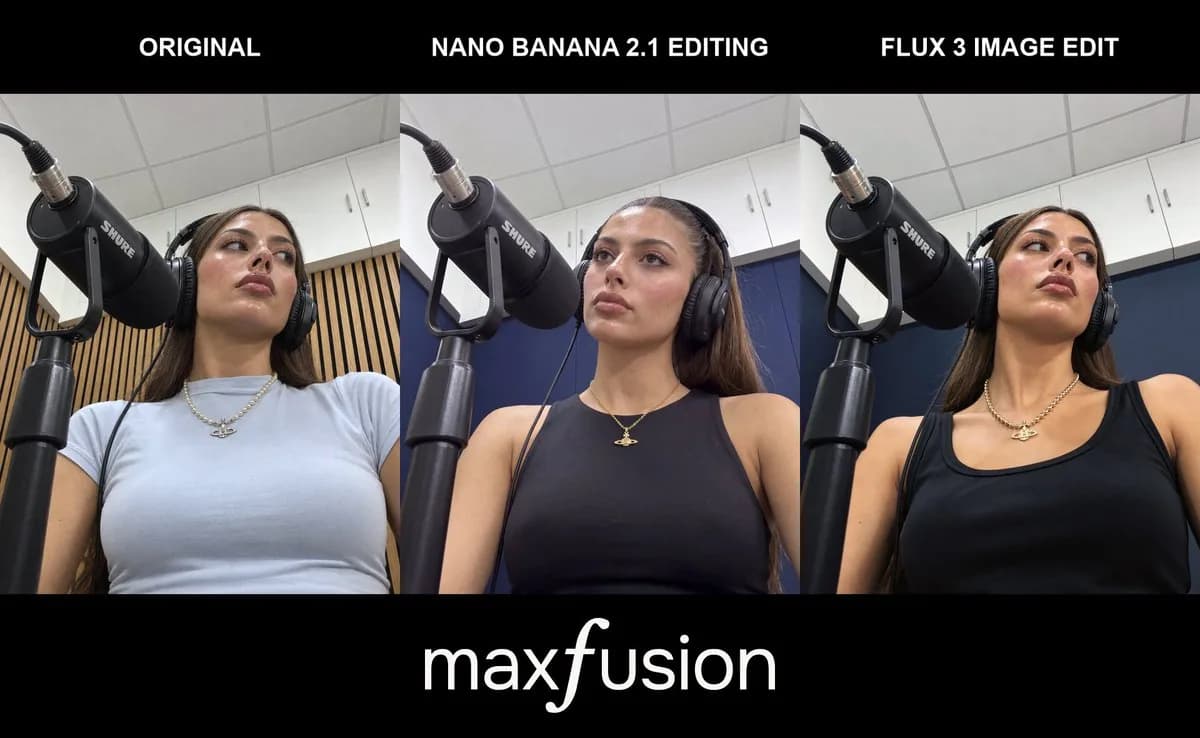
Change that she is wearing a tanktop black sleevless and her necklece is now gold she also has her hair in a pony tail and the background behind her has dark blue walls instead of wood panels, everything else stays the same

출처 및 작성자
골든 아워 인물 사진: 여성 — 원본 게시물의 이미지·영상
원본 게시물의 이미지·영상
완전한 프롬프트

골든 아워 인물 사진: 여성

사진·인물 사진 · @ozansihay

필요한 입력: 참조 이미지 불필요

프롬프트 원문 보기

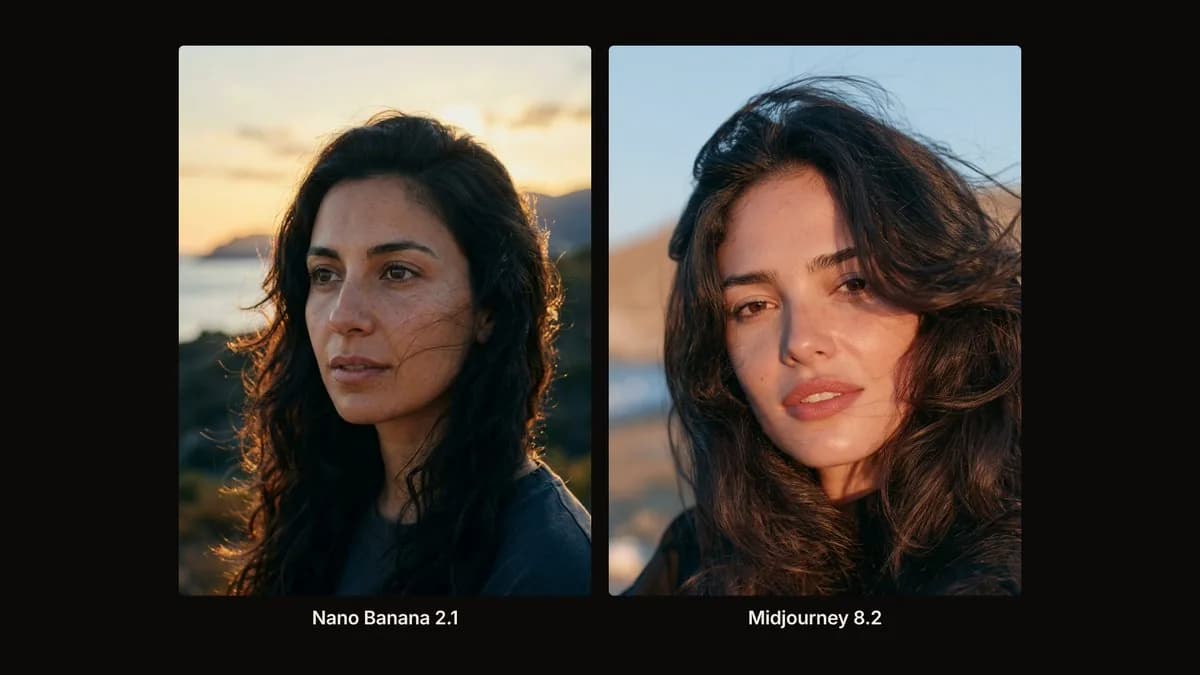
Cinematic outdoor close-up at golden hour of a beautiful woman in her late 20s with Mediterranean features, warm olive skin, dark brown eyes catching the low sun, soft freckles, natural slightly parted lips, loose dark wavy hair lifted by a light breeze across her right cheek. Head-and-shoulders, face filling about 60% of the frame, eyes on the upper third, body turned three-quarter toward camera-left while she looks just past the lens. Real sunset backlight from behind-right wrapping her hair in warm rim glow, soft open-shade fill on the face from the sky, long gentle shadows. Background: softly blurred coastal landscape with amber sky, distant hills and a hint of sea sparkle, empty of people and props. Shot like an arthouse film still on 85mm f/1.4, creamy bokeh, fine film grain, natural skin texture, warm gold highlights against cool blue shadow pockets, photoreal, no flash look, no plastic skin, no text.

출처 및 작성자
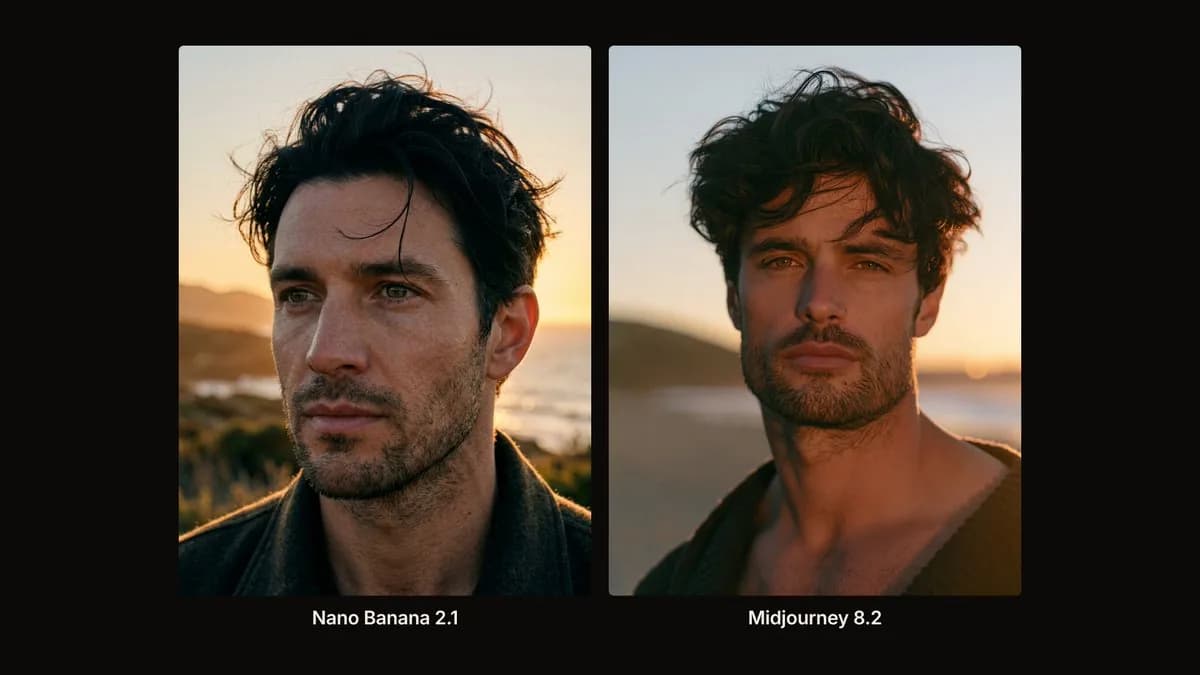
골든 아워 인물 사진: 남성 — 원본 게시물의 이미지·영상
원본 게시물의 이미지·영상
완전한 프롬프트

골든 아워 인물 사진: 남성

사진·인물 사진 · @ozansihay

필요한 입력: 참조 이미지 불필요

프롬프트 원문 보기

Cinematic outdoor close-up at golden hour of a handsome man in his early 30s, strong jaw under short dark stubble, hazel eyes catching the low sun, messy black hair with a few wind-blown strands on the forehead, natural lips slightly closed. Identical framing to the female portrait: head-and-shoulders, face filling about 60% of the frame, eyes on the upper third, body turned three-quarter toward camera-left while he looks just past the lens. Real sunset backlight from behind-right wrapping his hair and shoulders in warm rim glow, soft open-shade fill on the face from the sky, long gentle shadows. Background: the same softly blurred coastal landscape with amber sky, distant hills and a hint of sea sparkle, empty of people and props. Shot like an arthouse film still on 85mm f/1.4, creamy bokeh, fine film grain, visible pores and microtexture, warm gold highlights against cool blue shadow pockets, photoreal, no flash look, no plastic skin, no text.

출처 및 작성자
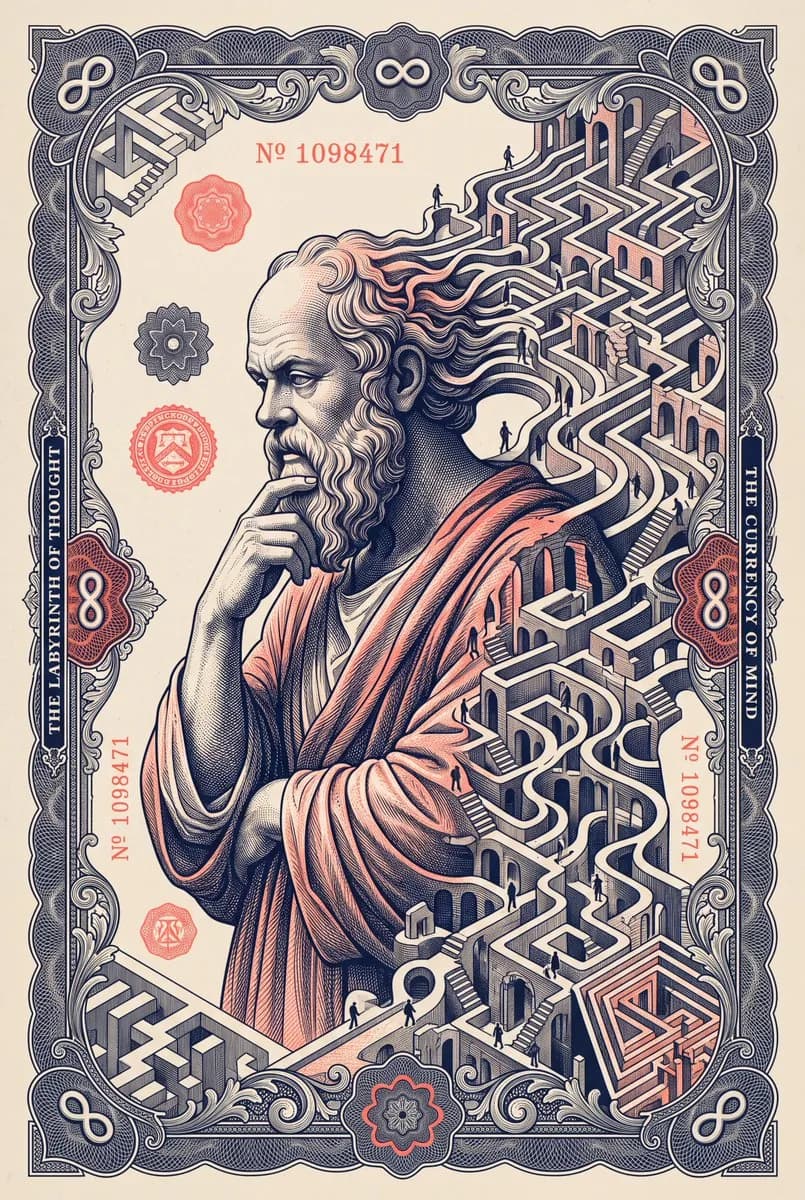
지폐 워크플로 · 1. 생성 — 원본 게시물의 이미지·영상
원본 게시물의 이미지·영상
완전한 프롬프트

지폐 워크플로 · 1. 생성

여러 단계 워크플로 · @ibexdream

필요한 입력: 참조 이미지 불필요

프롬프트 원문 보기

A classical philosopher depicted on an imaginary banknote, his silhouette gradually opening into an elaborate labyrinth populated by tiny anonymous figures. The surrounding ornamental frame contains subtle optical illusions that change direction across the page. Copperplate engraving, muted ivory stock, deep navy and fluorescent coral inks, cerebral surrealism, museum-print precision.

3단계를 순서대로 진행하고 직전 결과를 다음 입력으로 사용하세요.

출처 및 작성자
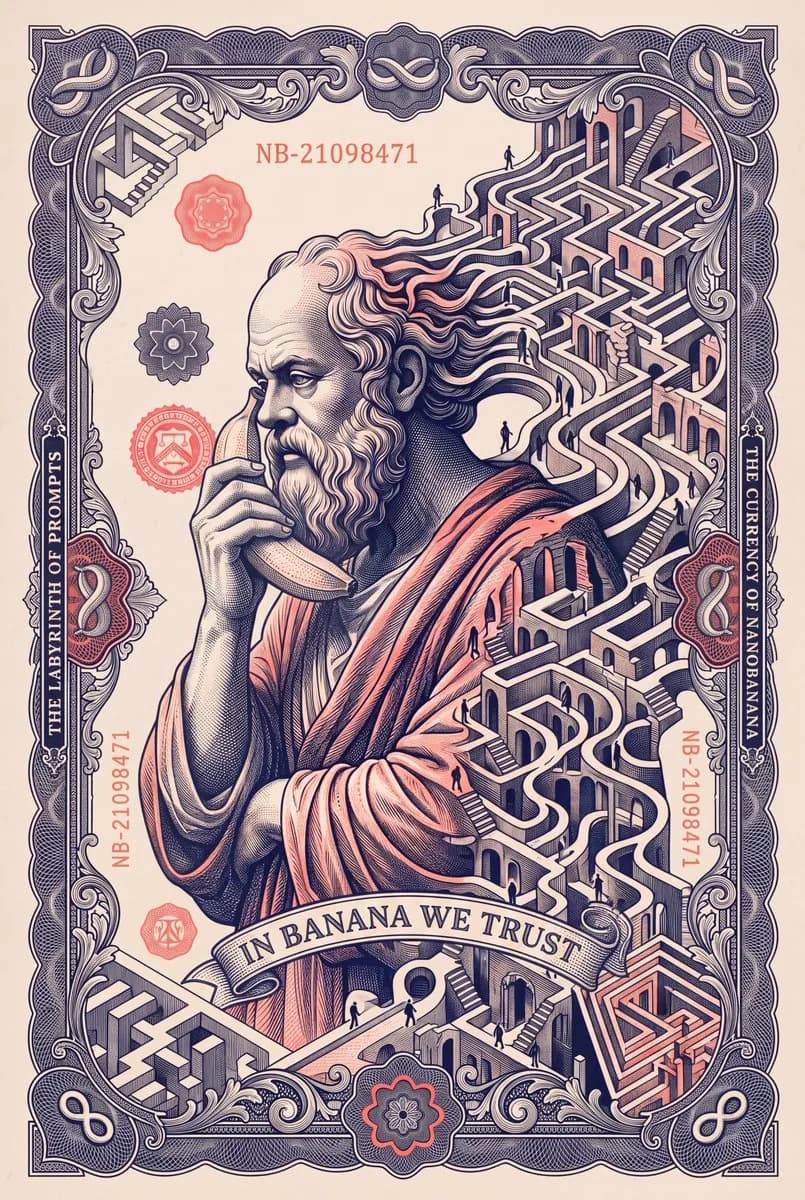
지폐 워크플로 · 2. 글자·소품 편집 — 원본 게시물의 이미지·영상
원본 게시물의 이미지·영상
완전한 프롬프트

지폐 워크플로 · 2. 글자·소품 편집

여러 단계 워크플로 · @ibexdream

필요한 입력: 1단계 지폐 이미지 필요

프롬프트 원문 보기

Edit this image while preserving the antique engraved banknote style, the philosopher’s identity, and the overall composition. Change the philosopher so he is holding a banana to his ear as if he is speaking on a telephone. Replace the text "THE CURRENCY OF THOUGHT" with "THE CURRENCY OF NANOBANANA". Replace the text "THE LABYRINTH OF THOUGHT" with "THE LABYRINTH OF PROMPTS". Add the central motto "IN BANANA WE TRUST". Change the serial number to "NB-21098471". Redesign the corner symbols so they become banana-infinity icons. Keep the image elegant, surreal, intricate, and visually coherent, with all changes integrated naturally into the engraved banknote design.

3단계를 순서대로 진행하고 직전 결과를 다음 입력으로 사용하세요.

출처 및 작성자
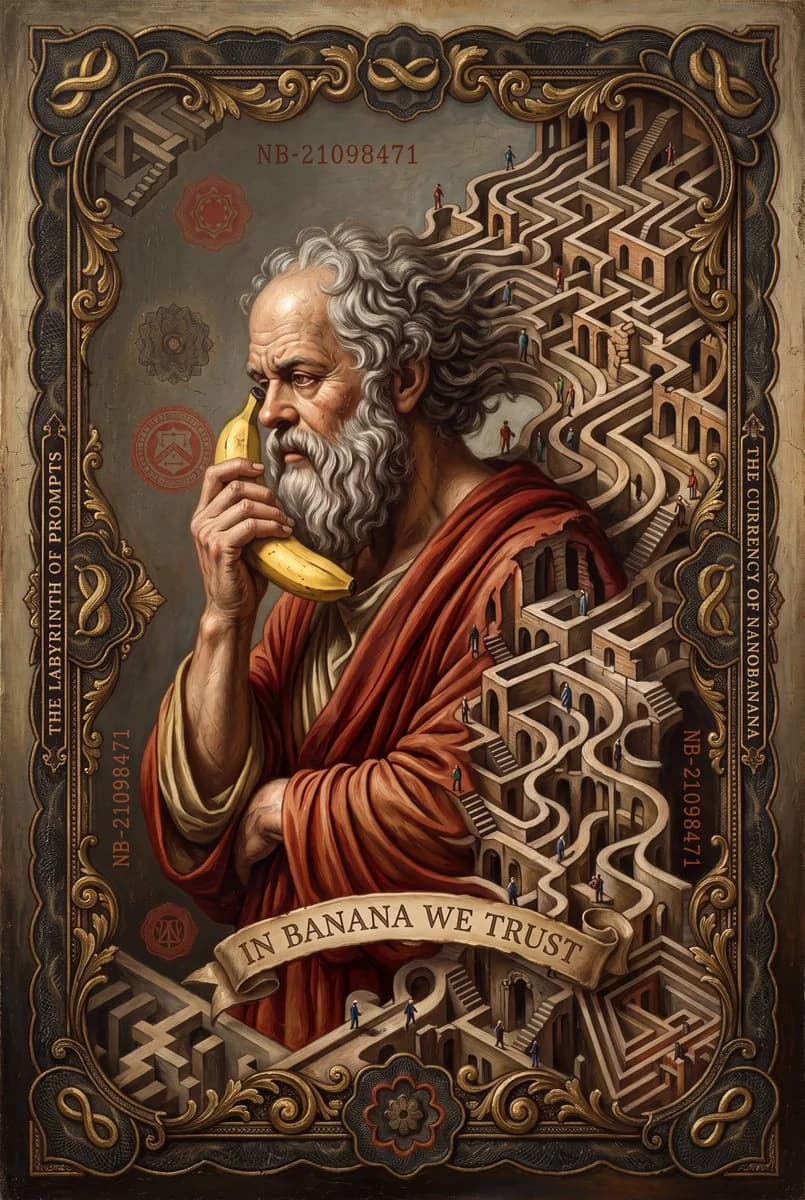
지폐 워크플로 · 3. 유화 — 원본 게시물의 이미지·영상
원본 게시물의 이미지·영상
완전한 프롬프트

지폐 워크플로 · 3. 유화

여러 단계 워크플로 · @ibexdream

필요한 입력: 2단계에서 편집한 지폐 이미지 필요

프롬프트 원문 보기

Transform this image into an ultra-realistic oil painting while preserving the philosopher’s identity, the banana held to his ear like a telephone, the labyrinth concept, and the overall composition. Reinterpret the engraved banknote design as a richly painted fine-art scene with realistic skin, expressive brushwork, detailed robes, and a dramatic, museum-quality atmosphere. The labyrinth should become a painted architectural maze integrated into the composition. Preserve the text “THE CURRENCY OF NANOBANANA,” “THE LABYRINTH OF PROMPTS,” the motto “IN BANANA WE TRUST,” the serial number “NB-21098471,” and the banana-infinity corner icons, adapting them naturally into the painted design. The final result should feel grand, surreal, elegant, and visually impressive.

3단계를 순서대로 진행하고 직전 결과를 다음 입력으로 사용하세요.

출처 및 작성자
원본 게시물의 이미지·영상
완전한 프롬프트

여러 참조 이미지로 만든 패션 인물 사진

사진·인물 사진 · @jameygannon

필요한 입력: 영상에 나온 해당 참조 이미지 필요(별도 제공되지 않음)

프롬프트 원문 보기

create an image of an editorial headshot of a woman. use the three uploaded images as style references.

화면에 표시된 영어를 줄별로 전사했습니다. 줄바꿈을 보존했으며 원본 참조 이미지는 별도로 제공되지 않았습니다.

출처 및 작성자
원본 게시물의 이미지·영상
완전한 프롬프트

추가 팔다리 수정

이미지 편집 · @jameygannon

필요한 입력: 영상에 나온 해당 참조 이미지 필요(별도 제공되지 않음)

프롬프트 원문 보기

Fix the slop in this image. She should only have two legs. Do not change anything else about the image, including the style and angle.

화면에 표시된 영어를 줄별로 전사했습니다. 줄바꿈을 보존했으며 원본 참조 이미지는 별도로 제공되지 않았습니다.

출처 및 작성자
원본 게시물의 이미지·영상
완전한 프롬프트

카메라 방향 변경

이미지 편집 · @jameygannon

필요한 입력: 영상에 나온 해당 참조 이미지 필요(별도 제공되지 않음)

프롬프트 원문 보기

Change the angle of this image so we are facing the woman running towards the ocean. Do not change the camera style. Maintain its grainy, low-resolution, filmic quality.

화면에 표시된 영어를 줄별로 전사했습니다. 줄바꿈을 보존했으며 원본 참조 이미지는 별도로 제공되지 않았습니다.

출처 및 작성자
원본 게시물의 이미지·영상
완전한 프롬프트

참조 이미지로 갤러리 벽 구성

이미지 편집 · @jameygannon

필요한 입력: 영상에 나온 해당 참조 이미지 필요(별도 제공되지 않음)

프롬프트 원문 보기

create an image of a modern western themed graphic design gallery wall in an apartment. Blank gallery wall, no furniture, minimal interior design. use the uploaded images as style references.

화면에 표시된 영어를 줄별로 전사했습니다. 줄바꿈을 보존했으며 원본 참조 이미지는 별도로 제공되지 않았습니다.

출처 및 작성자

연속 이미지 편집 워크플로

각각 40단계인 커뮤니티 테스트 2개입니다. 각 편집은 직전 결과에 의존합니다. 영상은 테스트 기록이며, 변경 대상 외의 모든 세부 사항이 유지된다는 보장은 아닙니다.

연속 이미지 편집 워크플로@mightyking
원본 게시물의 이미지·영상

음료를 든 인물의 40단계 편집 테스트

직전 결과를 다음 입력으로 사용하세요.

40단계 모두 보기
  1. 단계 1 · ≈ 2s

    Make the tank top red

  2. 단계 2 · ≈ 2.6s

    Make the jacket black

  3. 단계 3 · ≈ 3.2s

    Make it chocolate milk

  4. 단계 4 · ≈ 3.8s

    Make her hair platinum blonde

  5. 단계 5 · ≈ 4.4s

    Remove the star tattoos

  6. 단계 6 · ≈ 5s

    Make the shorts navy

  7. 단계 7 · ≈ 5.6s

    Remove the earrings

  8. 단계 8 · ≈ 6.2s

    Add a rose tattoo

  9. 단계 9 · ≈ 6.8s

    Remove the belly piercing

  10. 단계 10 · ≈ 7.4s

    Make her hair copper red

  11. 단계 11 · ≈ 8s

    Make the tank top emerald

  12. 단계 12 · ≈ 8.6s

    Make the jacket light grey

  13. 단계 13 · ≈ 9.2s

    Remove the forearm tattoo

  14. 단계 14 · ≈ 9.8s

    Add a gold hoop earring

  15. 단계 15 · ≈ 10.4s

    Remove the bracelet

  16. 단계 16 · ≈ 11s

    Make the shorts grey

  17. 단계 17 · ≈ 11.6s

    Paint the nails red

  18. 단계 18 · ≈ 12.2s

    Make her hair jet black

  19. 단계 19 · ≈ 12.8s

    Add a heart tattoo

  20. 단계 20 · ≈ 13.4s

    Make it white milk again

  21. 단계 21 · ≈ 14s

    Make the tank top white

  22. 단계 22 · ≈ 14.6s

    Make the jacket white

  23. 단계 23 · ≈ 15.2s

    Add a silver necklace

  24. 단계 24 · ≈ 15.8s

    Make the shorts black

  25. 단계 25 · ≈ 16.4s

    Make her hair copper red

  26. 단계 26 · ≈ 17s

    Remove the heart tattoo

  27. 단계 27 · ≈ 17.6s

    Make the nails nude

  28. 단계 28 · ≈ 18.2s

    Add a gold belly piercing

  29. 단계 29 · ≈ 18.8s

    Remove the rose tattoo

  30. 단계 30 · ≈ 19.4s

    Make her hair dark brown

  31. 단계 31 · ≈ 20s

    Add a gold bracelet

  32. 단계 32 · ≈ 20.6s

    Remove the necklace

  33. 단계 33 · ≈ 21.2s

    Make the jacket baby blue

  34. 단계 34 · ≈ 21.8s

    Make the shorts white

  35. 단계 35 · ≈ 22.4s

    Make her hair brown again

  36. 단계 36 · ≈ 23s

    Remove the hoop earring

  37. 단계 37 · ≈ 23.6s

    Make it strawberry milk

  38. 단계 38 · ≈ 24.2s

    Make the jacket white

  39. 단계 39 · ≈ 24.8s

    Make it white milk again

  40. 단계 40 · ≈ 27.8s

    Make the tank top red

연속 이미지 편집 워크플로@OriSilver
원본 게시물의 이미지·영상

피트니스 인물 사진의 40단계 편집 테스트

직전 결과를 다음 입력으로 사용하세요.

40단계 모두 보기
  1. 단계 1 · ≈ 2s

    Make the sports bra black

  2. 단계 2 · ≈ 2.6s

    Make the sweatpants grey

  3. 단계 3 · ≈ 3.2s

    Remove the belly piercing

  4. 단계 4 · ≈ 3.8s

    Make the headphones white

  5. 단계 5 · ≈ 4.4s

    Make her hair jet black

  6. 단계 6 · ≈ 5s

    Remove the necklace

  7. 단계 7 · ≈ 5.6s

    Remove the forearm tattoo

  8. 단계 8 · ≈ 6.2s

    Add a rose tattoo

  9. 단계 9 · ≈ 6.8s

    Make the bracelet silver

  10. 단계 10 · ≈ 7.4s

    Paint the nails red

  11. 단계 11 · ≈ 8s

    Make the sports bra red

  12. 단계 12 · ≈ 8.6s

    Make the sweatpants navy

  13. 단계 13 · ≈ 9.2s

    Make the headphones pink

  14. 단계 14 · ≈ 9.8s

    Make her hair platinum blonde

  15. 단계 15 · ≈ 10.4s

    Add a gold necklace

  16. 단계 16 · ≈ 11s

    Remove the bracelet

  17. 단계 17 · ≈ 11.6s

    Add a sweatband

  18. 단계 18 · ≈ 12.2s

    Make the sports bra white

  19. 단계 19 · ≈ 12.8s

    Make the sweatpants olive

  20. 단계 20 · ≈ 13.4s

    Add a star tattoo

  21. 단계 21 · ≈ 14s

    Make the headphones black

  22. 단계 22 · ≈ 14.6s

    Make the nails nude

  23. 단계 23 · ≈ 15.2s

    Add a gold belly piercing

  24. 단계 24 · ≈ 15.8s

    Remove the rose tattoo

  25. 단계 25 · ≈ 16.4s

    Make her hair copper red

  26. 단계 26 · ≈ 17s

    Make the sports bra navy

  27. 단계 27 · ≈ 17.6s

    Make the sweatpants black

  28. 단계 28 · ≈ 18.2s

    Remove the sweatband

  29. 단계 29 · ≈ 18.8s

    Make the necklace silver

  30. 단계 30 · ≈ 19.4s

    Add a gold bracelet

  31. 단계 31 · ≈ 20s

    Remove the star tattoo

  32. 단계 32 · ≈ 20.6s

    Make the sports bra lavender

  33. 단계 33 · ≈ 21.2s

    Make her hair dark brown

  34. 단계 34 · ≈ 21.8s

    Make the headphones white

  35. 단계 35 · ≈ 22.4s

    Make the sweatpants burgundy

  36. 단계 36 · ≈ 23s

    Remove the necklace

  37. 단계 37 · ≈ 23.6s

    Make the headphones black

  38. 단계 38 · ≈ 24.2s

    Make the sweatpants black

  39. 단계 39 · ≈ 24.8s

    Make her hair dirty blonde

  40. 단계 40 · ≈ 27.8s

    Make the sports bra sage green

더 많은 커뮤니티 예시

프롬프트를 확보하지 못한 게시물의 예시와 출처입니다. 이미지에서 프롬프트를 추론해 추가하지 않았습니다.

프롬프트 미확보@ComfyUI
원본 게시물의 이미지·영상

ComfyUI 연동 및 여러 참조 이미지 데모

원본 게시물
프롬프트 미확보@arena
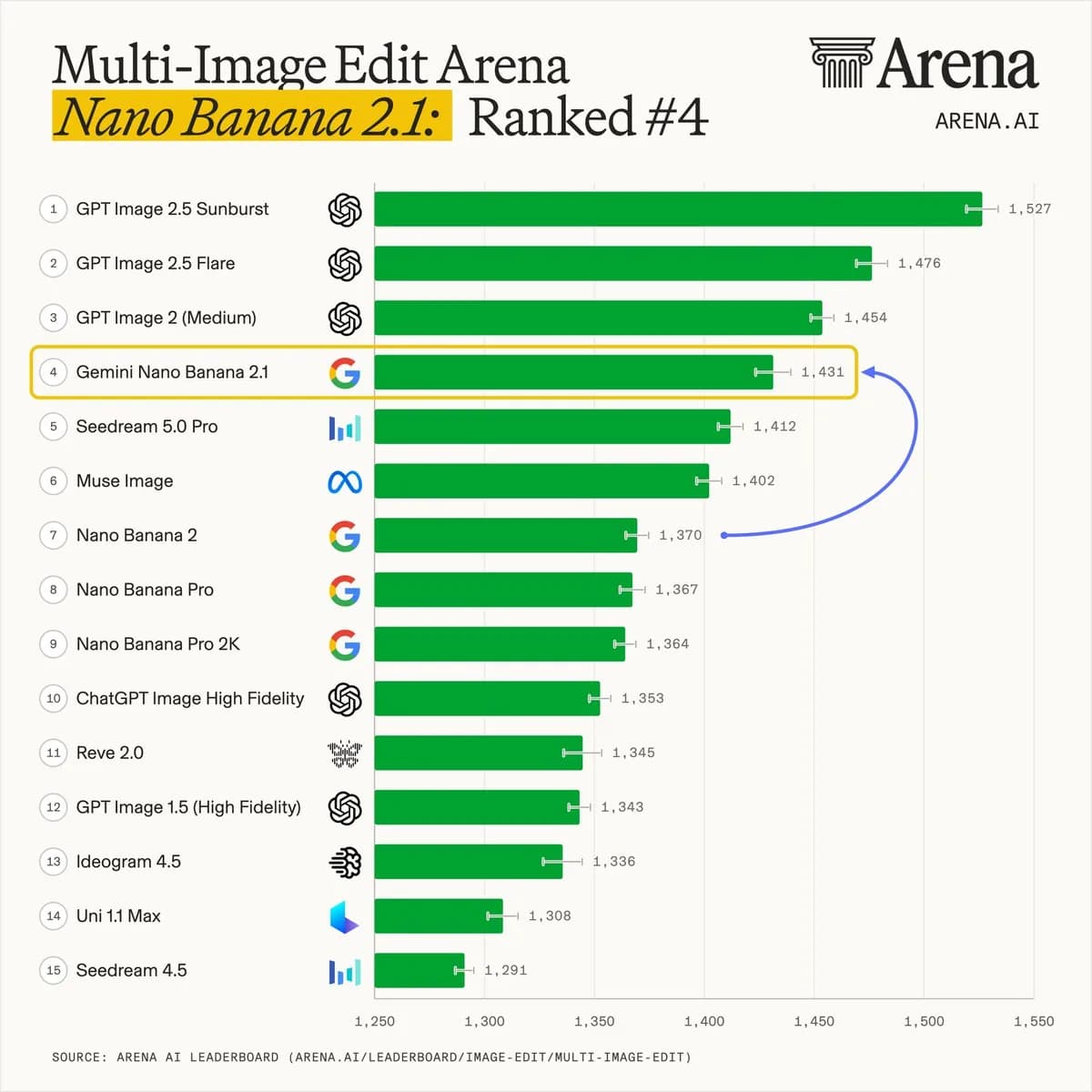
Arena 이미지 모델 순위 — 원본 게시물의 이미지·영상
원본 게시물의 이미지·영상

Arena 이미지 모델 순위

원본 게시물
프롬프트 미확보@miilesus
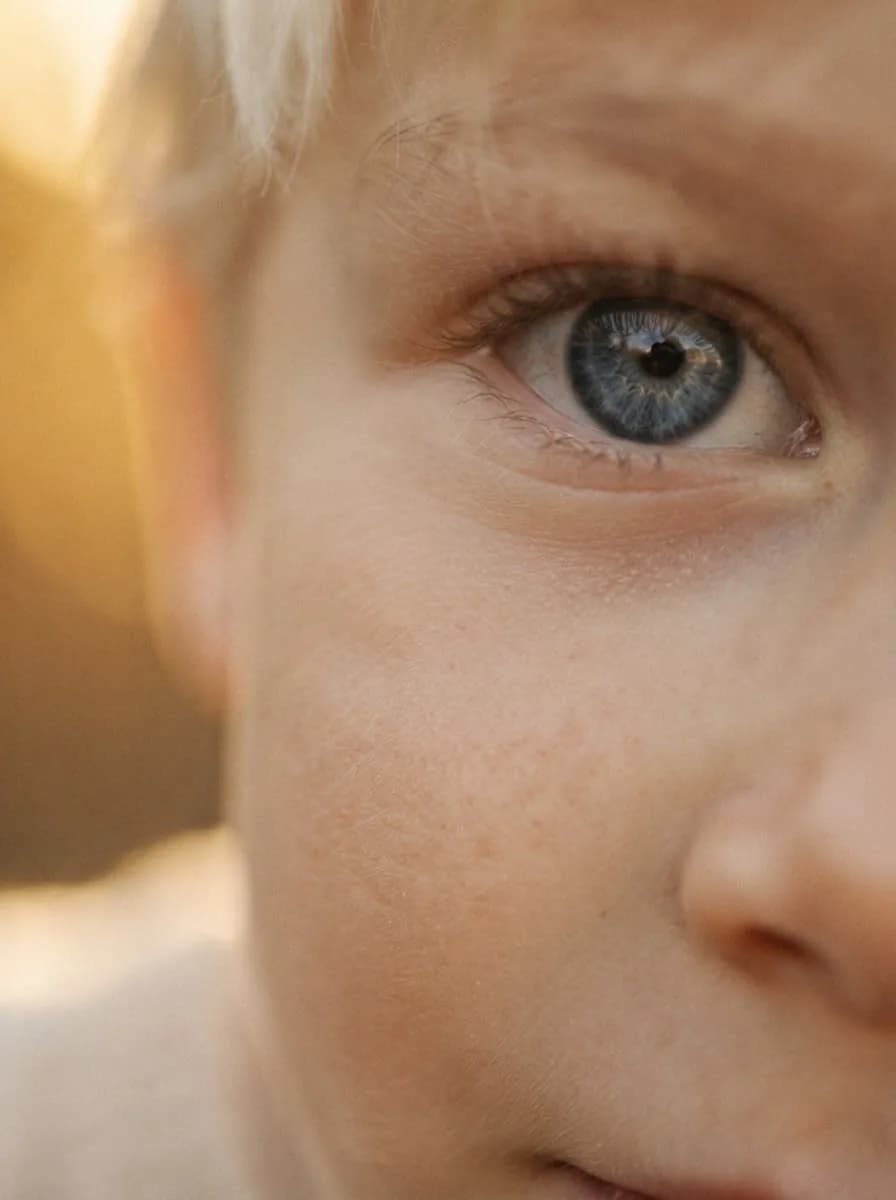
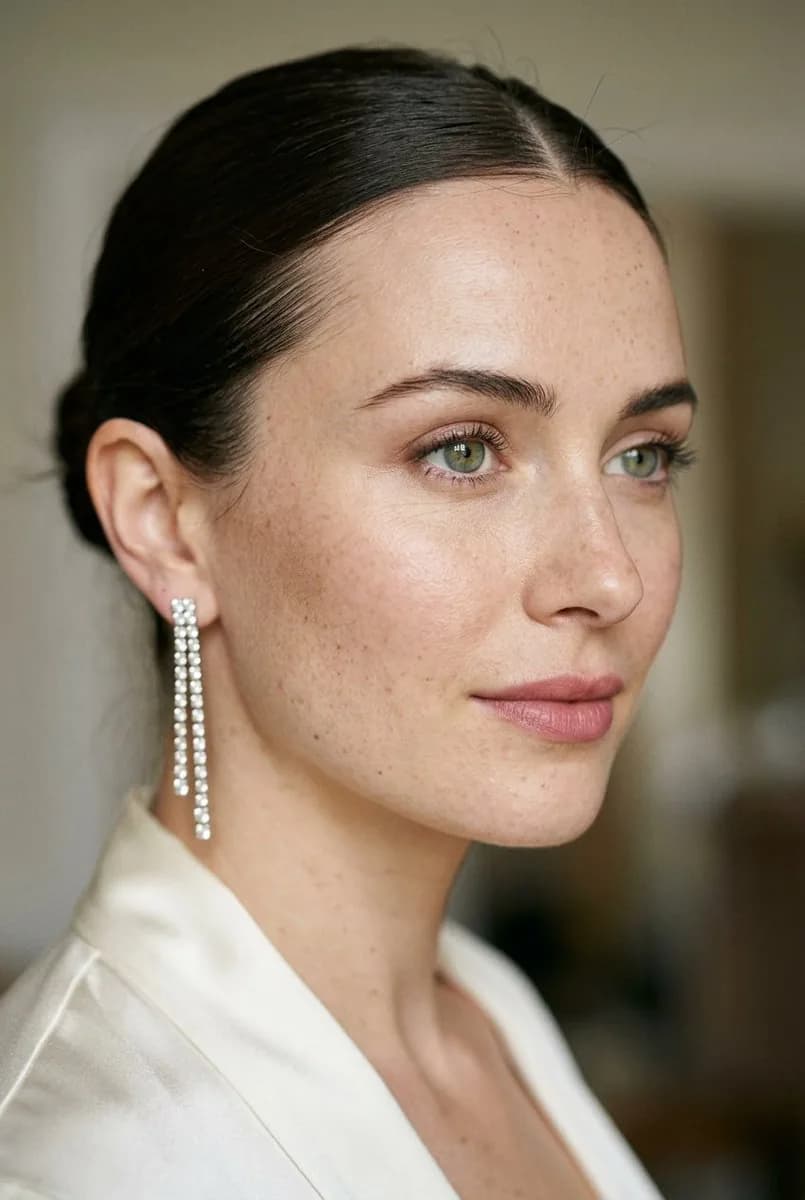
동일 프롬프트의 인물 사진 비교 — 원본 게시물의 이미지·영상
원본 게시물의 이미지·영상

동일 프롬프트의 인물 사진 비교

원본 게시물

프롬프트 사용 방법

  1. 새 이미지를 만들 때는 완전한 프롬프트를 선택하세요. 편집할 때는 필요한 참조 이미지를 먼저 업로드하세요. 짧은 지시만으로는 원본 이미지가 포함되지 않습니다.
  2. 연속 편집에서는 이전 단계의 결과를 사용하세요. 바꿀 내용과 유지할 인물의 얼굴과 특징, 구도 또는 다른 세부 사항을 명시하세요.
  3. 각 결과에서 얼굴, 제품 세부 사항, 텍스트와 프레이밍을 확인하세요. 커뮤니티 예시와 데모 전사문은 독립적으로 검증된 재현 방법이 아닙니다.
  4. 모델 페이지에서 Playground 설정, 현재 요금, EvoLink 통합 API 게이트웨이를 통한 API 연동 방법을 확인하세요.

Nano Banana 2.1 프롬프트 자주 묻는 질문

참조 이미지가 필요한가요?

각 항목에 입력 조건을 표시합니다. 편집에는 원본 사진, 여러 참조 이미지 또는 직전 결과가 필요할 수 있습니다. 일부 영상은 원본 참조 이미지를 별도로 제공하지 않습니다.

짧은 편집 지시로 텍스트 기반 이미지를 생성할 수 있나요?

일반적으로 기존 이미지의 변경을 설명하는 지시입니다. 필요한 입력 이미지를 업로드한 뒤 편집에 사용하세요. ‘확인 가능한 지시’는 서버에 전달된 전체 요청을 알 수 없다는 뜻이기도 합니다.

여러 단계의 워크플로는 어떻게 따라 하나요?

순서대로 진행하면서 직전 이미지를 다음 편집에 전달하세요. 지폐 예시는 3단계이며, 40단계 영상 2개는 작성자의 테스트에서 확인된 편집 순서를 보존합니다.

인물이나 장면의 일관성을 어떻게 유지하나요?

해당 참조 이미지를 제공하고 유지할 인물의 얼굴과 특징, 구도와 세부 사항을 명확하게 설명하세요. 결과를 매번 확인해야 하며, 프롬프트만으로 완벽한 일관성을 보장할 수는 없습니다.

EvoLink가 검증한 예시인가요?

아닙니다. 작성자를 밝힌 커뮤니티 게시물과 확인 가능한 텍스트의 전사문입니다. 작성자와 출처 링크를 보존했습니다. 일부 자료는 여러 모델을 비교하므로 EvoLink가 생성한 결과로 보면 안 됩니다.

일부 프롬프트가 불완전한 이유는 무엇인가요?

원본 게시물이나 화면에 일부 텍스트만 표시되어 있기 때문입니다. 확인 가능한 부분을 보존하고 불완전하다고 표시하며, 누락된 내용은 지어내지 않습니다.

API로 Nano Banana 2.1을 어떻게 사용하나요?

Nano Banana 2.1 모델 페이지에서 Playground를 사용하고 API 문서, 입력 설정과 현재 요금을 확인하세요. EvoLink 통합 API 게이트웨이로 이용할 수 있습니다.

Nano Banana 2.1 사용하기