
Where to Use Seed Audio 1.5: Free Access, Web Tools, Cloud & API Guide
Where can you actually use Seed Audio 1.5 right now? Compare free listening vs. paid API access across EvoLink, CapCut/Dreamina/Pippit, Volcengine, BytePlus ModelArk, and ComfyUI—plus a 6-point API buyer checklist.
 Himi LiProduct Manager at EvoLink
On this page
Current Rollout Status: Seed Audio 1.5 is currently in its pre-launch rollout window. Many public web pages still display "Coming Soon" or restrict access by region/account tier, and EvoLink is preparing browser and API access for all four modes. Bookmark the Seed Audio 1.5 API & Playground page on EvoLink to check availability, or start building immediately with Seed Audio 1.0 live on EvoLink.
Quick Answer: Where Can You Actually Use Seed Audio 1.5?
- Developers, AI SaaS & Batch Workflows → EvoLink (/seed-audio-1-5): Unified asynchronous REST API covering all four Seed Audio 1.5 modes (
seed-audio-1.5,video-to-audio,video-dubbing, andaudio-separation) plus a browser Playground under one API key and per-second billing. - Solo Creators & Timeline Editors → CapCut, Dreamina & Pippit: ByteDance's consumer apps tie Seed Audio 1.5 into visual multitrack editors, though availability rolls out gradually by country and account tier.
- Enterprise Cloud Teams → Volcengine (China) & BytePlus ModelArk (International): For teams already on either cloud, check regional model access in the provider console. The BytePlus Singapore integration documents the
dola-seed-audio-1-5-*family. - Node-Graph Technical Artists → ComfyUI (
byteplus-saNodes): Open-source ComfyUI nodes connecting local graphs to Singapore ModelArk endpoints (requires a funded BytePlus ModelArk API key).
Is Seed Audio 1.5 Free? How to Try It Without a Monthly Subscription
You can evaluate it without signing up for a monthly subscription or an enterprise contract:
- Listen to an official sample for free. Play the Pippit sample on the EvoLink Seed Audio 1.5 page to hear how the sound follows the action. For samples with dialogue, listen for naturalness, pacing, and regional pronunciation.
- Check creator-app trial limits. Some apps offer trial credits with limits on duration, watermarks, or region. They can be useful for a quick manual test. Use an API for batch processing or automation.
- Test on EvoLink with pay-as-you-go credits. Once 1.5 access opens, EvoLink will charge for the billable seconds of the selected mode, rounded up to the next whole second. Failed jobs automatically receive a full refund of reserved credits. The price of a 15-second test depends on the mode and its launch rate. You can start validating your prompts today with Seed Audio 1.0 using the same EvoLink account.
Persona Decision Matrix: Picking the Right Entry Point
| Your Role & Job-to-Be-Done | Best Entry Point | Why This Route Fits | Watch-Out Before Committing |
|---|---|---|---|
| Building an ad-localization SaaS, UGC tool, or batch dubbing pipeline | EvoLink API | All four modes behind one REST endpoint, HTTPS webhooks, and per-second billing. Dubbing can return SRT and sentence-level JSONL. | Download outputs within 7 days before links expire |
| Testing prompts in a browser before writing code | EvoLink Playground access | Visual form UI + raw JSON preview across all 4 modes under the same account as your API key | Browser Playground uses web-playable codecs (omits raw headerless pcm) |
| Manually editing social videos on a visual timeline | CapCut / Dreamina / Pippit | Drag-and-drop multitrack timeline paired with video editing tools | Phased regional rollout; no programmable batch API or webhook delivery |
| Running high-concurrency workloads inside existing Volcengine/BytePlus cloud | Volcengine / BytePlus ModelArk | Regional access and quotas, with BytePlus documenting up to 1 GB for eligible TOS video inputs | Check regional access and quota. The documented BytePlus node makes synchronous requests. |
| Chaining audiovisual nodes in a local ComfyUI workflow | ComfyUI (byteplus-sa) | Visual node integration with image/video generators via BytePlus ModelArk docs | Local seed does not lock upstream determinism; still requires paid ModelArk key |
Deep Dive Into All Four Seed Audio 1.5 Access Channels
1. EvoLink (/seed-audio-1-5): Unified 4-Mode Async API & Playground
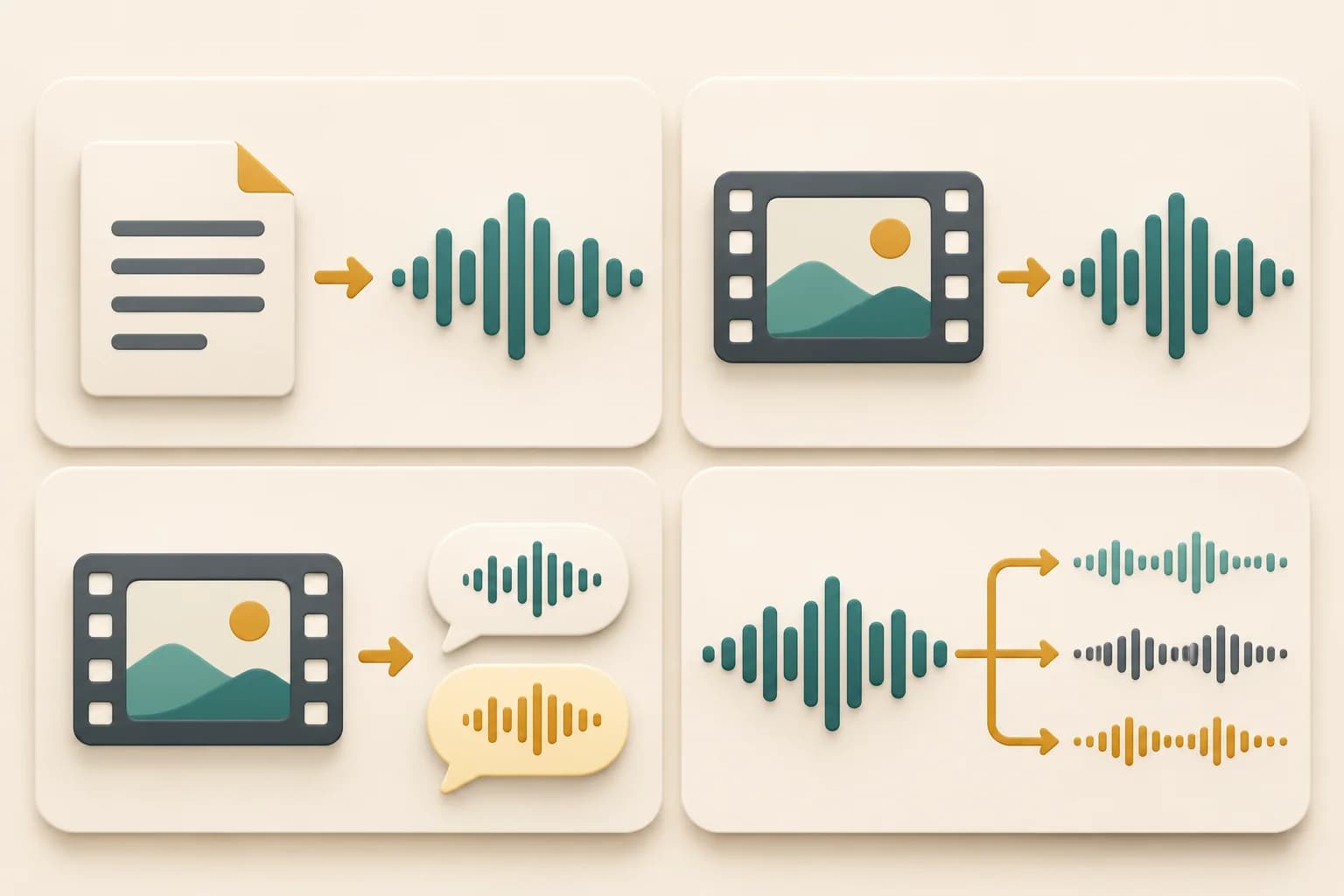
- All four modes under one endpoint (
POST https://api.evolink.ai/v1/audios/generations):- Seed Audio 1.5 Audio Generation (
seed-audio-1.5) — text + optional image or up to 6 reference voices. - Seed Audio 1.5 Video-to-Audio (
seed-audio-1.5-video-to-audio) — score a 4–360smp4/movvideo with new scripted dialogue and Foley, with optional muxed video, SRT, and JSONL with approximate word-level timestamps. - Seed Audio 1.5 Video Dubbing (
seed-audio-1.5-video-dubbing) — translate and re-dub Chinese/English videos into 30 target languages with optional SRT and sentence-level JSONL. - Seed Audio 1.5 Audio Separation (
seed-audio-1.5-audio-separation) — extractspeaker,sfx, andbgmstems for remixing.
- Seed Audio 1.5 Audio Generation (
- Asynchronous polling + HTTPS webhooks: Generating a 6-minute audio scene or processing a 200 MB video clip takes longer than a standard web timeout. EvoLink returns a task ID in an
audio.generation.taskresponse so your backend can pollGET /v1/tasks/{task_id}or receive an HTTPScallback_urlwebhook (10-second timeout, up to 3 automatic retries at 1s/2s/4s backoff). - Per-second billing & automatic failure refunds: Credits are reserved upfront (
usage.credits_reserved) and settled on the billable seconds for the requested mode (usage.billed_seconds, rounded up to the nearest second). If a job fails, reserved credits are refunded automatically. - Unified multi-model dashboard: Manage Seed Audio 1.5 alongside Seed Audio 1.0, video models, image models, and LLMs with one API key and one balance.
2. Creator Web Tools: CapCut, Dreamina & Pippit
Keep three practical realities in mind before relying on consumer apps for client work:
- Regional and account gating: Social teasers and marketing pages frequently go live before every region gets full access. Pippit’s preview page still marks the model as coming soon, and independent checks (such as AI for Mortals) have documented access restrictions during early rollout.
- No batch automation or webhook pipelines: You cannot feed 200 SKU videos from a CMS, enforce a brand glossary programmatically, or pull word-level
jsonltimestamps into a dynamic caption renderer from a manual consumer editor. - Single-line edit risk: Across AI dubbing tools in general, users frequently report frustration when re-generating one mistranslated line alters surrounding segments without version history. With an API pipeline, you control asset versioning and archival yourself.
3. Direct Upstream Cloud: Volcengine (Beijing) & BytePlus ModelArk (Singapore)
Enterprise engineering teams already using ByteDance cloud services can check direct access through the relevant regional platform:
- Volcengine (Mainland China / Beijing): Check your mainland China account for the
doubao-seed-audio-1-5-*model family and confirm model IDs, allowlisting, and shared-resource access before integrating. - BytePlus ModelArk (International / Singapore): Serves
dola-seed-audio-1-5-*onPOST /api/v3/contents/generationswith Bearer authentication.
content media types and role values such as dubbing_video and separate_audio. If your team wants dedicated top-level parameters (return_video, subtitles, custom_subtitle_url), async task IDs, and one global account an aggregated gateway like EvoLink reduces the number of integration paths you need to maintain.4. ComfyUI Node Ecosystem (byteplus-sa)
byteplus-sa ComfyUI node package (v0.13.0+, documented at BytePlus ModelArk Seed Audio 1.5 docs). It connects ComfyUI directly to Singapore ModelArk's dola-seed-audio-1-5-* models and supports a glossary or custom subtitles. Choose one of the two for a dubbing request. Remember that it is a hosted API client—not local open weights—so you still need a funded BytePlus ModelArk API key.6-Point Buyer's Checklist Before Choosing a Seed Audio 1.5 API Provider
Before writing production glue code for any third-party wrapper or aggregator, verify these six operational details:
- Full 4-mode coverage vs. partial wrappers: Some early providers only expose 2 or 3 endpoints (for instance, omitting 30-language dubbing or stem separation). Confirm all four modes exist under one schema if your roadmap includes both dubbing and multitrack editing.
- Per-second vs. per-started-minute billing: This is huge for short-form video. A provider billing per started minute charges a full minute for a 12-second UGC ad—and jumps to 2× at 61 seconds. Per-second billing keeps 15-second and 30-second ad economics proportional to actual output length.
- True async webhooks with retries: Confirm the provider does not force synchronous HTTP connections on 3–6 minute audio jobs, and check webhook timeout and retry policies.
- Video and subtitle downloads. Check
return_video: trueandsubtitles: true. Both modes offer SRT and JSONL. JSONL timestamps are per sentence for dubbing and approximately per word for video-to-audio. - Output link retention window: Check whether links expire in 24 hours (common on older 1.0 routes) or 7 days (EvoLink's 1.5 standard), and automate downloads to S3/R2/GCS inside your webhook worker.
- Verify live status vs. "Coming Soon": Never assume a marketing page means the endpoint is callable today. Check the live API manual and console status before promising a ship date to stakeholders.
What You Can Do Right Now (Pre-Launch 3-Step Checklist)
Even before general availability opens, your team can prepare the key pieces of the integration:
- Create or reuse your EvoLink API key: Set up your dashboard account so you can check your account eligibility on the Seed Audio 1.5 hub page.
- Validate your scene-prompting workflow on Seed Audio 1.0 today: Seed Audio 1.0 is live on EvoLink right now. Test multi-character dialogue pacing, reference voice recordings, and async task polling against
doubao-seed-audio-1-0. - Prepare your 1.5 schema & test assets: Read What Is Seed Audio 1.5? and Seed Audio 1.5 vs. Seed Audio 1.0 so your request builder separates the four 1.5 model IDs and normalizes test videos to 720p/1080p ahead of Day 1.
Frequently Asked Questions
Can I try Seed Audio 1.5 online for free right now?
Do I need a Mainland China cloud account to use the Seed Audio 1.5 API?
Which platform provides API access to all four Seed Audio 1.5 workflows?
What is the difference between using CapCut/Pippit vs. the Seed Audio 1.5 API?
srt/jsonl subtitle extraction.Can I run Seed Audio 1.5 locally on my own GPU?
byteplus-sa ComfyUI nodes call hosted BytePlus ModelArk endpoints over the network.Why do some Seed Audio 1.5 pages still say "Coming Soon"?
General availability rolls out in phases across ByteDance's creator apps, regional cloud platforms, and API partners. Always check live status on the provider's model page and API docs before deploying production traffic.