GPT Image 2.6 vs 2.5: Quality Tiers, Costs and Migration
Decide whether to move from GPT Image 2.5 to 2.6. Compare low and medium output costs, hold settings fixed, and migrate editing and GIF requests.
 EvoLink TeamProduct Team
On this page
If your current batch uses GPT Image 2.5 medium, compare that setup with GPT Image 2.6 low and medium before changing the default. The same quality name can consume more output tokens on 2.6, so judge the usable images and total cost together.
What changes from GPT Image 2.5 to 2.6
For an EvoLink integration, the main differences are:
| Capability or setting | GPT Image 2.5 on EvoLink | GPT Image 2.6 on EvoLink |
|---|---|---|
| Planning control | No exposed complexity field | low, medium, or high |
| Quality tiers | low, medium, high, xhigh, max | Same names, different output-token estimates at low and medium |
| Regional edits | Reference images with a mask | Reference images with a mask or a separate markup layer |
| GIF output | Static PNG, JPEG, or WebP output | Finished GIF output with frame-count and timing controls |
| SVG output | Unavailable | Not currently available on EvoLink; supported upstream |
Does medium quality cost more on GPT Image 2.6?
At the same image-output token rate, a 1024×1024 medium image has an estimated output cost about 3.3 times higher on 2.6 than on 2.5.
medium changes from about 439 tokens on 2.5 to about 1,449 on 2.6. At low, it changes from about 196 to about 824. The higher three tiers keep the same estimated output-token counts.| Quality | GPT Image 2.5 | GPT Image 2.6 | Relative output cost |
|---|---|---|---|
low | $0.0059 | $0.0247 | About 4.2× |
medium | $0.0132 | $0.0435 | About 3.3× |
high | $0.0527 | $0.0527 | 1.0× at the official rate |
xhigh | $0.0937 | $0.0937 | 1.0× at the official rate |
max | $0.2107 | $0.2107 | 1.0× at the official rate |
medium and high is also smaller: about $0.0435 versus $0.0527 in output charges. If small lettering or product texture determines whether you can use the asset, comparing those two tiers may be worthwhile.medium, compare three configurations before changing the default: the existing 2.5 setup, 2.6 low, and 2.6 medium. Judge the usable results alongside their costs. A lower quality label on the newer model does not establish equal quality to the previous model's medium setting.Is GPT Image 2.6 faster than 2.5?
The answer differs between Flare and Sunburst. In CellCog’s November 5, 2026 test through OpenAI’s API, matched prompts, dimensions and quality settings produced these request-to-file times:
| Task, dimensions and quality | 2.5 Flare | 2.6 Flare | 2.5 Sunburst | 2.6 Sunburst |
|---|---|---|---|---|
Data graphic, 1536×1024, high | 13.8 s | 6.8 s | 20.4 s | 23.8 s |
Event poster, 1024×1536, high | 15.1 s | 8.0 s | 25.3 s | 25.4 s |
Mascot, 1024×1024, medium | 10.2 s | 6.2 s | 13.3 s | 16.9 s |
Pictogram, 1024×1024, low | 7.5 s | 5.6 s | 9.5 s | 14.5 s |
Across these four tasks, 2.6 Flare finished sooner than 2.5 Flare; 2.6 Sunburst took similar or longer times than 2.5 Sunburst. These are CellCog’s measurements from one machine on one evening. For an EvoLink migration, compare the same variant and include the route’s queue and download time in your own waiting-time estimate.
Do the same prompts produce better images on 2.6?
There is no universal answer. A version change alone does not make every prompt or layout better. Compare the two variants on representative jobs with the same prompt, references, dimensions and quality. Keep 2.5 when accepted assets already meet the brief; move a task to 2.6 when its planning, editing behavior or GIF output improves that specific job.
Which settings should stay fixed when comparing 2.5 and 2.6?
For the first version comparison, keep the existing size, references and explicit quality tier fixed. The four settings below help you separate a version change from a change in dimensions, rendering detail or planning:
| Setting | What it controls | Example |
|---|---|---|
size | Shape and dimensions | A square, a wide banner, or 1536x1024 |
resolution | A dimension preset for ratio-based sizing on EvoLink | A 16:9 image at 2K |
quality | Rendering detail and output-token consumption | Draft exploration versus checking small lettering and textures |
complexity | How much planning happens before rendering | A focused background edit versus a layout with several labeled objects |
complexity: low. For an infographic with several products, prices, and labels, start with high. The default is high, and there is no separate complexity fee. More planning can take longer or introduce unwanted changes, particularly when the brief already specifies the design closely. Complexity settingsquality fixed while comparing complexity. Once the layout and object relationships work, compare quality tiers to see whether finer rendering improves the result.resolution applies when size is an aspect ratio. With explicit pixel dimensions or auto, it does not apply. GIF output uses its own frame-sizing rules. Selecting max quality does not automatically make an image 4K; a square image at the route's 4K preset is 2880×2880 because the preset must fit the pixel budget.


Should you keep mask editing or try markup on 2.6?
mask_url on 2.6. When pointing at an object is easier than drawing a precise region, test the separate markup_url input instead. For example, circle one vase in a scene and request a different color.image_urls. Create a separate transparent PNG with the same dimensions containing only the circle, arrow, or other annotation, and pass its URL in markup_url. Keep the layer separate from the photograph. A prompt could say:Change the vase inside the red circle to cobalt blue. Keep its shape, the flowers, the table, and the background unchanged. Remove the red circle from the finished image.
mask_url and markup_url. Review both the requested change and the surrounding details; neither method guarantees that every other pixel stays identical. EvoLink editing parameters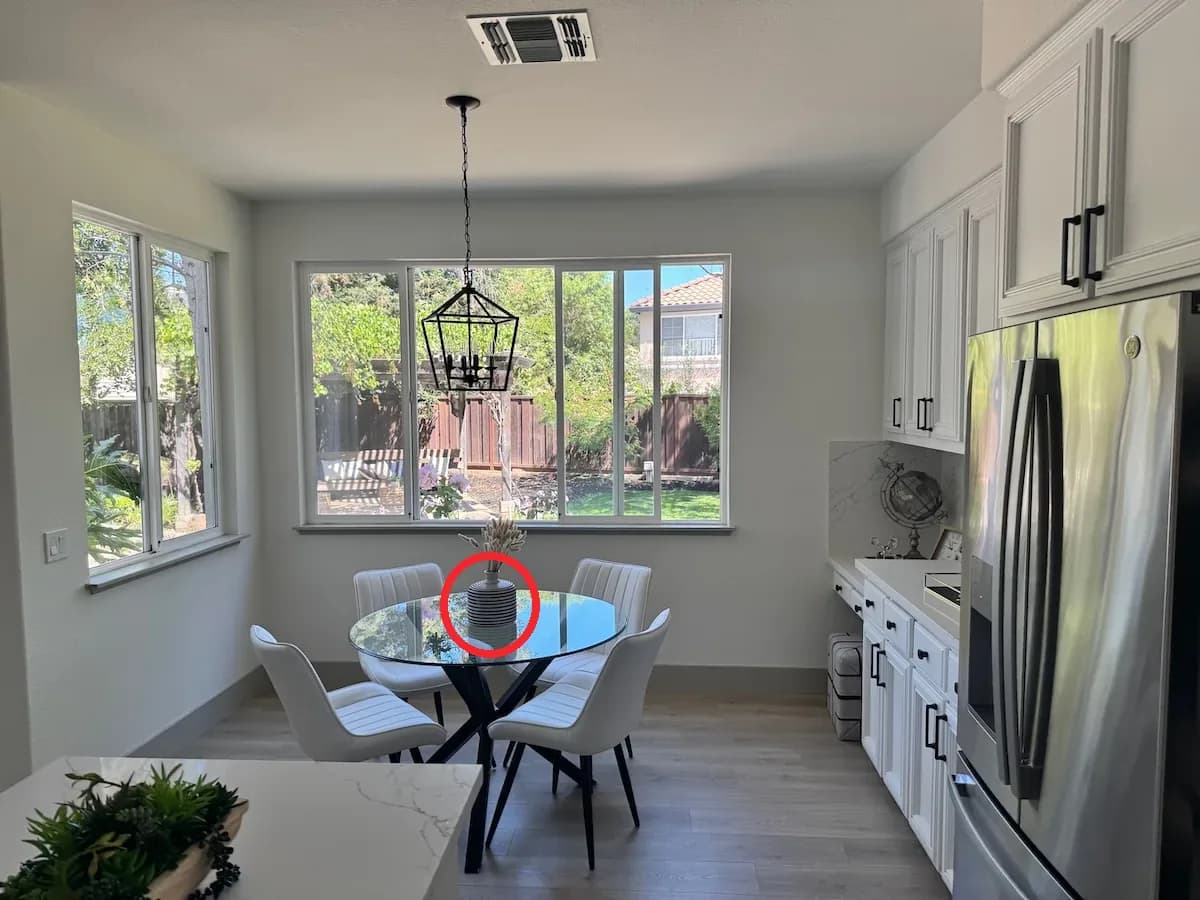
Add GIF output to a static-image workflow
A 2.5 static-image workflow delivers PNG, JPEG or WebP. Moving this task to 2.6 lets you request the completed GIF directly, using a prompt or still reference for a mascot gesture, reaction or short product loop. Evaluate this as an additional deliverable alongside your static-image comparison.
output_format: gif and place frame_count and frame_duration_ms inside model_params. A straightforward starting point is size: auto, 9 frames, and 200 milliseconds per frame: 512×512 frames and a 1.8-second loop. Use n: 1 and an opaque background.
Check SVG delivery before choosing the migration route
How should you decide whether to move a task to 2.6?
An existing 2.5 workflow remains worth keeping when it already meets the brief and its lower-tier economics matter to a large batch. Test 2.6 where adjustable planning, markup on EvoLink, or direct GIF output solves a specific production need.
Count accepted assets, editing effort, retries, and spend together. A more expensive attempt can still be worthwhile if it reduces the work needed to finish an asset; that benefit needs to appear in your own results.
Move an existing API workflow in small steps
gpt-image-2.5-flare to gpt-image-2.6-flare, or from gpt-image-2.5-sunburst to gpt-image-2.6-sunburst.POST /v1/images/generations, save the task ID, and query GET /v1/tasks/{task_id} until completion. Inspect the returned image and usage, then compare quality tiers and complexity separately. Download files you need to keep within the result URL's 24-hour validity window.GPT Image 2.6 vs 2.5 FAQ
Do low and medium both have higher output costs on 2.6?
For the 1024×1024 comparison at the common token rate used here, yes: estimated output costs are about 4.2 times higher at low and 3.3 times higher at medium. The estimates rise from 196 to 824 output tokens per image at low and from 439 to 1,449 at medium. Include input usage in the final budget. At EvoLink's listed output rates, the corresponding estimates are about 4.7× and 3.7×; use the model-page calculator for current charges.
When should I keep an existing GPT Image 2.5 workflow?
Keep it when it already meets your delivery requirements and low- or medium-tier costs matter to your batch. Compare your existing setup with 2.6 low and medium on representative jobs, then count accepted assets, revisions, and total spend. Adopt 2.6 where planning control, markup, or GIF output improves that workflow.
Which request fields should I review when moving to EvoLink 2.6?
markup_url for an annotation URL and places GIF frame count and timing inside model_params. Streaming, compression and output formats also depend on the interface; use the documentation for the route you call.Does keeping quality fixed also keep image dimensions fixed?
size explicit, or keep the same supported aspect-ratio and resolution combination. quality controls rendering detail, so fixing quality alone does not fix the output dimensions.Which complexity should I try when moving from 2.5 to 2.6?
For a focused background or object edit, start by comparing low. For an open composition with several objects or labels, try high, the default. Keep quality fixed and inspect both the requested result and any unwanted changes.
What changes for markup editing when moving from 2.5 to 2.6?
markup_url on its 2.6 routes; use the original image plus a separate transparent annotation layer. markup_url and mask_url are mutually exclusive in the same request.