GPT Image 2.5 Flare vs Sunburst: Which Should You Choose?

For EvoLink users planning a creative SaaS or ecommerce image pipeline, the distinction becomes concrete quickly. A discarded layout sketch costs another attempt. An unnoticed change to a product label can invalidate an otherwise attractive asset. Those workflows deserve different evaluation criteria, even when they use the same image API.
Use this decision order when results arrive:
- Keep Flare when it passes the task's hard requirements and delivery limits, and Sunburst's improvement does not reduce enough rework to justify its additional cost or waiting.
- Choose Sunburst for a workload when your paired test shows that it fixes a consequential failure, such as altered product details, and still fits the delivery budget. Keep other workloads on their existing configuration.
- Keep the current workflow or use manual editing when neither variant meets the requirements, or the apparent difference rests on too few examples. Exact product preservation can require compositing the original product over a generated background.
Flare vs Sunburst at a glance
max does not change one model into the other. They have separate model identifiers, while sharing the quality options listed below. Flare model reference, Sunburst model reference| Decision variable | Flare | Sunburst |
|---|---|---|
| Official model ID | gpt-image-2.5-flare | gpt-image-2.5-sunburst |
| OpenAI's positioning | Everyday generation, rapid iteration, default for most applications | Generation and editing where precision matters most |
| Evaluation starting point | Frequent drafts and variations with clear acceptance rules | Edits where preserving approved details is essential |
| OpenAI quality settings | low, medium, high, xhigh, max, auto | low, medium, high, xhigh, max, auto |
| Inputs and output | Text and image inputs; image output | Text and image inputs; image output |
| Standard token rates | Same listed rates as Sunburst | Same listed rates as Flare |
| What to establish on your workload | Whether faster iteration also produces enough acceptable results | Whether improved acceptance justifies additional waiting |
low through max) and defaults to medium; auto in the official table is not an EvoLink quality option. See the Flare parameter overview and Sunburst parameter overview.Choose the model around what makes an image usable
Begin with the requirement that is hardest to recover after generation. For a layout sketch, that might be a recognizable content hierarchy. For a product photograph, it might be the exact shape and placement of a label. Write that requirement before comparing outputs; otherwise an appealing style can distract from a failed brief.
The following starting points apply OpenAI's positioning to common workloads. They are hypotheses to evaluate with your own assets.
| Workflow | Evaluate first | What counts as a pass | When to reconsider |
|---|---|---|---|
| UI concepts and landing-page drafts | Flare, with a Sunburst comparison set | Correct hierarchy, readable labels, required reference elements, useful composition | Another model or setting consistently reduces layout corrections |
| Social assets in several formats | Flare | Accurate copy, recognizable brand treatment, useful crops across required sizes | Repeated rejects remove the latency or cost benefit |
| Product image with a new background | Sunburst, paired with Flare | Product shape, color, label, and approved details remain acceptable | Either variant changes protected details; require review before delivery |
| A person placed into a new scene | Both on the same reference set | Identity, lighting, texture, and scene consistency pass review | Attractive samples fail identity or texture checks across the full set |
| Several rounds of local editing | Sunburst, paired with Flare | Earlier edits survive; untouched regions remain acceptable | Drift accumulates enough to require returning to an earlier approved image |
| Posters and transparent brand assets | Both with explicit output settings | Exact text, usable edges, correct composition, required transparency | Higher quality settings still fail the specific deliverable requirement |
Two task briefs: from input to a model decision
These examples show how to turn Flare's everyday-generation positioning and Sunburst's editing emphasis into different acceptance tests. They do not predict either model's pass rate.
Task 1: a UI draft ready for a designer's handoff
Use this task prompt with your own reference assets:
Create a desktop dashboard concept using the attached wireframe.
Preserve its four regions: navigation, upload, job queue, usage summary.
Use these labels exactly: "Upload images", "Queue", "Usage", "Settings".
Keep the supplied logo unchanged. Use a neutral background and teal accents.
Do not add features, pricing cards, or navigation items.
The deliverable is a visual design reference, not working interface code.
Review the required content before visual style:
| Check | Accept | Reject / next action |
|---|---|---|
| Information architecture | All four regions and required controls are present | Missing upload or queue: fail the output; check that the reference and prompt agree |
| Copy and branding | Required labels are exact; logo is usable | Changed labels or logo: fail; consider placing exact text/logo in the design tool |
| Handoff usefulness | Hierarchy and spacing can be implemented without redesigning the screen | Attractive but structurally confusing: record a layout failure |
Start with Flare because this is a draft-and-iteration job. If its outputs meet these rules and Sunburst mainly changes the aesthetic, keep Flare when its measured delivery cost or latency is better. If Flare repeatedly drops a required region while Sunburst preserves it across the comparison set, consider Sunburst for this class of brief. A single attractive Sunburst image is insufficient to establish that pattern.
If both fail exact typography, separate composition generation from text placement rather than repeatedly increasing quality. The requirement may be better served by a design tool. Include that finishing time when comparing the completed handoff.
Task 2: a new background without changing the product
Replace the background of the attached product photograph with a light
stone surface and a warm off-white wall. Match the reference background's
lighting. Add a natural contact shadow beneath the bottle.
Preserve the bottle shape, cap, label lettering, logo, and liquid color.
Do not add props, alter the camera angle, crop the bottle, or redesign it.
Sunburst is the first candidate here because editing precision is the central requirement. Include Flare as a comparison: an editing-focused position does not establish that Sunburst is necessary for every simple background replacement.
Then test a short edit sequence: warm the wall color, soften the shadow, and remove a distracting background mark. For this task, run three edits on each branch and save every intermediate image. Check all protected details after every edit, together with whether earlier requested changes survived. Count a sequence as accepted only when its final deliverable passes the full checklist.
Compare cost per accepted image
usage; consumption depends on the model and settings. Its output estimator covers output costs, while a complete request can also include inputs. Responses API workflows additionally incur the main model's usage. OpenAI's cost and latency guidanceFor your comparison, define:
Cost per accepted image =
  total actual generation and retry charges for the evaluation batch
  / number of images that pass the acceptance rules
For editing sessions, count accepted final deliverables rather than every intermediate image. Include the charges for all steps and retries. Report a batch with no accepted deliverable as unsuccessful; its unit cost is undefined, not zero. Keep review and repair labor separate, then add it for a total delivery-cost comparison.
Worked example: when a higher batch bill is worthwhile
| Illustrative batch | Jobs | Total charges | Accepted final images | Cost per accepted image |
|---|---|---|---|---|
| Flare example | 20 | $4.00 | 10 | $0.40 |
| Sunburst example | 20 | $6.00 | 18 | About $0.33 |
In this hypothetical batch, Sunburst's bill is 50% higher, but its cost per accepted image is about 17% lower. It only becomes the preferable configuration if its latency and other delivery requirements also pass.
The break-even point is useful: with a $6 batch bill, Sunburst needs 15 accepted images to match Flare's $0.40, and at least 16 to beat it. If a different Flare configuration instead delivers 16 accepted images for the same $4, Flare costs $0.25 per accepted image and the choice reverses. Actual configuration changes can also change the bill, so recalculate both inputs rather than assuming charges stay fixed.
This is why a shared token rate cannot settle the decision. Compare the accepted-output denominator and the full bill together. Reconcile timed-out or failed requests with the provider's billing rules; neither free failures nor duplicate charges should be assumed.
Quality settings need their own comparison
auto adds another changing variable, and the same quality label across models does not prove equal compute, visual quality, or total cost. The official guide documents model-specific token estimates and recommends using actual usage to check consumption. Image generation guideFirst compare matching explicit settings, then test another quality setting only against the failures you observed. For example, if the UI configuration loses required regions, compare whether a changed prompt, higher quality, or Sunburst fixes that omission. Change one variable at a time. Freeze the selected configuration and test it on fresh briefs before adopting it; selecting and validating on the same examples can overstate the improvement.
max. A misspelled label, incomplete instruction, unsuitable reference, or wrong crop needs diagnosis. A higher quality setting is a candidate intervention, not a substitute for understanding the failure.Run the test and fill in the decision worksheet
Save a configuration record containing the exact model or snapshot, provider, prompt version, reference assets, quality, size, output settings, and retry policy. For edit sequences, also save each parent output and requested change. Alternate the variants' request order under comparable load so a busy period does not systematically affect only one model. Include your current workflow as a baseline if this is a migration decision.
Score deliverability before preference
Use the task-specific hard checks above first. Then score three soft criteria—composition, lighting/visual coherence, and finish—from 0 to 2: 0 needs substantial work, 1 needs minor repair, 2 is ready for the intended handoff. For this illustrative rubric, accept only outputs that pass every hard check and score at least 5/6. Set your real threshold before viewing model labels.
That means an attractive product image with an altered label fails even at 6/6. A UI concept with all required elements and scores of 2/2/1 passes this example rubric. Record the remaining repair time rather than treating it as free.
run_log_reference.completed, failed, or unfinished for job status, and yes/no for the acceptance and deadline fields. A completed request can still produce an unacceptable image. Leave time-to-acceptance empty when no output is accepted. Mark billing pending until reconciled; wait for the whole batch's charges before comparing cost, rather than omitting pending jobs or treating them as free.Summarize each workload separately:
| Decision field | Flare | Sunburst |
|---|---|---|
| Configuration ID and sample count | Fill in | Fill in |
| Accepted final deliverables / attempted jobs | Fill in | Fill in |
| Hard failures by reason | Fill in | Fill in |
| Reconciled batch charges / accepted deliverables | Fill in | Fill in |
| Time to accepted deliverable; unfinished jobs | Fill in | Fill in |
| Review and repair minutes | Fill in | Fill in |
| Meets this workload's delivery limits? | Yes / no / insufficient evidence | Yes / no / insufficient evidence |
Keep unfinished jobs visible when reporting time: a model with many failures must not look faster because only its easiest successes were timed. For this small screen, show observed durations and missed deadlines; do not present a reliable p95 or broad performance claim.
Turn the worksheet into a decision
If Flare accepts 12 and Sunburst 18, and the logged difference is repeated product-label preservation, advance Sunburst to a fresh product-edit validation set. If its added waiting violates the deadline, it still fails the delivery decision. If neither reaches 16, retain the existing workflow, revise the task, or use manual handling. These numbers demonstrate a decision rule, not observed results or universal acceptance targets.
Turn the results into a routing policy
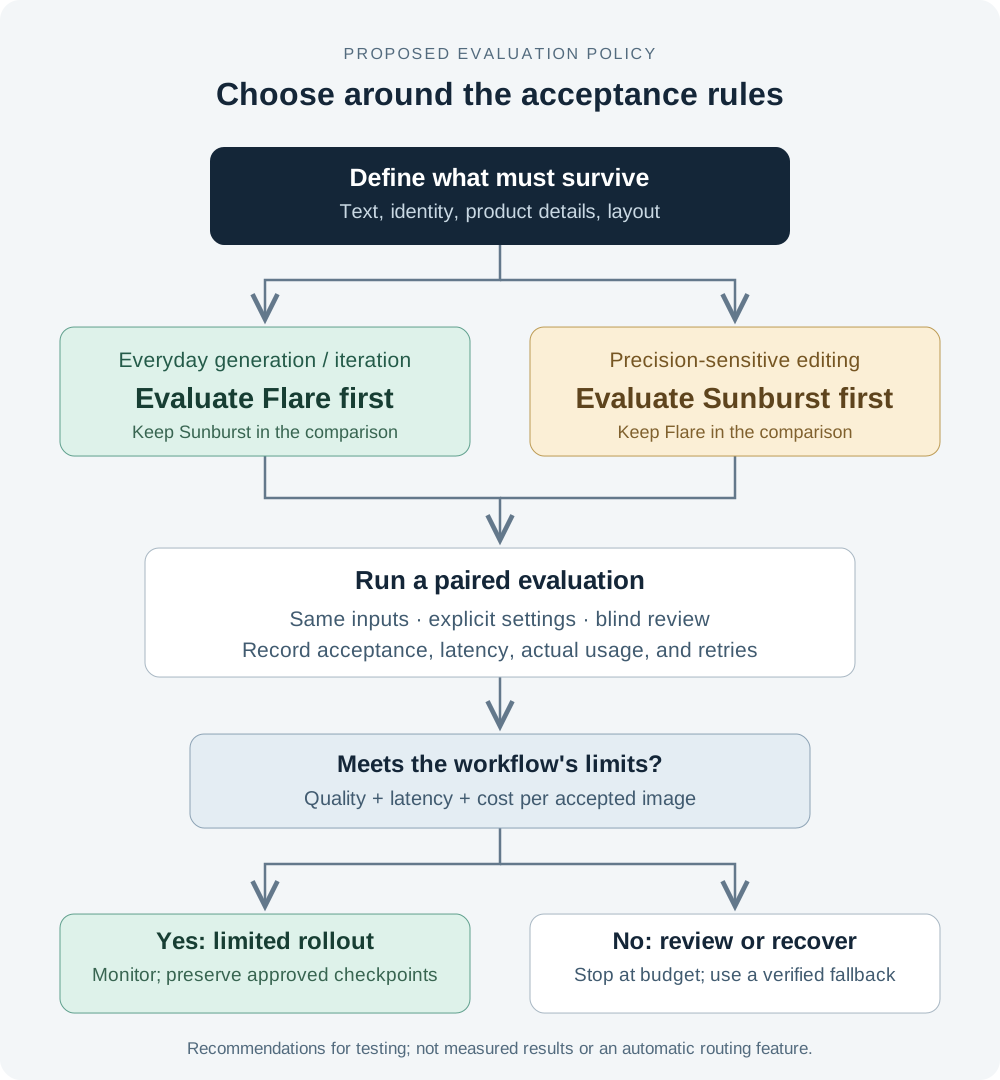
Once a frozen configuration passes fresh validation, introduce it to a limited set of that workload. Keep Flare and Sunburst decisions separate by task: a product-edit improvement does not justify moving UI drafts. Retain the previous working configuration and approved assets so you can reverse the rollout when cost, rejection rate, or delivery time exceeds your limits.
An initial policy can distinguish four outcomes:
| Outcome | Proposed action |
|---|---|
| Output passes the task's acceptance rules | Deliver it; retain enough configuration and billing evidence to review performance |
| Output completes but fails a specific visual requirement | Record the failure; try a tested alternative configuration or send it for review within the retry budget |
| Request fails because of transport, rate limiting, or provider availability | Follow the documented retry/status behavior; use a verified fallback when appropriate |
| Budget is exhausted, requirements are incompatible, or review keeps failing | Stop generating and return the task for clarification or manual handling |
Keep technical failures separate from quality failures. Switching models might improve an identity-preservation result, while repeatedly changing models will not fix a malformed request. After a timeout, reconcile the request status where the channel supports it before submitting another potentially billable job.
Preserve the last approved asset and the working configuration. If a new model drifts during an edit sequence, recover from an approved checkpoint instead of repeatedly editing an already unacceptable result. Review latency and acceptance by workload after rollout, rather than watching only the total number of successful API responses.
Applying this through EvoLink
For teams using a unified gateway, keep the workload policy separate from provider-specific request details. The application should know why a job needs a particular configuration; the verified integration supplies the accepted model identifier, parameters, and billing behavior.
Test Flare and Sunburst separately before routing production traffic through EvoLink: confirm the accepted parameters, one generated and one edited result, and the reconciled bill for each. Passing your integration test on one variant does not replace testing the other; both variants are already available on EvoLink. The policy above is an application design, not a claim that EvoLink offers automatic failover between these variants.
FAQ
Which should I try first: Flare or Sunburst?
Use Flare as the first evaluation candidate for everyday generation and frequent variations. Prioritize Sunburst when editing precision and preserving approved details are the main challenge. These starting points follow OpenAI's positioning; keep the final choice tied to your acceptance rules.
Is Sunburst always better than Flare?
This guide does not establish that. A workload needs an acceptable result within its latency and cost budget. A more demanding model configuration is useful only when its improvement matters to that task. Evaluate both on difficult cases before setting the default.
Is Flare cheaper?
The official standard token rates are the same. Compare actual input and output usage, retries, and the number of accepted images. Flare may be more economical for a particular task, but the model name and shared rate sheet do not establish that result.
Should I use max quality for every final image?
Choose the lowest-cost tested configuration that meets the delivery requirements. Include higher settings in the evaluation when a lower one fails, and check whether they address the actual failure. Keep review time and retries in the cost comparison.
Does Sunburst guarantee unchanged product details across edits?
No guarantee is established by the sources used here. Treat the protected details as explicit acceptance criteria. Test the full edit sequence and retain an approved source image for recovery or manual compositing.
Can I use Flare for drafts and Sunburst for final edits?
That is a reasonable workflow to evaluate. Test the transition itself: the second model must receive the right reference assets and preserve approved choices. Compare the total two-stage cost and completion time against running the task with one model.
Can I tell which variant ChatGPT used from the image?
Appearance alone is insufficient, and this article has not verified individual ChatGPT or Codex requests. For reproducible testing, select and record the image model explicitly; both official model pages document Images API and Responses image-tool selection. A community screenshot without its configuration, attempts, and charges cannot establish a paired API result.
Are both variants available through EvoLink?
gpt-image-2.5 alias, so name the variant in the request.Sources and update policy
- Introducing ChatGPT Images 2.5 — official positioning and release context; checked September 9, 2026.
- GPT-Image-2.5 Flare model reference — model ID, modalities, quality options, and standard rates; checked September 9, 2026.
- GPT-Image-2.5 Sunburst model reference — model ID, modalities, quality options, and standard rates; checked September 9, 2026.
- OpenAI image generation guide — model selection and usage/cost guidance; checked September 9, 2026.
- UI-generation comparison shared by a 12ui author — community demonstration with a disclosed product connection; not an independently verified performance source.
Revisit the recommendations when model behavior, official settings, verified route availability, or comparable workload results change. Record the exact configuration and test date when adding measurements, and preserve the distinction between vendor claims, third-party reports, and EvoLink's own results.