

Kimi K3.1 Pro API Pricing: Token Rates, Cache Fees, and Cost Examples
Compare Kimi K3.1 Pro and Highspeed token rates, cache-write fees, reasoning costs, and worked examples for single requests and monthly API budgets.
 EvoLink Team
On this page
The cost of an individual request depends on its input, output, cache activity, and tool usage. This guide breaks down those charges and shows how to estimate costs for a single request or thousands of monthly calls.
How Much Does Kimi K3.1 Pro Cost on EvoLink?
| Billing category | K3.1 Pro Standard | K3.1 Pro Highspeed |
|---|---|---|
| Regular input | $2.00 | $4.00 |
| Output | $10.00 | $20.00 |
| Cache reads | $0.20 | $0.20 |
| Cache writes: 5 minutes | $2.00 | $4.00 |
| Cache writes: 1 hour | $4.00 | $8.00 |
The input charges fall into three categories:
- Regular input: Content billed at the regular input rate.
- Cache reads: Content successfully reused from an existing cache.
- Cache writes: Content written to cache and charged according to its lifetime.
How Much Does One API Request Cost?
Kimi K3.1 Pro charges by token usage rather than a fixed price per request. A short question, a large document, and a request reusing cached context can produce very different bills.
Here are three examples using the rates above:
| Usage per request | Standard cost | Highspeed cost | Standard: 1,000 requests |
|---|---|---|---|
| 2,000 regular input + 1,000 output tokens | $0.014 | $0.028 | $14 |
| 100,000 regular input + 10,000 output tokens | $0.30 | $0.60 | $300 |
| 100,000 cached input + 1,000 regular input + 2,000 output tokens | $0.042 | $0.064 | $42 |
Smaller Request: $0.014 on Standard
A request containing 2,000 regular input tokens and generating 1,000 output tokens costs:
Regular input: 2,000 ÷ 1,000,000 × $2  = $0.004
Output:        1,000 ÷ 1,000,000 × $10 = $0.010

Total: $0.014Larger Request: $0.30 on Standard
A request containing 100,000 regular input tokens and generating 10,000 output tokens costs:
Regular input: 100,000 ÷ 1,000,000 × $2  = $0.20
Output:         10,000 ÷ 1,000,000 × $10 = $0.10

Total: $0.30For a monthly budget, group requests by their typical usage, calculate the cost of each group, and multiply by its expected request count.
Does Highspeed Double the Cost?
Highspeed’s regular input, output, and cache-write rates are twice Standard’s rates. Its cache-read rate is unchanged.
For a request containing only regular input and output, identical usage doubles the token cost:
100,000 regular input + 10,000 output tokens

Standard:  $0.30
Highspeed: $0.60
For a request dominated by cache reads, the difference is smaller:
100,000 cached input + 1,000 regular input + 2,000 output tokens

Standard:  $0.042
Highspeed: $0.064These calculations hold token usage constant to show the effect of the rates. For actual calls, calculate each bill from its reported usage.
Cache Pricing: First Writes and Subsequent Reads
Standard’s cache-read rate is one-tenth of its regular input rate, but creating the cache has a separate write charge.
Consider a Standard request with:
- A reusable 100,000-token prefix written to a five-minute cache.
- Another 1,000 regular input tokens.
- 2,000 billed output tokens.
The first request costs:
Cache write:   100,000 ÷ 1,000,000 × $2  = $0.200
Regular input:   1,000 ÷ 1,000,000 × $2  = $0.002
Output:          2,000 ÷ 1,000,000 × $10 = $0.020

First request total: $0.222
When a subsequent request successfully reuses that 100,000-token cache, the cost becomes:
Cache read:    100,000 ÷ 1,000,000 × $0.20 = $0.020
Regular input:   1,000 ÷ 1,000,000 × $2    = $0.002
Output:          2,000 ÷ 1,000,000 × $10   = $0.020

Subsequent request total: $0.042
If the first write is followed by nine successful cache-hit requests:
Total for ten requests
= $0.222 + 9 × $0.042
= $0.60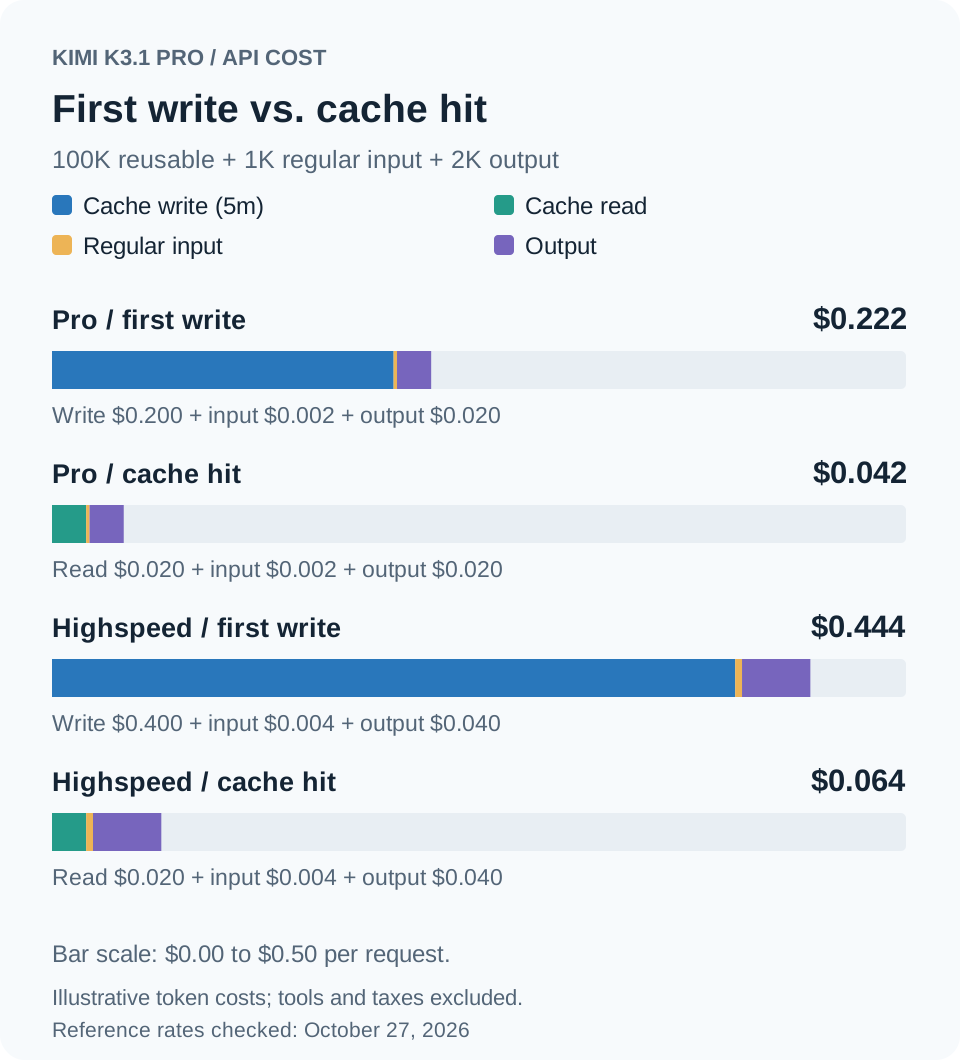
Five-Minute vs. One-Hour Cache Pricing
Standard’s cache-write rates are:
- Five minutes: $2 per million tokens.
- One hour: $4 per million tokens.
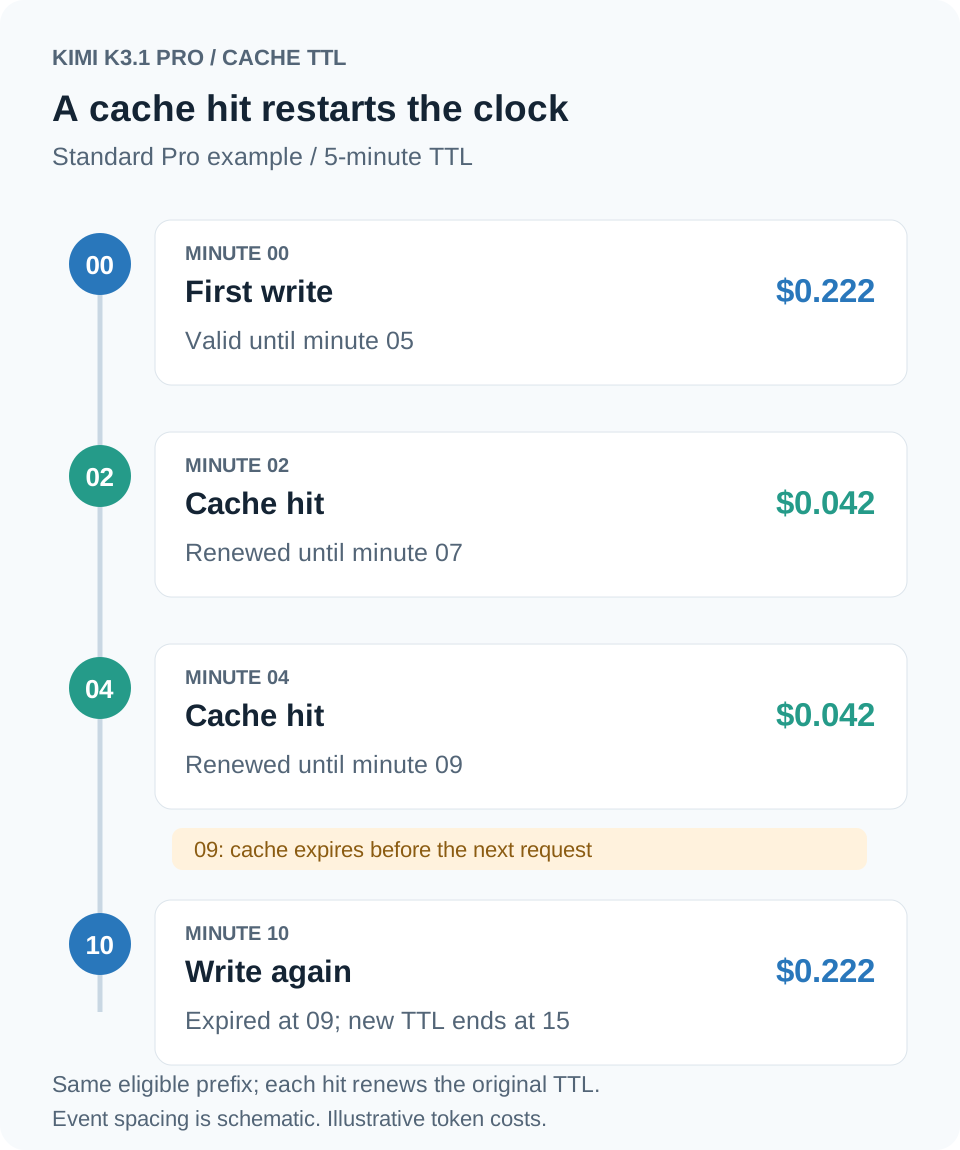
Both request count and timing affect recurring costs. Ten requests that successfully reuse a cache can cost differently from ten requests that repeatedly arrive after it expires.
How Are Reasoning Tokens Charged?
For example, a request reports 10,000 total billed output tokens, consisting of:
- 9,000 reasoning tokens.
- 1,000 final-answer tokens.
Standard’s output charge is:
10,000 ÷ 1,000,000 × $10 = $0.10The reasoning tokens are already included in the output total. Do not add them a second time. Use the API’s reported total billed output when calculating the charge.
Tool Fees and Minimum Charges
Three billable searches add:
3 × $0.005 = $0.015Add tool charges to the model’s token charges. Search results passed into a subsequent model request can also contribute to input usage.
Calculate Your Token Cost with Code
This JavaScript example uses Standard’s reference rates. Replace the token counts with your usage to calculate the corresponding token cost.
// Standard Pro reference rates checked on October 27, 2026.
// Input categories must not overlap.
const tokens = {
  regularInput: 1_000,
  cachedInput: 100_000,
  cacheWrite5m: 0,
  cacheWrite1h: 0,
  output: 2_000, // Includes billed reasoning tokens.
};

const ratePerMillion = {
  regularInput: 2,
  cachedInput: 0.2,
  cacheWrite5m: 2,
  cacheWrite1h: 4,
  output: 10,
};

const tokenCost = Object.entries(tokens).reduce(
  (total, [category, count]) =>
    total + (count * ratePerMillion[category]) / 1_000_000,
  0
);

console.log(`Estimated token cost: $${tokenCost.toFixed(6)}`);
// Estimated token cost: $0.042000ratePerMillion when your account rates change.FAQ
How Much Does Kimi K3.1 Pro Cost per Token?
At Standard’s base rates:
- Regular input: $0.000002 per token.
- Output: $0.00001 per token.
- Cache reads: $0.0000002 per token.
These are category-specific rates. The price of a request depends on the number of tokens billed in each category.
If Cache Reads Are 90% Cheaper, Is the Whole Request 90% Cheaper?
No. The 90% reduction compares Standard’s cache-read rate with its regular input rate. Output, cache writes, and tools can still contribute to the request’s total cost.
Why Do Different Websites Show Different Prices?
Check the exact model name, Standard or Highspeed variant, provider, currency, billing unit, and update date. Public list prices, account discounts, and weighted average prices also describe different things.


