

Kimi K3.1 Pro Review: Coding, 3D Modeling, and Research
Kimi K3.1 Pro review covering code repair, Blender and CAD, data analysis, and reasoning latency, with public benchmarks and task examples.
 EvoLink Team
On this page
Public tests of Kimi K3.1 Pro show successful code repair and data investigation, alongside gaps in browser validation and an error in data grouping. Moonshot AI’s 3D examples extend the picture: the model can use Blender and CAD tools to produce structured scenes and objects.
The practical questions are how well those outputs work, what needs checking, and how much time the model spends reaching a final answer. Artificial Analysis, Atomic Agent, PacBench, and Plotly provide concrete results to examine alongside Moonshot AI’s official examples.
Kimi K3.1 Pro benchmarks: coding, agents, and reasoning
Artificial Analysis’s October 23, 2026 launch evaluation covers terminal tasks, SaaS workflows, knowledge work, and difficult reasoning questions:
| Evaluation | K3.1 Pro result | What it examines |
|---|---|---|
| Terminal-Bench 4.0 | 67% | Coding and operational tasks in a terminal environment |
| AutomationBench-AA | 73% | Agents carrying out SaaS workflows |
| GDPval-AA | 1,846 Elo | Relative performance on knowledge-work deliverables |
| Humanity’s Last Exam | 52% | Difficult knowledge and reasoning questions |
The four evaluations cover different kinds of work. Terminal and SaaS tasks ask an agent to act in an environment, while knowledge-work evaluations look at the deliverable it produces. Difficult question answering adds another dimension: arriving at a correct answer when the reasoning itself is demanding. A strong result in one category can coexist with a weakness in another part of a workflow.
For a developer, this distinction helps explain why a coding benchmark and a generated application can tell different stories. Solving a repository task involves reading files, making changes, running checks, and interpreting failures. Delivering an interactive application adds controls, rendering, and the behavior users encounter after the program starts. The examples below make those differences visible.
Coding: code repair and longer tasks
Low and max on a Python repair task
Atomic Agent tested a Python package with five planted bugs and two missing features: a settlement function and a command-line tool. The agent received a short instruction to read the task file, complete the work, and run tests until they passed. The runs used Atomic Agent v0.6.9 with the same task and tools.
Each reasoning setting ran three times, with 32 hidden assertions per run. Those hidden checks were separate from the tests the agent could see while working. Both settings passed every assertion:
| Setting | Assertions across three runs | Average time | Average model calls |
|---|---|---|---|
| Low | 96/96 | 2.2 minutes | 19 |
| Max | 96/96 | 4.9 minutes | 28 |
For this task, low was the more efficient setting. Calculated from the reported averages, max took about 2.2 times as long and made roughly 47% more model calls, with the same pass result.
For code repair, the completed patch is the useful comparison point. Did it fix the requested behavior, preserve the public interface, and avoid unrelated changes? A higher effort level earns its place when it improves those outcomes. A longer explanation or a larger number of tool calls is an execution characteristic, not by itself a better patch.
Changing the diagnosis during a long task
The simulator was built on the human-atlas anatomical model, which includes 296 skeletal components and 402 muscle components. Moonshot describes the model using open-loop dynamics probes to investigate the arm-motion problem before changing the calculations and retraining the controller.
That sequence matters in a coupled system. A controller can be trained against an incorrect simulation, just as application code can be tuned around a faulty dependency or a broken test fixture. Repeatedly improving the outer loop may leave the underlying defect untouched. Here, the model moved from the training objective to the simulator that defined the training environment.
For a long coding task, useful progress therefore includes changes in diagnostic direction: reading a dependency, checking a numerical assumption, or revising the original explanation after a new result. The final deliverable should preserve enough of that trail—changed files, test commands, and measured outcomes—for another developer to continue the work.
A generated game and its validation gap
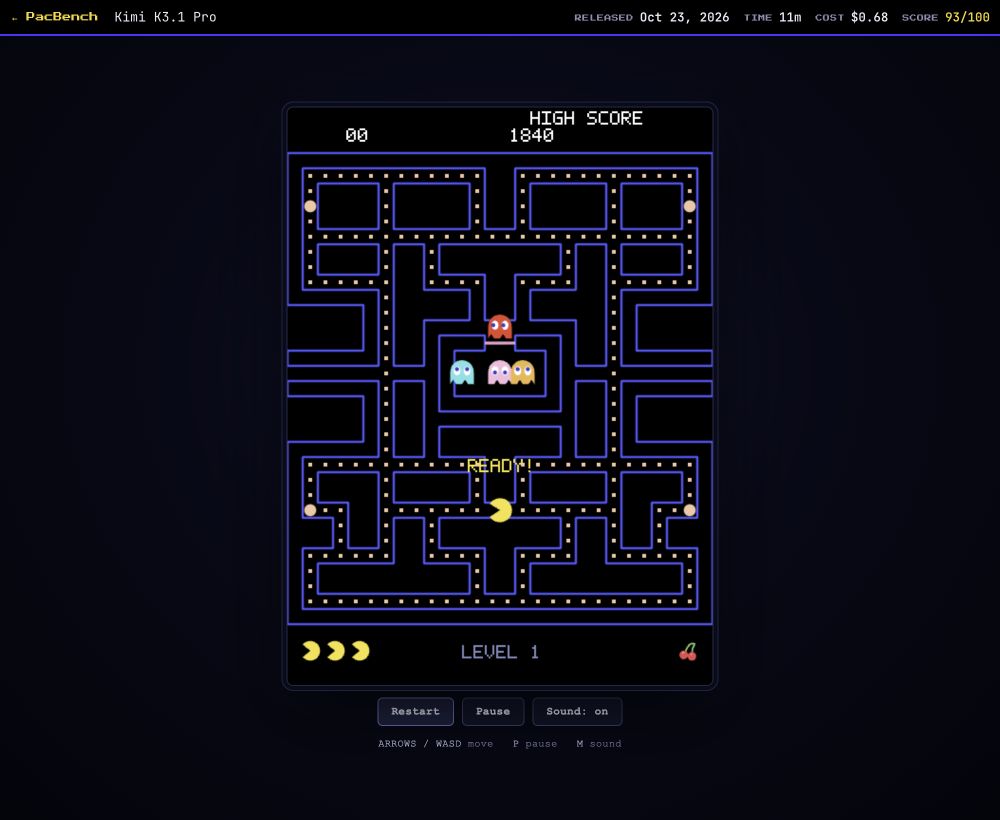
PacBench’s K3.1 Pro entry used high effort, involved 17 model responses, and took about 11.5 minutes. The generated Pac-Man game is available to play, together with its execution record.
The evaluator also documented what worked: a classic 28×31 maze, all 244 pellets reachable, and no stuck movement across the tested frame rates. That makes the remaining defects more informative than a simple “works” or “does not work” label.
The remaining work was browser validation. A Node substitute could exercise game-state transitions, but keyboard focus and background-tab audio are browser behaviors. For an interactive deliverable, checking a win condition and checking the experience of playing are separate parts of completion.
3D modeling: Blender, CAD, and asset inspection
What the CAD benchmark reconstructs
The metric is Voxel IoU: geometric overlap between generated and reference shapes in voxel space. It measures shape similarity, not the percentage of assets ready for production. The task is closer to recovering an object’s structure than to producing a convincing picture of that object.
From a visible shape to an editable asset
For an individual asset, inspect three things:
| Level | What to inspect |
|---|---|
| Overall form | Silhouette, proportions, and spatial arrangement |
| Local structure | Connections, occlusion, symmetry, and detail |
| Practical use | Source files, dimensions, topology, and export results |
Asset inspection checklist: compiled for this article.
For a mechanical object, a useful inspection question is whether connected parts meet where they should, and whether a dimension change preserves their relationship. For an architectural scene, check repeated components, openings, and the arrangement of spaces. These checks help reveal intersections and missing connections that a single camera view can hide.
The delivery format matters too. A preview supports visual review; editable files support later changes; an export supports use in another tool. Asking for the intended format at the start makes it easier to distinguish a good presentation from an asset that another person can actually continue working with.
Data analysis: Plotly’s 42/43 result and a grouping error
The model passed 42, including all five hidden-pattern questions and all three data-quality questions.
Finding problems the question does not spell out
In the data-quality cases, Plotly reports that K3.1 Pro identified duplicated rows and a missing last day of the month, and distinguished decommissioned turbines with no data from turbines producing zero. Those are different data states, even though a simple aggregate can make them look similar.
The hidden-pattern questions add another kind of work: investigating relationships without being told exactly what to find. That makes the result relevant to exploratory analysis, where the next query depends on what the previous query revealed.
How a small grouping error changes the answer
That changes the population being compared. “Not on this firmware” and “on a different firmware” describe different groups when some records have no firmware at all. Adding the missing-state records changes the baseline before any statistical test is applied.
The analytical method can therefore look careful while the question has already shifted. A useful review starts with the population: which records entered each group, which were excluded, and what a missing value means in this dataset. Then inspect the calculation and check that the prose describes the filters actually used. The calculation only answers the intended question when the groups match its business definition.
Financial and research deliverables
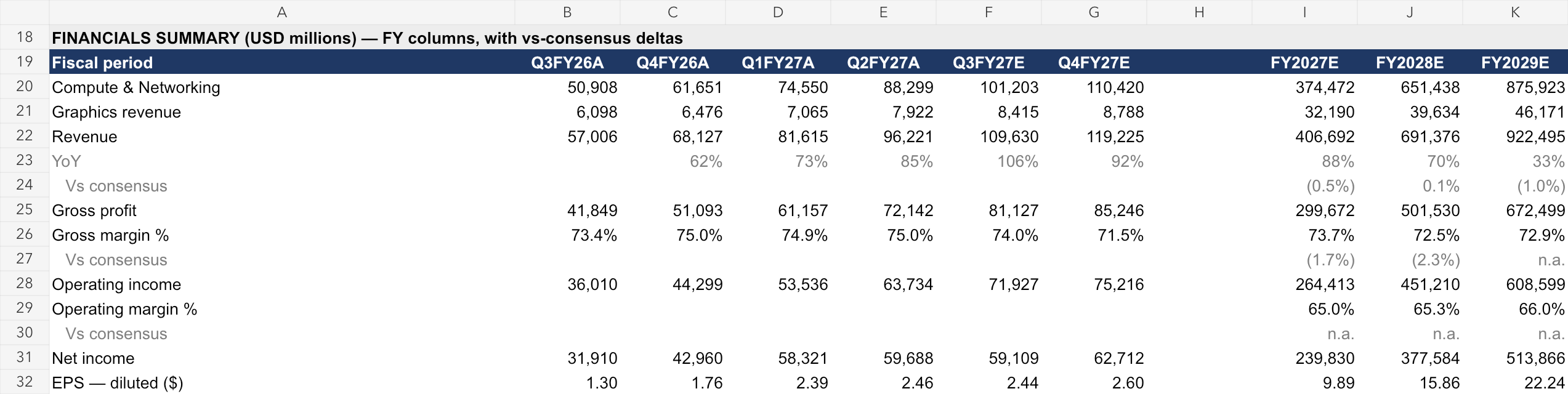
The NVDA screenshot shows quarterly and annual columns alongside revenue, profit, margins, and diluted earnings per share. It is a financial summary page, so its usefulness depends on how clearly a reader can connect the headline numbers to the assumptions and supporting sheets behind them.
For a modeling workbook, follow one forecast from an assumption through the relevant formula references to the summary. Check that fiscal periods line up and that a changed assumption updates the intended outputs. For a report or presentation, follow important claims back to their sources and check that charts and written conclusions use the same period and definition.
These files also show why research delivery is broader than generating a long answer. A workbook has numerical dependencies; slides need a clear sequence of arguments; a report needs traceable support for its conclusions. The model’s contribution includes organizing those relationships into a format another person can inspect and revise.
Image and video understanding: practical checks
- For charts, verify values, units, and statistical definitions together.
- For spatial tasks, check positions and relationships between objects.
- For video, test action order and changes of state across frames.
A chart task illustrates the difference between reading and interpretation. Extracting two values is only the start if one series uses a different unit, time period, or population. A useful answer needs to keep the value attached to the right axis, legend, and surrounding explanation.
content as an array of message parts, with images supplied as base64 or uploaded file references. The guide describes video processing in terms of key frames: frame count and resolution affect input size. These details are documented in the vision input guide.For video, choose examples where the answer depends on sequence rather than a single frame—for example, what changed before a failure, or which action preceded another. The public tests discussed here focus on coding and data work; a visual application needs its own examples of the events and details it must recognize.
Reasoning latency: waiting for the final answer
On October 24, 2026, AIHubMix tested one prompt asking for a hash-map explanation with Python code, running standard Pro three times at low effort. The measured wait differed sharply between the first reasoning token and the first final-answer token:
Time to first reasoning and final-answer tokens
Standard Pro · one prompt · low effort · three runs
- First reasoning token
- 3.6–4.5 s
- First final-answer token
- 71–91 s
Seconds from request start
Reasoning accounted for about 85%–90% of completion tokens in these runs, and one run reached the 8,192-completion-token cap. An interface that displays only final answers can therefore appear idle while the model is already streaming reasoning.
Streaming progress and a usable answer
Three timings describe different parts of the experience: when the stream starts, when final-answer text begins, and when the response completes. A healthy connection can still leave a user waiting for a usable answer. A short first-token time therefore does not describe the entire wait.
For an interactive application, measure all three timings on the prompts users will actually send. Also record the effort setting and completion limit, so a fast but truncated response is distinguishable from a completed answer. In a background task, completion quality and total duration may matter more than how quickly text first appears.
reasoning_content for reasoning increments and content for final-answer increments. An application can distinguish processing status from the answer it presents or parses. In multi-turn tool workflows, the quickstart also requires retaining the complete assistant message and matching tool results, rather than keeping final-answer text alone.That connects the timing result back to agent behavior. The application is managing an ongoing task, including tool requests, returned observations, and the eventual answer. Reasoning effort is one control in that process; validation and message handling still determine whether the work is delivered correctly.
Where Kimi K3.1 Pro fits
The cases suggest different priorities for each workload:
| Capability | What the evidence supports | Remaining limits |
|---|---|---|
| Coding and long tasks | Completed repairs and sustained debugging | Reliability on larger projects needs validation in the target environment |
| 3D and spatial reasoning | Tool-driven construction of scenes and objects | Shape overlap does not establish topology or export quality |
| Data analysis and research | Strong results in Plotly’s specialist test | Grouping rules and assumptions can still be wrong |
| Visual understanding | Official image and video input support | These tests do not establish accuracy on specialist visual tasks |
| Reasoning and execution | Substantial reasoning and tool use | Extra effort can add latency without improving the measured result |
Summary of the sources discussed above.
Start with a code-repair or data-analysis task you can score. For a repair task, keep the original failing case and check the resulting diff. For analysis, keep a small set of known answers and include missing or exceptional states. For a 3D deliverable, agree on the source and export formats before reviewing the preview.
Compare final quality, execution time, tool calls, and token usage before expanding to less structured work. Atomic’s low/max comparison, PacBench’s browser gap, and Plotly’s grouping error each point to a concrete check worth including. Together they connect the evaluation to the work the model will actually do.
FAQ
Can Kimi K3.1 Pro create editable 3D models?
Should I use low or max reasoning effort for coding?
Start by comparing them on a representative task set. In Atomic Agent’s Python experiment, both settings passed the same assertions, while low averaged 2.2 minutes and 19 calls against max’s 4.9 minutes and 28 calls. Increase effort when it improves your patches or pass rate enough to justify the extra time and usage.
Why is Kimi K3.1 Pro streaming without giving a final answer?
Does Plotly’s 42/43 result make research conclusions ready to use?
It is a strong result on Plotly’s synthetic wind-farm dataset. The missed firmware question shows why reviewing the population and grouping rules still matters. For another dataset, check missing values, time periods, formulas, and sources before using the conclusions.


