Gemini 4 Neon vs Claude Opus 5.5 for Coding and Cost
Use public benchmarks to compare Gemini 4 Neon and Opus 5.5 in one editor and in their own agent tools. Decide when to switch by pricing accepted patches.
 EvoLink TeamProduct Team
On this page
high on recurring coding tasks backed by automated tests. Keep Claude Opus 5.5 as the baseline for repository workflows your team has already validated. Neon posts competitive multi-file coding results and lower standard input and output rates. Before switching, measure first-pass acceptance, reviewer time, and whether the new configuration supports the tools your team needs. CursorBench 4.1 · Google API pricing · Anthropic pricingCompare Gemini 4 Neon and Claude Opus 5.5 in your coding setup
| Your current setup | What to test | What decides |
|---|---|---|
| Both models are available in the same editor | Change the model with the editor, tools, and review workflow fixed | Accepted patches, total cost, and reviewer intervention |
| Your team uses Claude Code heavily | Compare Claude Code with Opus against Antigravity with Neon as complete setups | Whether repository instructions, permissions, and hand-offs work |
| Your application calls models through an API | Use the same task, approved tools, and validation in your application | Correct tool use, a valid patch, and recoverable failures |
| Your setup handles rare, high-risk migrations | Run Neon on a replay or isolated branch | Compatibility checks and manual rework |
What the two coding benchmarks measure
xhigh in Antigravity CLI scored 59 at $6.86 per task, while Opus 5.5 max in Claude Code scored 58 at $12.61. These are rounded scores for each model and tool combination. CursorBench 4.1 gives a second view from within the same editor environment. Artificial Analysis evaluation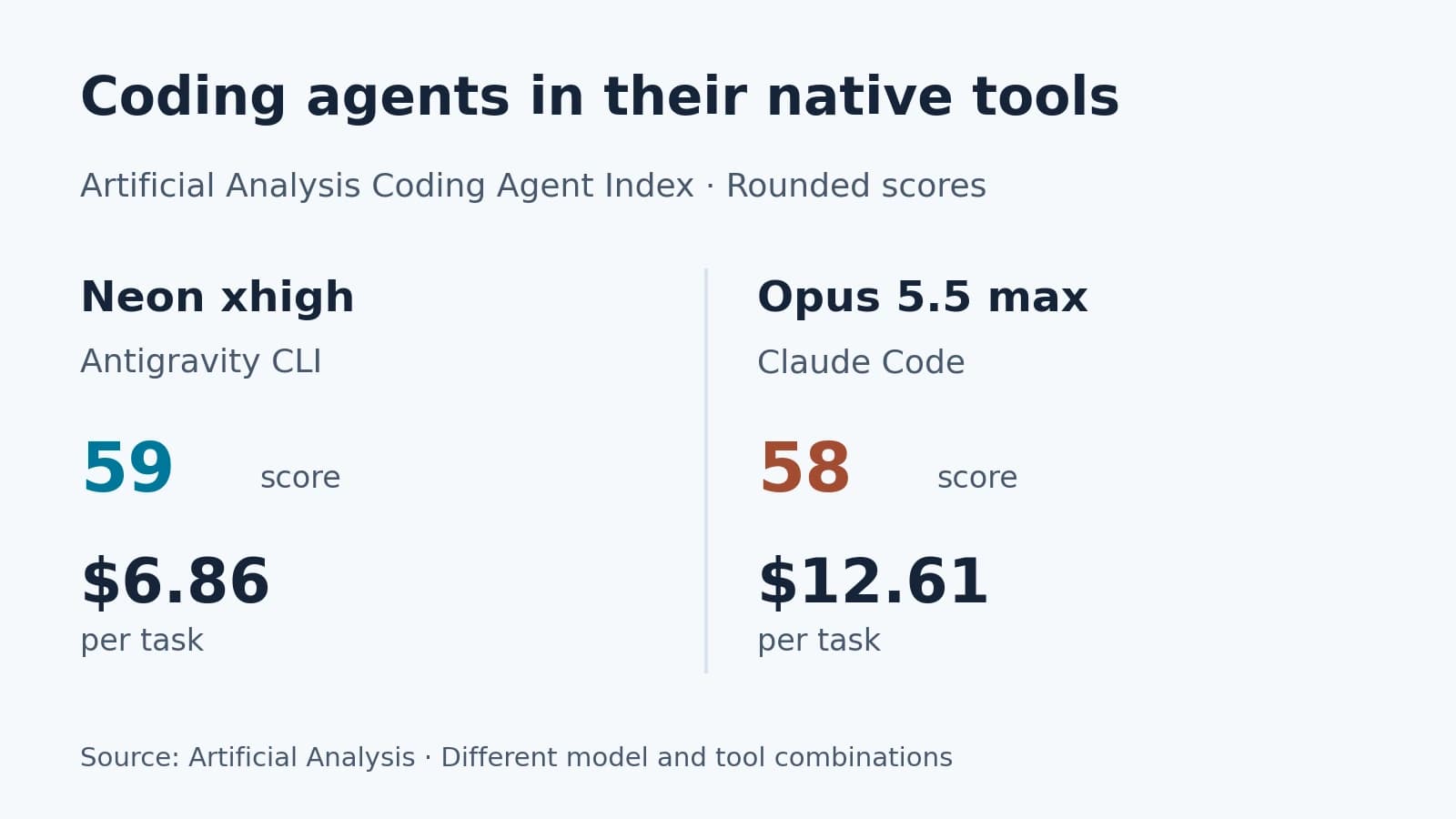
| CursorBench 4.1 configuration | Score | Listed cost per task |
|---|---|---|
Neon medium | 57.7% | $3.07 |
Opus 5.5 high | 54.5% | $3.87 |
Neon high | 63.7% | $6.54 |
Opus 5.5 xhigh | 56.7% | $6.54 |
Neon xhigh | 65.4% | $10.67 |
Opus 5.5 max | 58.1% | $11.88 |
high is a useful starting configuration on these results. Google's published evaluation shows Opus slightly ahead on Terminal-Bench 4.1 and FrontierCode 2.0. If your workload is mostly difficult terminal debugging or merge-quality repository changes, include those tasks explicitly in your replay. Use benchmarks to choose what to test and your own acceptance criteria to decide whether to switch. CursorBench figures checked on November 19, 2026. CursorBench · Google DeepMind evaluationHow much does the agent framework affect the scores?
| SWE-sweep setup | Neon | Opus 5.5 |
|---|---|---|
| Each provider's agent framework | 39.0% | 10.1% |
| Common mini-SWE harness | 12.8% | 3.6% |

Both the scores and the gap change when the framework changes. Google says Antigravity CLI can delegate parallel repository searches, a feature suited to bug-finding tasks like SWE-sweep. To test a model change, keep the framework fixed where possible. To pick a new IDE, compare both toolchains with the same permissions and task boundaries. Count the time to learn the tool and review the resulting code.
Calculate the cost per accepted patch
In this illustrative example of 100 coding tasks, the totals include failed attempts and retries.
| Route | Total API spend | Accepted patches | API cost per accepted patch |
|---|---|---|---|
| Neon | $45 | 75 | $0.60 |
| Opus 5.5 | $60 | 90 | $0.67 |
| Neon, with fewer accepted patches | $45 | 65 | $0.69 |
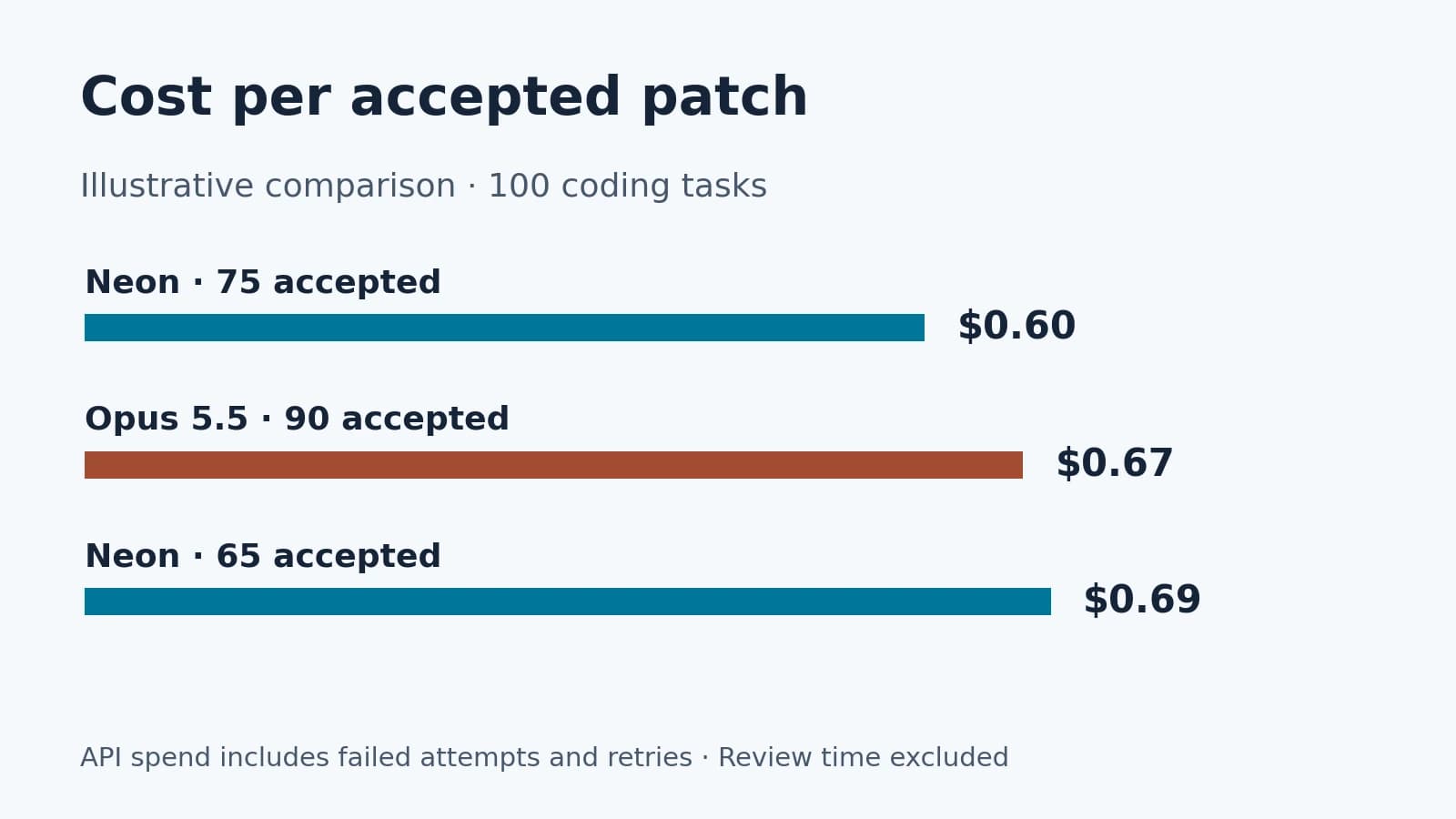
At the same $45 of Neon spend, a lower acceptance rate can make each accepted patch more expensive than with Opus 5.5. Count reviewer time and any manual fixes alongside API spend. A missed compatibility constraint on a shared interface can cost more to fix than the request itself.
Check API integration before switching providers
high as its default thinking level, while Opus 5.5 uses adaptive thinking with medium as the default effort. Compare explicit supported settings alongside the defaults you would actually ship. Using the same label on both requests does not control for the amount of computation. Google Neon developer guide · Anthropic model documentation| Integration surface | Gemini 4 Neon | Claude Opus 5.5 |
|---|---|---|
| Long output on the native API | Together, thinking and output default to 65,536 tokens in a synchronous response. Long decode is available on supported workflows | Anthropic lists a 128K maximum output |
| Cache behavior | Google documents implicit cache hits and $0.15 per million cached input tokens on Standard | Anthropic lists reads at $0.20 and writes at $5 for five minutes or $8 for one hour, per million tokens |
| Multi-turn tool state | Preserve Google-specific interaction or thought-signature state for the selected interface | Follow Claude Messages' tool-result and thinking contract |
Design a comparison that can guide a switch
Use a recurring class of tickets, such as fixing flaky tests with a known reproduction. Give both agents the same branch, issue description, tool access, time budget, and test command. Keep each attempt isolated. Review the diffs against the same checklist, ideally with the model name hidden.
Define acceptance before reviewing patches
Use a small set of representative tickets with measurable outcomes. Set the same revision, dependency lockfile, repository instructions, available tools, and stopping rules. For an existing Claude Code setup, record which repo hooks and commands contribute to successful runs. Recreate the checks in a model-neutral test runner when the goal is to compare the models themselves.
| What to score | A concrete acceptance check |
|---|---|
| Functional behavior | The original failure reproduces before the edit and the target test passes afterward |
| Compatibility | Existing examples still pass and older saved inputs or clients behave as expected |
| Scope | Changes stay within the ticket, and no broad assertion is disabled to make the suite pass |
| Recovery | When a tool stops, the agent reports the unfinished state and avoids unsafe duplicate work |
Keep one row per original task with first-pass outcome, final outcome, time to a reviewable diff, charged tokens, and reviewer minutes. If a model solves a previous failure on a second attempt, count both calls and record whether the reviewer supplied new evidence. That makes the cost of recovery visible and gives you a clear reason to keep Opus on some work and move other tickets to Neon.
FAQ
Is Neon better than Opus 5.5 at coding?
Neon leads in the cited CursorBench configurations. Opus leads on some terminal and repository benchmarks. Pick the test closest to your workload.
Is Neon cheaper?
Its standard input and output rates are 25% lower. The difference per accepted task depends on usage, caching, retries, and review.
Should I compare both at their highest effort?
Include that run for difficult cases. For regular traffic, compare the settings your budget and latency requirements allow.
Can a team compare the models without changing editors?
Yes, if both models and the required features are available in the same editor. That removes one major variable.
Can I switch a running agent by changing the model name?
Check the integration first. Tool messages, thinking controls, and state handling can differ across provider APIs.
What's the first workload to try?
Pick a repeated ticket with a reproducible failure and clear acceptance checks. The result can tell you which route to use the next time that ticket appears.