GPT Image 2.5 Flare & Sunburst are live on EvoLinkTry GPT Image 2.5
Community examples · Pre-release watch

Claude Fable 5.5
Use Cases & Prompts

Explore interactive worlds, code-drawn films, and motion design shared by builders. Start with a source-linked example, then adapt the workflow to your own project.

20 selected examples5 task categoriesOriginal source links
Community Three.js city-driving demo by @mindblown_ai

Featured community demo

A city you can drive through

@mindblown_ai

Find your next workflow

Start with something you want to build.

Watch the creator's preview, check the required tools, and copy an adapted prompt. Each workflow includes inputs and checks for your own evaluation.

6 of 20 selected examples

Interactive & Games@mindblown_ai · X
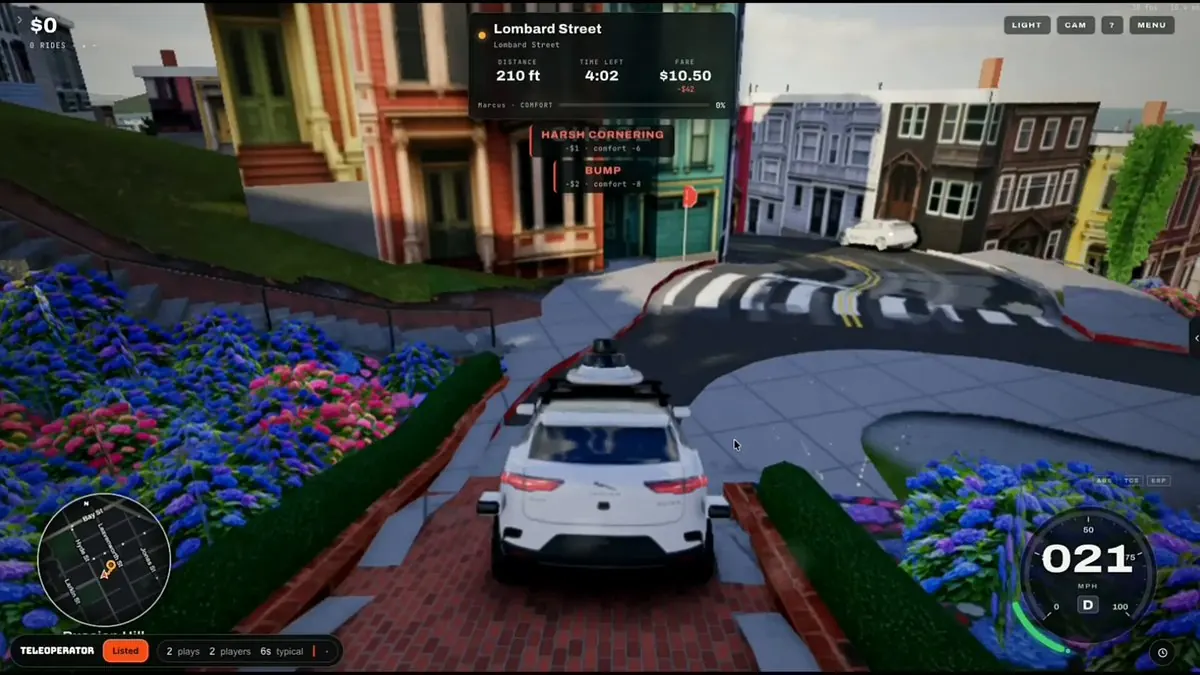
A city you can drive through — community preview by @mindblown_ai1:12
Agent workflowAdapted · Untested

A city you can drive through

A creator-reported Three.js driving demo set on San Francisco streets.

Build your own

A navigable city scene with driving controls, a route, and a reset button.

Coding agentThree.jsBrowser
Open demo

Code-drawn Films@chetaslua · X
A story told in Blender — community preview by @chetaslua3:40
Agent workflowAdapted · Untested

A story told in Blender

A community short whose creator describes a Blender and ElevenLabs workflow.

Build your own

An editable short film with scene code, a shot list, and an optional narration track.

Coding agentBlenderOptional audio API
View source

Code-drawn Films@imjustnewatai · X
Human progress, drawn in code — community preview by @imjustnewatai3:09
Agent workflowAdapted · Untested

Human progress, drawn in code

A creator-reported animated history film with a code-generated score.

Build your own

A chaptered animation with editable milestones, transitions, and a reproducible render.

Coding agentCanvas or SVGVideo renderer
View source

Interactive & Games@pankajkumar_dev · X
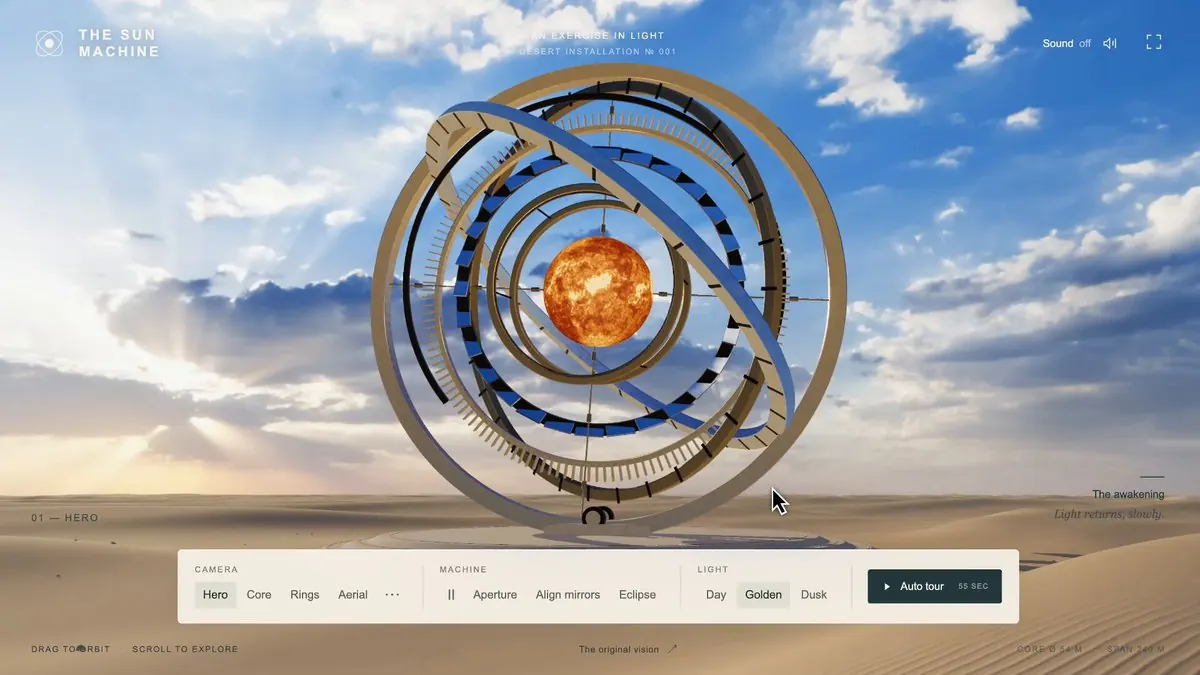
An interactive sun machine — community preview by @pankajkumar_dev1:14
Agent workflowAdapted · Untested

An interactive sun machine

A community 3D scene with mirrors, aperture controls, and an eclipse interaction.

Build your own

A browser scene with three connected controls and visible changes in light and shadow.

Coding agentThree.jsBrowser
View source

Interactive & Games@blueemi99 · X
A pixel game with a real boss fight — community preview by @blueemi991:23
Agent workflowAdapted · Untested

A pixel game with a real boss fight

A playable community pixel game featuring Clawd, bugs, and bosses.

Build your own

An original browser game with movement, enemies, a boss encounter, and a restart flow.

Coding agentCanvasBrowser
Open demo

Motion Design@blueemi99 · X
A fast motion-design sequence — community preview by @blueemi990:15
Agent workflowAdapted · Untested

A fast motion-design sequence

A short creator-reported motion piece with animated graphics and sound.

Build your own

A timed motion sequence with editable type, transitions, and animation curves.

Coding agentCanvas or SVGVideo renderer
View source

Community-reported Fable 5.5 examples (20)
  1. A city you can drive through

    A creator-reported Three.js driving demo set on San Francisco streets.

  2. A story told in Blender

    A community short whose creator describes a Blender and ElevenLabs workflow.

  3. Human progress, drawn in code

    A creator-reported animated history film with a code-generated score.

  4. An interactive sun machine

    A community 3D scene with mirrors, aperture controls, and an eclipse interaction.

  5. A pixel game with a real boss fight

    A playable community pixel game featuring Clawd, bugs, and bosses.

  6. A fast motion-design sequence

    A short creator-reported motion piece with animated graphics and sound.

  7. Motion design from a detailed brief

    A community motion demo described as starting from a detailed text brief.

  8. A brand launch in 40 seconds

    A creator-reported launch ad for the creator’s own brand.

  9. A demo for an imagined product

    A community presentation imagining a future game console.

  10. A three-body simulation

    A community orbital-simulation demo with a linked Bend2 repository.

  11. A scientific process in animated SVG

    A creator-reported HTML and SVG animation illustrating a metabolic process.

  12. A continuous zoom across scales

    A creator-reported code-drawn journey from particles to the observable universe.

  13. A city built one year at a time

    An interactive architectural timeline of Lower Manhattan, with selectable buildings.

  14. A 3D chain-reaction machine

    A community 3D Rube Goldberg sequence with linked mechanical events.

  15. Words that move with the music

    A creator-shared kinetic typography video synchronized to a song.

  16. Sixteen launches in animated SVG

    An HTML/SVG launch sequence showing liftoff, stage separation, and ascent.

  17. How a language model is built

    A community explainer about the stages of building a large language model.

  18. A character you can rig and animate

    A creator-shared Blender sequence combining modeling, rigging, and animation.

  19. A painting revealed stroke by stroke

    A community painting timelapse showing an image emerging over time.

  20. Rendering light around a black hole

    A creator-shared Python renderer visualizing light near a non-rotating black hole.

From a compelling demo to a repeatable workflow.

Use EvoLink's unified API gateway to evaluate available models without rebuilding your integration for each provider. Treat the demo as a starting point and verify the complete task before scaling it.

01

Prepare the environment

Match the template to your coding agent, browser, renderer, and input assets. Model access and tool access are separate requirements.

02

Reproduce a small slice

Start with one scene, one interaction, or one chapter. Keep the code and project files so the result can be changed and run again.

03

Evaluate before scaling

Compare available models through EvoLink using the same task and acceptance checks. Include retries and external tools in your cost estimate.

Before you run a prompt

Are these verified Claude Fable 5.5 results?

No. These are community examples whose creators name Fable 5.5 in their original posts. We checked the source posts and their media, but that does not independently establish the underlying model. These examples are not official benchmarks or proof of API availability.

Are the prompts the exact instructions used by the creators?

No. Every copyable prompt on this page is an EvoLink adaptation inspired by the task. It adds inputs, environment requirements, editable deliverables, and verification steps. It has not been tested on Fable 5.5 and does not guarantee the same output as the community demo.

Can a text API call produce these videos or games on its own?

These workflows need an execution environment. A coding agent runs the generated code, a browser displays an interactive application, and a renderer exports a video. Some examples also use Blender or an external audio service. The required tools are listed on each card.

How do I start evaluating one of these workflows?

Copy a template, replace its placeholders, and prepare the listed inputs and tools. Start with a short scene or small playable slice, then verify the source, interactions, and exported output. Check the model page for current EvoLink availability before configuring a model route.

How should I compare models for a production workflow?

Run the same inputs and acceptance checks for each available model. Record successful tasks, retries, token charges, tool costs, render time, and manual fixes separately. Choose the model that meets the required quality at an acceptable total cost per successful task.