

MiniMax H3 Max Is Live: Features, Specs, and API Access

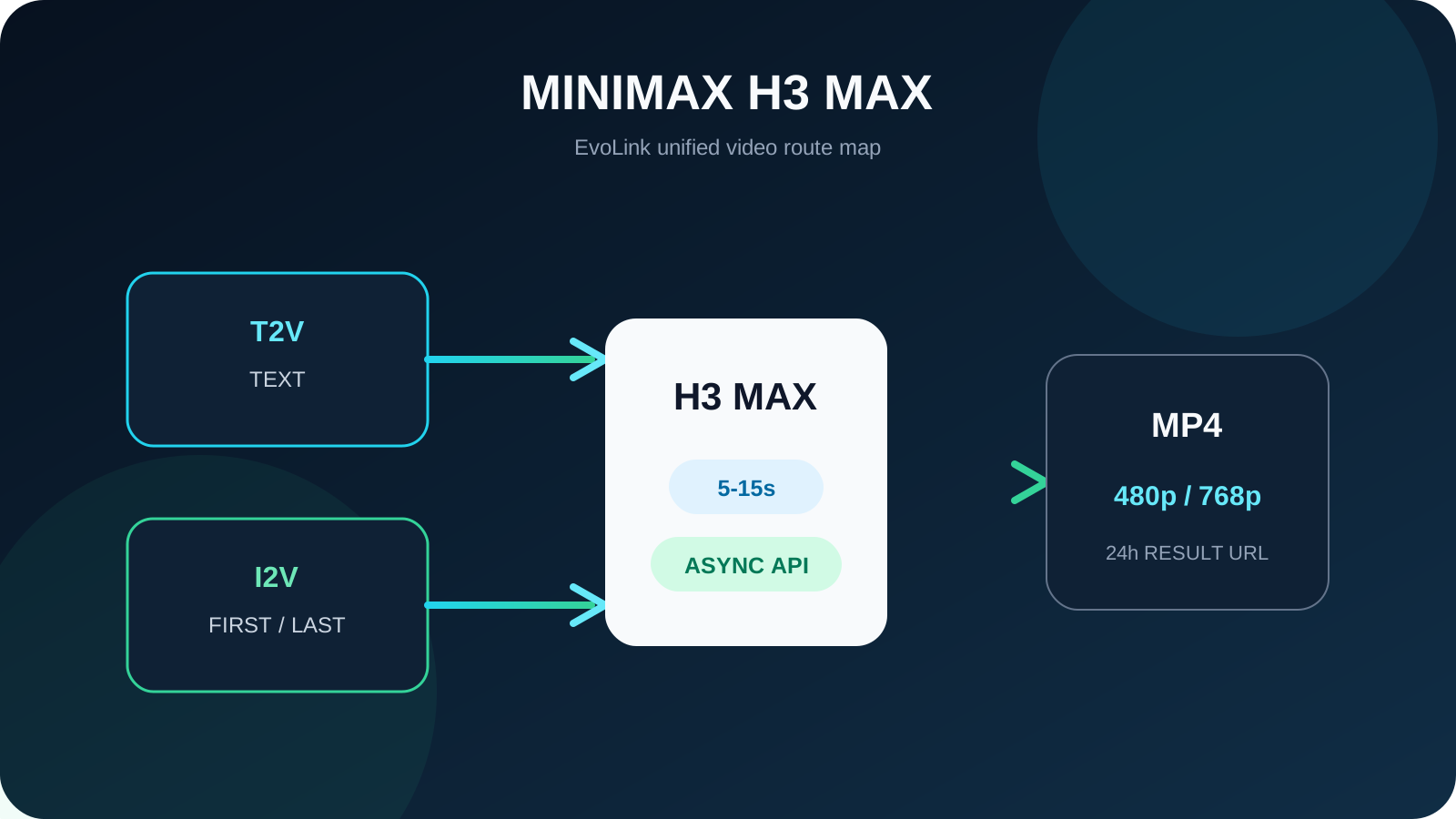
MiniMax-H3-Max in its current video-generation API documentation. On EvoLink, the model is exposed as two explicit routes: text-to-video and image-to-video with a first frame, a last frame, or both. Both routes produce 480p or 768p clips from 5 to 15 seconds through the same asynchronous video API used by other EvoLink video models.The important product decision is not whether “Max” replaces the rest of the H3 family. It does not. H3 Max is the speed-oriented route for prompt-led or keyframe-led iteration when 768p is sufficient. MiniMax H3 remains the broader route for teams that need 2K output or image, video, and audio reference inputs.
Start with the route contract, not the name. Open the MiniMax H3 Max model page to test the live routes and current price, or use the H3 Max vs H3 decision guide before choosing a production default.
MiniMax H3 Max Release Status on September 3, 2026
The release status has two layers that should not be mixed together:
| Layer | Confirmed status | What it means |
|---|---|---|
| MiniMax official release | MiniMax-H3-Max appears in MiniMax's official Video Generation V2 documentation | H3 Max is an official model launched by MiniMax for API use |
| EvoLink access | Two H3 Max model IDs are live behind EvoLink's unified video endpoint | Teams can test, price, and integrate the supported T2V and I2V workflows without a separate provider integration |
Confirmed H3 Max Features and Limits
The table below describes the H3 Max contract currently exposed through EvoLink. It is not a prediction based on H3, and it should not be expanded with capabilities from a different provider's endpoint.
| Area | Current H3 Max route on EvoLink | Production implication |
|---|---|---|
| Generation modes | Text-to-video; first-frame, last-frame, or first-and-last-frame image-to-video | Choose the model ID from the input contract, not from prompt wording |
| Resolution | 480p or 768p; 768p is the API default | Use 480p for lower-cost exploration and 768p for review or delivery where it is sufficient |
| Duration | Any integer from 5 through 15 seconds | A 4-second request is invalid even though base H3 starts at 4 seconds |
| Text prompt | Required; Chinese and English supported; up to 7,000 characters | Keep the scene, motion, camera, and constraints explicit rather than filling the full limit |
| T2V aspect ratio | 21:9, 16:9, 4:3, 1:1, 3:4, or 9:16 | Select the delivery format before generating variants |
| I2V aspect ratio | Follows the supplied first or last frame | Prepare keyframes in the intended delivery ratio |
| Task lifecycle | Asynchronous submit, status polling, or callback | Store the task ID and make completion handling idempotent |
| Result retention | Generated result URLs remain available for 24 hours | Copy accepted MP4 files to durable storage promptly |
| Current exclusions | No 2K tier and no general reference-image, reference-video, or reference-audio inputs on these EvoLink routes | Use MiniMax H3 when the brief requires those controls |
Where H3 Max Fits in a Production Video Stack
H3 Max is most useful when iteration throughput changes the economics of the product. A team producing one hero clip may care more about the broadest reference controls and highest available output tier. A team producing hundreds of ad, catalog, or social variants has a different bottleneck: how quickly it can generate, review, reject, and retry candidates.
Good starting workloads include:
- Ad concept variation: produce multiple hooks, camera moves, compositions, and endings from a controlled brief.
- Ecommerce motion: animate a prepared product image while preserving the item's silhouette, logo placement, and final composition.
- Social clips: create vertical or square variations without building separate provider-specific integrations.
- Storyboard validation: test shot direction and pacing before committing a higher-resolution final route.
- First-to-last-frame transitions: define both endpoints of a short transformation or product reveal.
- Multi-model applications: route fast drafts to H3 Max and move reference-heavy or 2K jobs to H3 without changing the API host or account.
The model is a weaker default when the job requires 2K output, open-weight deployment, rich reference packs, a 4-second clip, synchronous completion, or cancellation after submission. Those are contract differences, not quality opinions.
What H3 Max Changes for EvoLink Users
The value of adding H3 Max to EvoLink is not another logo in a catalog. It creates a distinct fast lane inside an existing video stack.
One integration, two H3 Max input contracts
minimax-h3-max-text-to-video for prompt-only requests. Use minimax-h3-max-image-to-video when the request includes a first frame, a last frame, or both. Both routes submit to POST /v1/videos/generations, return a task identifier, and use the shared task-status flow.Keeping the input contracts separate prevents a common production mistake: sending unsupported media fields to a text-only route or assuming that a start-frame model accepts an arbitrary reference pack.
A practical draft-to-delivery policy
Teams do not need one model to perform every step. A defensible starting policy is:
- Generate exploratory candidates at 480p when the review question is composition, motion, or prompt interpretation.
- Regenerate shortlisted candidates at 768p for a closer review.
- Route only briefs that require 2K or broader references to MiniMax H3.
- Keep a separate video-model fallback for availability and workload-specific quality.
This policy must still be validated on real prompts. A cheaper or faster first pass is useful only if reviewers can detect failure early and the winning prompt transfers reliably to the next step.
Accepted-output cost instead of showcase quality
Measure H3 Max with the same rubric used for other video routes:
cost per accepted clip = total generation spend / clips that pass reviewTrack first-pass acceptance, retries, queue time, reviewer minutes, artifact rate, identity retention, prompt adherence, and delivery readiness. Generation speed can improve throughput, but it does not erase the cost of rejected clips or manual repair.
A Release-Day Evaluation Checklist
| Check | Pass condition | Why it matters |
|---|---|---|
| Route selection | Prompt-only and keyframe jobs use the correct model IDs | Prevents avoidable request errors |
| Input validation | Duration, resolution, aspect ratio, and image constraints are enforced before submission | Reduces failed jobs and unclear user feedback |
| Quality test | At least 20 representative prompts are reviewed under a fixed rubric | Avoids choosing from hand-picked demos |
| Cost test | Spend is normalized by accepted clips, not attempts | Captures retry and review cost |
| Async handling | Polling or callback processing is idempotent and recoverable | Prevents duplicate delivery and lost results |
| Storage | Completed assets are copied before the 24-hour URL expires | Protects customer deliverables |
| Fallback | One H3 or cross-provider route is tested for each critical workload | Makes the launch operationally useful |
What Not to Assume From the Launch
Several claims circulating around a fresh model launch should stay outside a production decision unless they are scoped and sourced:
- Do not describe H3 Max as a 2K or 4K EvoLink route. The current contract is 480p/768p.
- Do not copy a reference-to-video capability from another platform into EvoLink's two supported H3 Max routes.
- Do not present a vendor throughput test as a universal latency guarantee. Queue, duration, resolution, load, and serving stack all matter.
- Do not call H3 Max open source merely because MiniMax H3 has open weights.
- Do not hard-code an external provider's promotional price into an EvoLink budget.
- Do not assume “Max” is the universal replacement for H3. Their control surfaces are different.
Recommended Next Step
Start with a small paired test: five prompt-only briefs and five first/last-frame briefs, each at the resolution you actually expect to ship. Record accepted outputs and failure reasons. Then compare the briefs that need 2K or broader references on H3.
Frequently Asked Questions
Is MiniMax H3 Max officially released?
MiniMax-H3-Max in its official Video Generation V2 API documentation, and EvoLink exposes two callable H3 Max routes.Is H3 Max an official MiniMax model?
Yes. H3 Max is an official model launched by MiniMax and listed in MiniMax's Video Generation V2 API. EvoLink exposes it through two H3-family model IDs.
Which H3 Max model IDs are available on EvoLink?
minimax-h3-max-text-to-video for text input and minimax-h3-max-image-to-video for a first frame, a last frame, or both.Does H3 Max support first and last frames?
Yes. The image-to-video route accepts a first frame, a last frame, or both. At least one frame is required for that route.
Does H3 Max support reference video or audio on EvoLink?
No. The two current H3 Max routes accept a prompt and optional first/last frames. Use MiniMax H3's reference-to-video route when the workflow needs general image, video, or audio references.
How is H3 Max priced?
It is billed per output second with 480p and 768p tiers. Check the live estimator on the H3 Max product page before budgeting because the displayed rate can change.
Can I use the same EvoLink account for H3 Max and H3?
Yes. Both are available through EvoLink's unified video API, account, key, balance, and asynchronous task workflow, while keeping model-specific parameters explicit.
Sources and Verification Scope
- MiniMax official Video Generation V2 API documentation
- MiniMax official model catalog
- MiniMax H3 official release
- EvoLink MiniMax H3 Max model page and live route contract


