

How to Use the MiniMax H3 Max API for Text and Image to Video

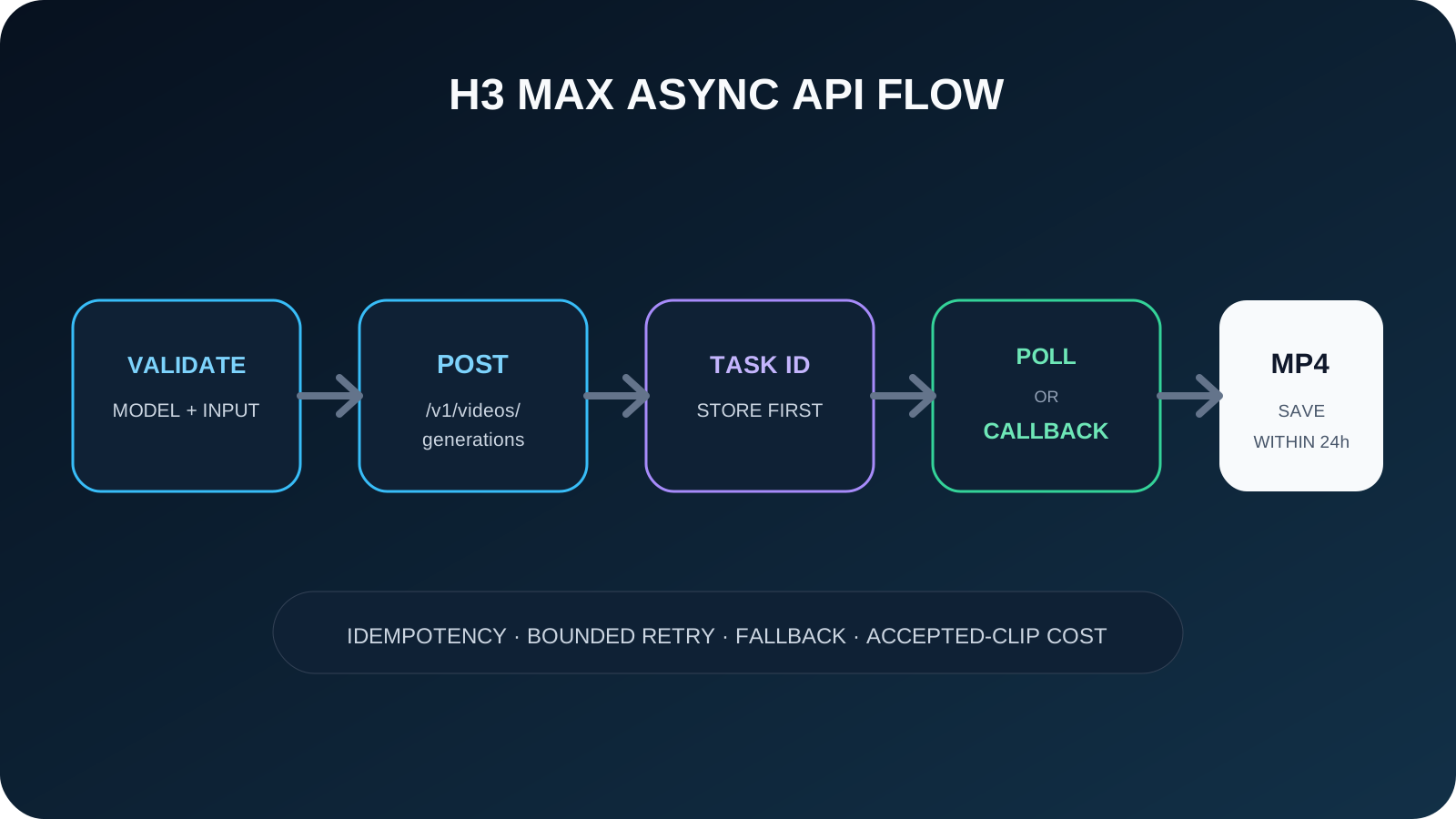
POST request to https://api.evolink.ai/v1/videos/generations, save the returned task id, then query GET /v1/tasks/{task_id} until the task completes. Use minimax-h3-max-text-to-video for prompt-only jobs. Use minimax-h3-max-image-to-video when you provide a first frame, a last frame, or both.This guide takes the shortest path to a successful request and then adds the validation, polling, callback, storage, and fallback decisions required for production. Until the dedicated H3 Max documentation pages are published, verify exact fields against the live route contract on the model page.
Create an EvoLink API key, check the live estimate on the MiniMax H3 Max model page, and keep the H3 Max vs H3 guide nearby if your workflow may need 2K or broader references.
Prerequisites
Before making the first request, confirm:
| Requirement | What you need | Common failure |
|---|---|---|
| EvoLink account | An account with sufficient credit balance | 402 insufficient quota |
| API key | A key from /dashboard/keys | 401 invalid or expired token |
| Model access | Access to the selected H3 Max model ID | 403 model access denied |
| Input contract | Prompt only for T2V; at least one frame for I2V | 400 invalid request |
| Async handler | A polling loop or HTTPS callback endpoint | Task created but result never delivered |
| Durable storage | A location to copy completed MP4 files | Result URL expires after 24 hours |
EVOLINK_API_KEY. Do not expose it in browser code, public repositories, logs, or screenshots.Choose the Correct H3 Max Model ID
| If your input is... | Model ID | Allowed media fields |
|---|---|---|
| Text prompt only | minimax-h3-max-text-to-video | None |
| First frame | minimax-h3-max-image-to-video | image_start |
| Last frame | minimax-h3-max-image-to-video | image_end |
| First and last frames | minimax-h3-max-image-to-video | image_start, image_end |
image_start, image_end, image_urls, video_urls, and audio_urls. The image-to-video route requires at least one of image_start or image_end and rejects general reference arrays.Step 1: Make a Text-to-Video Request
https://api.evolink.ai. Send the API key as a Bearer token and use JSON.curl --request POST \
--url https://api.evolink.ai/v1/videos/generations \
--header "Authorization: Bearer $EVOLINK_API_KEY" \
--header "Content-Type: application/json" \
--data '{
"model": "minimax-h3-max-text-to-video",
"prompt": "A premium running shoe rotates on a clean studio pedestal while soft daylight moves across the fabric. Slow camera push-in, realistic material detail, no text or logos added.",
"duration": 5,
"quality": "768p",
"aspect_ratio": "16:9"
}'The main T2V parameters are:
| Parameter | Rule | Recommended first test |
|---|---|---|
model | Must be the T2V model ID | minimax-h3-max-text-to-video |
prompt | Required, 1–7,000 characters, Chinese or English | One scene, one primary action, explicit camera direction |
duration | Integer from 5 to 15; default 5 | 5 |
quality | 480p or 768p; default 768p | 768p for acceptance review, 480p for cheaper exploration |
aspect_ratio | 21:9, 16:9, 4:3, 1:1, 3:4, or 9:16; default 16:9 | Match the delivery channel |
callback_url | Optional public HTTPS endpoint | Add after the first polling test works |
id; it is the value used in the status URL.{
"id": "task-unified-1774857405-abc123",
"model": "minimax-h3-max-text-to-video",
"object": "video.generation.task",
"progress": 0,
"status": "pending",
"type": "video"
}200 means the task was accepted, not that the asset is complete.Step 2: Make a First/Last-Frame Image-to-Video Request
image_start, image_end, or both. This example defines the beginning and end of a short product reveal.curl --request POST \
--url https://api.evolink.ai/v1/videos/generations \
--header "Authorization: Bearer $EVOLINK_API_KEY" \
--header "Content-Type: application/json" \
--data '{
"model": "minimax-h3-max-image-to-video",
"prompt": "The camera makes a slow half-orbit as the box opens and the product rises smoothly. Preserve the packaging shape, colors, and lighting; end exactly on the supplied final composition.",
"image_start": "https://cdn.example.com/h3-max/start.webp",
"image_end": "https://cdn.example.com/h3-max/end.webp",
"duration": 8,
"quality": "768p"
}'aspect_ratio. The output follows the input image proportions. Prepare first and last frames with matching dimensions and composition where possible; large geometric differences can make the requested transition harder.Each supplied image must use a directly accessible HTTP(S) URL and follow the current contract:
- JPG, JPEG, PNG, WEBP, HEIC, or HEIF.
- Maximum 30 MB per image.
- Width and height between 256 and 5,760 pixels.
- Width-to-height ratio from 0.4 through 2.5.
- At most one first frame and one last frame.
- Complete JSON body no larger than 64 MB; Base64 and
mm_file://are not accepted.
Step 3: Poll the Task Status
Query the task with the same Bearer token:
curl --request GET \
  --url "https://api.evolink.ai/v1/tasks/task-unified-1774857405-abc123" \
--header "Authorization: Bearer $EVOLINK_API_KEY"pending, processing, completed, or failed. When completed, the results array contains the generated asset URL.{
"id": "task-unified-1774857405-abc123",
"model": "minimax-h3-max-text-to-video",
"object": "video.generation.task",
"progress": 100,
"status": "completed",
"results": ["https://files.example.com/generated-video.mp4"],
"type": "video"
}A simple polling policy should use bounded exponential backoff with jitter rather than querying continuously. For example: start near two seconds, grow toward 10–15 seconds, stop at an application-defined deadline, and allow a later worker to resume using the stored task ID. The API contract does not provide cancellation for H3 Max, so a client timeout should not be mistaken for an upstream cancellation.
Step 4: Add a Callback for Production
callback_url to the create payload:{
"model": "minimax-h3-max-text-to-video",
"prompt": "A cinematic overhead shot of a city block transitioning from morning to night.",
"duration": 5,
"quality": "768p",
"aspect_ratio": "16:9",
"callback_url": "https://api.example.com/webhooks/evolink/video"
}The current EvoLink contract requires HTTPS, rejects private IP destinations, waits up to 10 seconds, and retries a failed callback up to three times. Your handler should:
- Authenticate the request using the verification mechanism configured by your application.
- Use the task ID as the idempotency key.
- Return a 2xx response quickly.
- Move downloads and heavy post-processing to a queue.
- Reconcile callback state with the task endpoint before final customer delivery when needed.
Keep polling available as a recovery path. Webhooks can be delayed, rejected by network policy, or processed twice by application infrastructure.
Validate Requests Before Submission
| Validation | T2V | I2V |
|---|---|---|
| Non-empty prompt | Required | Required |
| Duration | Integer 5–15 | Integer 5–15 |
| Quality | 480p or 768p | 480p or 768p |
| Aspect ratio | Six explicit ratios; no adaptive | Omit; follows input image |
| First/last frame | Rejected | At least one required |
| General references | Rejected | Rejected |
| Unknown fields | Rejected | Rejected |
4, 15.5, "5", auto, or unsupported fields into a valid request. Return a structured validation error to the caller so the product does not create an estimate for a job that the API will reject.Handle Errors by Category
| HTTP/status | Meaning | Production response |
|---|---|---|
400 | Invalid field, unsupported input, or bad value | Fix the request; do not retry unchanged |
401 | Missing, invalid, or expired key | Stop and repair authentication |
402 | Insufficient quota | Alert or route to an approved billing flow |
403 | Model access denied | Check account/model access; do not rotate keys blindly |
429 | Rate limit reached | Retry with exponential backoff and queue control |
500 | Temporary service error | Retry within a bounded policy, then use fallback |
Task failed | Asynchronous generation failed | Record business error, request context, and fallback decision |
Separate HTTP errors from asynchronous task failures. A create call can succeed while the generation later fails. Log the task ID, route, input class, duration, quality, final status, error code, retry count, and fallback result without logging secrets or sensitive source URLs.
Design the Production Handoff
Store the request and task relationship
Create your own job ID before submission. Store the EvoLink task ID, model ID, normalized parameters, customer/workspace ID, timestamps, and delivery state. This makes retry, audit, and support possible even if a worker restarts.
Download completed results promptly
H3 Max result URLs are available for 24 hours. Copy accepted results into durable storage and record the checksum or object key. Do not make the temporary source URL the permanent customer asset.
Make retries explicit
Do not submit a new generation because a polling request timed out. First query the stored task ID. Only create a new task when the original reached a terminal failure and your retry policy allows another billed attempt.
Route incompatible jobs before the call
Measure accepted output
Track:
- task success rate and completion latency;
- first-pass acceptance and retry rate;
- cost per accepted clip;
- prompt, identity, and keyframe adherence;
- moderation and invalid-request rate;
- fallback frequency and recovery rate;
- download completion before URL expiry.
Common Integration Mistakes
| Mistake | Result | Fix |
|---|---|---|
| Sending frames to the T2V model ID | 400 invalid request | Select the I2V model before building the payload |
| Sending no frame to I2V | 400 invalid request | Require image_start or image_end |
Passing adaptive to T2V | Request rejected | Use one of the six explicit aspect ratios |
Passing aspect_ratio to I2V | Request rejected | Derive delivery ratio from the source frame |
| Requesting 2K or four seconds | Request rejected | Use a supported H3 Max value or route to H3 |
Treating creation 200 as completion | Missing output | Persist the task ID and wait for a terminal state |
| Retrying after a poll timeout | Duplicate billed tasks | Resume the original task before creating another |
| Keeping only the result URL | Asset disappears after 24 hours | Download to durable storage |
| Removing unsupported fields silently | Brief changes without user consent | Reject clearly or route to a compatible model |
Go-Live Checklist
- The API key is server-side and can be rotated.
- T2V and I2V use separate validation schemas.
- Duration, quality, aspect ratio, and image limits are enforced locally.
- The creation response
idis stored before the worker exits. - Polling uses bounded backoff and can resume.
- Callback handling is idempotent and polling remains available.
- Completed MP4 files are copied within 24 hours.
- Logs separate request errors, task failures, and review rejection.
- Pricing comes from the current model page or pricing service, not a hard-coded blog value.
- H3 and one independent fallback are tested for incompatible or failed jobs.
Frequently Asked Questions
What endpoint does MiniMax H3 Max use on EvoLink?
POST https://api.evolink.ai/v1/videos/generations. Query the returned task with GET https://api.evolink.ai/v1/tasks/{task_id}.Which model ID should I use?
minimax-h3-max-text-to-video for prompt-only input. Use minimax-h3-max-image-to-video when supplying a first frame, a last frame, or both.Is the H3 Max API synchronous?
completed or failed.Can I generate a four-second H3 Max video?
No. The supported duration is an integer from 5 through 15 seconds. MiniMax H3, not H3 Max, supports the four-second lower bound on EvoLink.
Can I use only a last frame?
Yes. The image-to-video model accepts first-frame-only, last-frame-only, and first-and-last-frame requests.
Can I send Base64 images?
mm_file:// inputs.Does image-to-video accept an aspect ratio?
Do not send one. The output follows the supplied frame ratio. Prepare the source frame for the intended delivery format.
How long do result URLs remain valid?
Twenty-four hours. Copy completed MP4 files to durable storage as part of the delivery workflow.
Where should I check current pricing?
Use the live pricing section and estimator on the H3 Max product page. Avoid hard-coding a blog rate into production budgeting.
API References and Verification Scope
- EvoLink MiniMax H3 Max model page and live route contract
- EvoLink asynchronous task-status reference
- MiniMax official Video Generation V2 documentation


