Why Multi-Model AI Apps Need One Unified API Layer

TL;DR
Multi-model AI apps are becoming normal. A product may use one model for chat, another for coding support, another for structured extraction, and separate image or video models for media workflows.
The hard part is not only calling more APIs. The hard part is keeping model choice, usage tracking, billing, cost policy, fallback behavior, and production operations under control as the model mix changes.
A unified API layer gives teams one control point between application code and supported AI models. It does not make all models behave the same, and it does not remove the need for evaluation. Its value is architectural: it gives product and infrastructure teams a stable place to manage model access, switching, routing, visibility, and operational policy.
Most teams do not adopt a unified API because they want fewer endpoints. They adopt it because multi-model applications eventually need a control layer.
Once an app depends on several model families, the hard questions move from "Can we call this model?" to "Can we operate model choice, usage, cost, fallback, and reliability without rewriting product code every time the model stack changes?"
Multi-model apps are becoming the default
Early AI products often started with one model and one provider. That was reasonable when the product surface was narrow: a chat box, a summarizer, a support assistant, or a basic content generator.
Modern AI apps are different. A single product can include:
- a fast model for classification or rewriting
- a stronger reasoning model for complex user questions
- a coding model for developer workflows
- a long-context model for document analysis
- an image model for asset generation or editing
- a video model for creative production
- an audio-generation route such as Seed Audio 1.0 for voice agents, creator tools, podcasts, or audiobook workflows
- a fallback path when one provider is slow, unavailable, or too expensive for a given task
That shift changes the architecture. Model selection stops being a one-time integration decision and becomes an operating decision that may change by feature, user tier, workload type, latency target, and budget.
For teams building agents, this pressure is even stronger. An agent workflow may classify intent, retrieve context, plan steps, call tools, summarize results, and generate a final response. Not every step needs the same model. If every model decision is hardcoded into application code, the product becomes harder to evolve.
The problem is not just multiple APIs
It is tempting to describe the problem as "we need to integrate with OpenAI, Anthropic, Google, and maybe a few image or video providers." That is only the visible part.
The deeper problem is operational drift.
Each provider can differ in:
- authentication and account setup
- model identifiers
- request and response shape
- streaming behavior
- rate limits and retry signals
- usage reporting
- pricing units
- error semantics
- supported modalities and parameters
- release cadence and deprecation behavior
Even if two providers expose an OpenAI-compatible endpoint, production systems still need to handle model-specific behavior. OpenAI-compatible often reduces onboarding friction, but it should not be treated as a complete operational contract.
For architecture decisions, the question is not only "Can we send a request?" The better question is:
Can the application change models, track usage, control cost, handle failures, and operate reliably without spreading provider-specific logic across the codebase?
That is where a unified API layer starts to matter.
Common mistake: treating one API as only an integration shortcut
A common mistake is to evaluate a unified API only by how many providers it supports. That misses the bigger architectural question.
The real question is whether the API layer gives your team a stable place to manage model selection, usage visibility, cost policy, fallback behavior, and production operations.
If the layer only hides provider URLs but does not improve control, visibility, or operational consistency, it may reduce integration work without solving the harder multi-model problem.
A unified API layer creates one control point
A unified API layer sits between the application and the underlying model providers or model routes. Application code talks to the unified layer. The layer handles the shared concerns that should not be duplicated across every feature team.
In the simplest version, this layer provides:
- one base URL
- one authentication pattern
- one place to choose supported models
- one usage and billing surface
- one place to introduce routing, fallback, or policy later
In a more mature version, it can become part of a broader AI delivery layer: model access, routing rules for supported LLM requests, usage visibility, cost controls, fallback planning, and production operations sit around the same API entry point.
This does not mean all models become interchangeable. A unified API layer should not hide important differences in quality, latency, modality, context window, tool behavior, or pricing. Good architecture keeps those differences visible enough to evaluate while preventing them from leaking everywhere in application code.
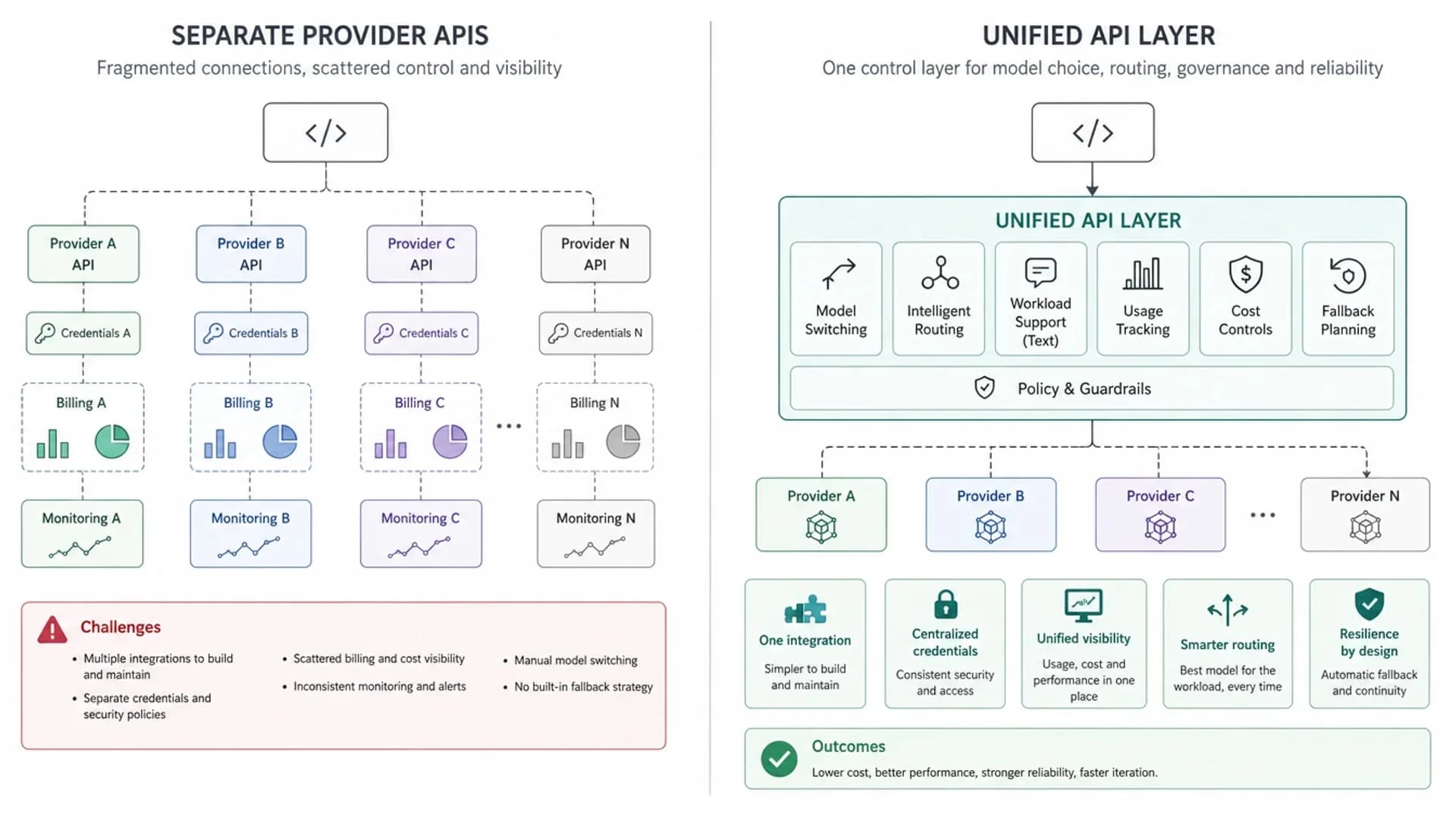
| Dimension | Separate provider APIs | Unified API layer |
|---|---|---|
| Integration | Each provider needs separate setup, credentials, SDK choices, and maintenance | One integration surface for supported models |
| Model switching | Often requires code changes, new SDK paths, or provider-specific adapters | Usually becomes a model or route selection decision |
| Usage tracking | Usage data is scattered across providers and internal logs | Usage can be normalized into one reporting surface |
| Cost control | Teams compare spend across different billing portals and pricing units | Cost policy can be managed closer to the API layer |
| Fallback | Each service may implement its own retry or backup logic | Fallback planning can be centralized where appropriate |
| Operations | Incidents, limits, and model changes spread across product code | Operational controls live closer to the model delivery layer |
What a unified API layer makes possible
Model switching without rewriting your app
The first benefit is straightforward: model switching becomes less invasive.
Without a unified layer, changing from one provider or model family to another may require new credentials, SDK changes, request mapping, response parsing, usage tracking changes, and new operational runbooks.
With a unified API layer, the application can keep a more stable integration contract while the model choice changes behind that contract. That does not mean the output quality will be identical. It means the integration path is less likely to become the blocker.
Example:
- A support workflow starts with a balanced model.
- Later, high-volume classification moves to a cheaper or faster model.
- Complex escalation cases move to a stronger reasoning model.
- The application does not need to rebuild its entire AI integration each time the model mix changes.
The business value is not "switch models for fun." The value is reducing the cost of adapting as models, prices, and workload needs change.
Routing based on workload needs
Multi-model apps often contain mixed LLM workloads. A short formatting task, a long-context analysis task, and a planning-heavy agent step do not need the same model profile.
A unified API layer gives teams a natural place to introduce routing logic for supported text workloads:
- route simple tasks to lower-latency or lower-cost models
- route reasoning-heavy tasks to stronger models
- keep fixed models for benchmarked or regulated workflows
- return the actual selected model when routing is used, so teams can log and evaluate behavior
Usage visibility and billing consistency
Once an app uses multiple models, usage visibility becomes a product and finance problem, not just an engineering detail.
Teams need to answer:
- Which feature is using which model?
- Which customer segment is driving spend?
- Are expensive models being used for simple tasks?
- Did a model change increase latency, token usage, or failure rate?
- Can usage be attributed by feature, team, environment, or API key?
Separate provider dashboards make these questions harder because each provider reports usage differently. A unified API layer can create a more consistent view of requests, tokens, task volume, and spend across supported models.
That visibility is the foundation for cost control. You cannot manage model economics if the usage data is fragmented.
Cost control across models
Cost control is not the same as guaranteed savings. A unified API layer should not promise that every request becomes cheaper.
The practical value is control:
- compare models by task type
- avoid overusing premium models for simple work
- set budgets or limits at the API-key, team, or product level
- evaluate model changes against usage and quality data
- keep cost policy closer to the platform layer instead of scattering it across application code
In production, the biggest cost issue is often not one expensive request. It is an expensive default that quietly serves millions of simple requests because nobody has a clean place to change it.
Fallback and reliability planning
Production AI systems need a plan for failure:
- provider outage
- quota exhaustion
- rate limiting
- degraded latency
- model-specific errors
- unexpected quality regression after a model update
With separate provider integrations, fallback logic often appears inside product services. One team retries one way. Another team uses a different timeout. A third team has no backup path.
A unified API layer gives teams a better place to define fallback behavior and operational policy. It can help separate application logic from provider availability decisions.
Fallback still requires care. A backup model may have different output behavior, context limits, tool support, or price. The goal is not blind substitution. The goal is having a controlled place to plan and test the substitution.
Cleaner production operations
As AI usage grows, the model layer starts to need the same operational discipline as other infrastructure:
- logging
- usage attribution
- latency tracking
- error classification
- access controls
- model change review
- incident response
- environment separation
- documentation for developers
If every feature team owns its own provider integration, those practices become inconsistent. A unified API layer makes it easier to define shared standards for how model calls are made, observed, and changed.
That is why the phrase "one API" can be misleading. The real architectural value is not just one endpoint. It is one place to operate model delivery.
When a simple unified API is enough
A simple unified API can be enough when your main need is integration stability.
Use a simple unified API layer when:
- you are using a small number of models
- you want one API key and one request pattern
- model choice is mostly explicit
- traffic volume is manageable
- fallback requirements are limited
- your team mainly wants to reduce integration overhead
For example, a startup may use one model for user chat, one model for internal summarization, and one image model for content generation. If the product does not yet need dynamic routing or advanced governance, the first win is a stable shared integration layer.
That stage is still valuable. It keeps the product from growing three separate integration stacks before the team understands its real workload.
When you need a more advanced gateway or routing layer
The need for a more advanced gateway appears when the unified API layer must do more than provide access.
You may need routing, gateway controls, or a managed model delivery layer when:
- request volume is high enough that model choice affects margin
- workloads vary widely in complexity
- reliability requirements are explicit
- multiple teams or services depend on model calls
- usage must be attributed by product, customer, or team
- fallback behavior must be tested and documented
- model changes need review rather than ad hoc edits
| Scenario | What you likely need | Why |
|---|---|---|
| Testing one model in a prototype | Direct API or simple unified API | Speed matters more than platform control |
| Using 2-3 models in one product | Simple unified API layer | One integration surface reduces provider-specific glue code |
| Running high-volume production workloads | Unified API plus cost and usage controls | Spend, latency, and usage attribution start to matter |
| Building agents with variable tasks | Unified API plus routing for supported text workloads | Different agent steps may need different model profiles |
| Managing reliability across providers | Gateway or routing layer with fallback planning | Failure handling should not be duplicated in every service |
How this maps to EvoLink
EvoLink is built around this model delivery pattern: one API entry point for supported models, with platform capabilities layered around access, cost visibility, text workload routing, and operational control.
Instead of treating every model integration as a separate project, teams can use EvoLink as a shared model delivery layer across supported model families.
That positioning matters because EvoLink is not just a model list. The long-term architecture is closer to AI model delivery infrastructure:
- Unified access: use one integration path for supported models instead of rebuilding access for every provider or model family.
- Cost control: compare model choices, inspect pricing, and avoid making cost policy an afterthought in application code.
- Invocation control: keep model selection, routing decisions for supported LLM requests, API keys, and usage boundaries closer to the platform layer.
- Production readiness: treat model calls as operational traffic that needs visibility, fallback planning, and stable integration practices.
The important boundary is this: a unified API layer can make model delivery easier to operate, but it should not pretend that every model has identical behavior. Teams still need evaluation, logging, cost review, and workflow-specific QA.
Decision checklist
Use this checklist before deciding whether your app needs a unified API layer, a gateway, or direct provider calls.
- Are you using more than one model family today?
- Will you add image, video, audio, coding, or long-context models later?
- Can you switch models without changing application code in multiple places?
- Can you see usage by feature, team, customer, or API key?
- Can you compare cost across models in one workflow?
- Do you know which model served each production request?
- Do you have a fallback plan for rate limits, provider failures, or degraded latency?
- Is retry and timeout behavior consistent across services?
- Can developers use one documented model access pattern?
- Is model choice reviewed as an operational decision, not only a code change?
If most answers are "no," the issue is not just integration convenience. Your model layer is becoming part of production infrastructure.
FAQ
What is a unified API for AI models?
A unified API for AI models is one integration layer that lets an application call supported models through a consistent API entry point. It can reduce duplicated provider setup and create a shared place for model access, usage visibility, billing, cost controls, routing, and operational policy.
Is a unified API the same as an LLM gateway?
Not always. A simple unified API may only provide one access surface for multiple models. An LLM gateway usually adds more infrastructure capabilities, such as routing, fallback, observability, policy controls, rate limits, or governance. In practice, many teams start with unified access and move toward a gateway as production requirements grow.
Do I need a unified API if I only use one model?
Usually not. If your product uses one model, has low traffic, and does not need fallback or multi-provider visibility, direct API access can be simpler. A unified API becomes more useful when you expect model choice, cost control, or reliability planning to become recurring work.
How does a unified API help with model routing?
Routing needs a stable place to make model selection decisions. A unified API layer gives the application one request path while routing logic chooses a model based on task type, latency needs, cost profile, or other signals. For production use, routing should also expose which model was selected so teams can log, evaluate, and debug behavior.
Does a unified API make all models behave the same?
No. A unified API can normalize parts of access, authentication, request shape, usage reporting, or routing policy, but it does not make model quality, latency, context limits, tool behavior, modality support, or pricing identical. Teams should still test each model against their own workflows.