

OpenClaw + Claude: How to Fix 429 Rate Limit Errors Permanently

OpenClaw + Claude: How to Fix 429 Rate Limit Errors Permanently
What You'll Learn
- Why OpenClaw users frequently hit 429 errors with the official Anthropic API
- How OpenClaw handles rate limit responses (and why it feels like your workflow just stops)
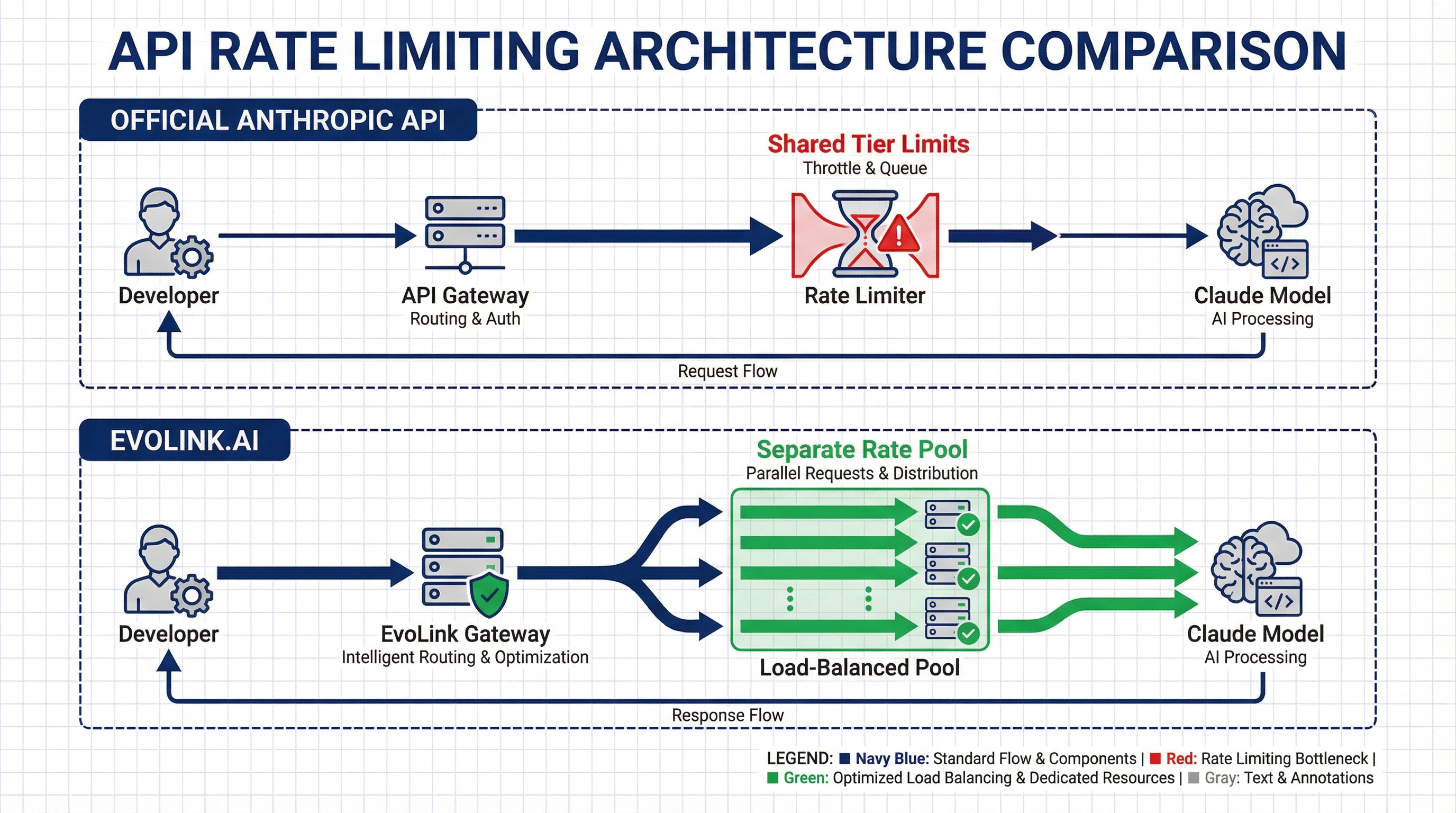
- How switching to EvoLink.AI moves you to a different rate limit pool
- Step-by-step configuration to resolve 429 interruptions
Why Does OpenClaw Keep Hitting 429 Errors?
The Root Cause: API Rate Limits and Usage Tiers
- Requests per minute (RPM)
- Input tokens per minute (ITPM)
- Output tokens per minute (OTPM)
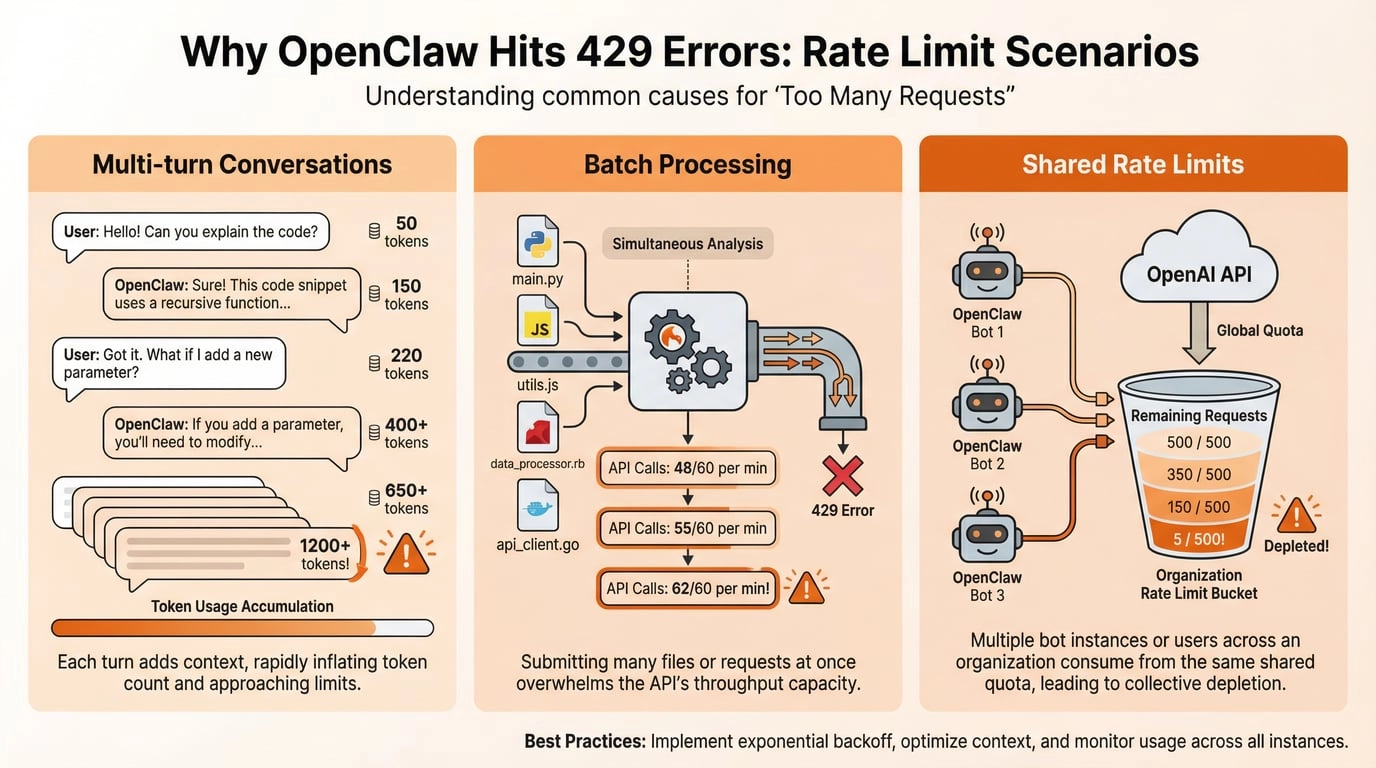
429 Too Many Requests response with:- A
retry-afterheader indicating how long to wait - Rate limit headers showing your current usage and limits
For developers running coding agents through OpenClaw, these limits are hit quickly. A single complex coding task can generate dozens of API calls in seconds, especially when using features like:
- Multi-turn conversations with full context
- Code analysis and refactoring across multiple files
- Real-time debugging sessions
- Batch file processing
Why OpenClaw Makes the Problem Feel Worse
According to OpenClaw's public issues (as of February 2026), when a model provider returns a 429 error, OpenClaw may:
- Mark the conversation as failed
- Enter a cooldown state
- Not automatically wait and retry based on the
retry-afterheader
This explains why it feels like your workflow just stops dead when you hit a 429—OpenClaw isn't silently waiting and retrying in the background. Your conversation is interrupted, and you have to manually restart.
The Multi-Agent Amplification
If you're running multiple OpenClaw bots or conversations simultaneously, they all share the same API key and rate limit pool. This means:
- Bot A's heavy usage affects Bot B's availability
- Multiple conversations can collectively exhaust your limits faster
- Peak usage times become unusable
The Solution: Switch to a Different Rate Limit Pool
https://code.evolink.ai. When you switch to EvoLink:What Changes
| Official Anthropic API | EvoLink.AI |
|---|---|
| Rate limits tied to your Anthropic organization tier | Different provider with separate rate limit pool |
| Tier progression requires spending history + time | Immediate access based on pay-as-you-go usage |
| Shared limits across all your applications | Separate API key with its own capacity |
| 429 errors during sustained high-volume usage | Infrastructure designed for continuous developer workloads |
What This Means for OpenClaw Users
- Different rate limit bucket: You're no longer competing with your other Anthropic API usage
- Higher sustained throughput: The infrastructure is provisioned for developer tools like OpenClaw
- Same models, same API format: Drop-in replacement—just change the base URL and API key
- Transparent pricing: Pay-as-you-go per token, no tier requirements
Step-by-Step: Configure OpenClaw to Use EvoLink.AI
Prerequisites
- OpenClaw already installed and configured
- An EvoLink.AI API key (get one here)
1. Locate Your OpenClaw Configuration
openclaw.json file in your OpenClaw installation directory:# The file is typically located at:
~/.openclaw/openclaw.json2. Update the Model Provider Configuration
openclaw.json and find the models.providers section. Replace or update the anthropic provider configuration:"models": {
"providers": {
"anthropic": {
"api": "anthropic-messages",
"baseUrl": "https://code.evolink.ai",
"apiKey": "sk-xxxxxxxxxxxxxxxxxxxxxxxxxxxxxxxx",
"models": [
{
"id": "claude-opus-4-5-20251101",
"name": "Claude Opus 4.5",
"reasoning": false,
"input": ["text"],
"cost": {
"input": 0,
"output": 0,
"cacheRead": 0,
"cacheWrite": 0
},
"contextWindow": 200000,
"maxTokens": 8192
}
]
}
}
}baseUrl: Changed from Anthropic's official endpoint tohttps://code.evolink.aiapiKey: Your EvoLink API key (typically starts withsk-)id: Use the exact model ID format shown above
3. Set Your Default Model
agents section, ensure model.primary points to the EvoLink model:"agents": {
"default": {
"model": {
"primary": "anthropic/claude-opus-4-5-20251101"
}
}
}anthropic/ prefix.4. Restart OpenClaw
After saving your changes, restart the OpenClaw gateway:
openclaw gateway restart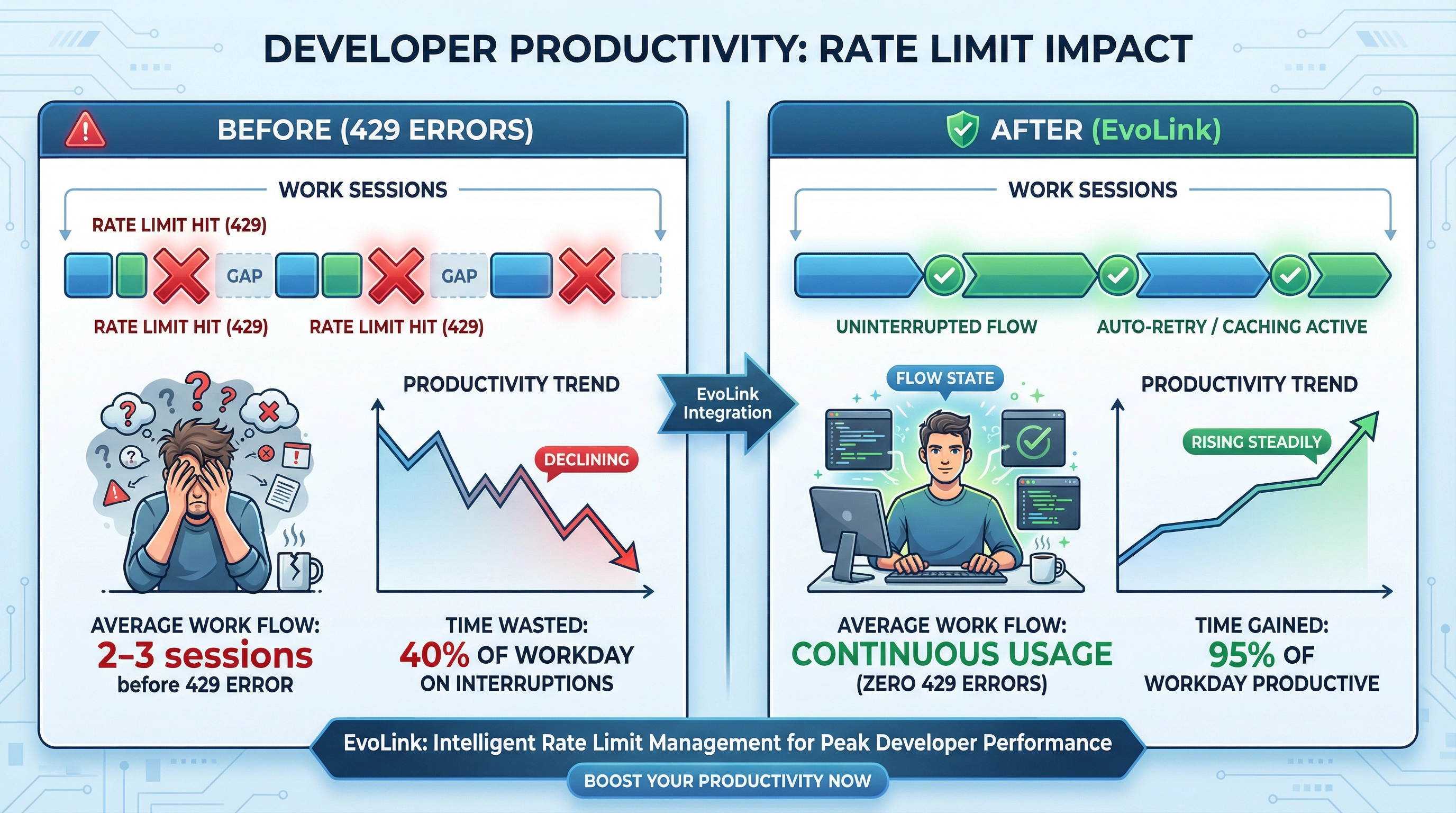
Verify Your Setup: Testing the New Configuration
Test 1: Run a Previously Problematic Task
Open your Telegram bot and try a task that previously triggered 429 errors:
Analyze this entire codebase and suggest refactoring opportunities for all files in the /src directoryWith EvoLink's separate rate limit pool, this should complete without the interruptions you experienced before.
Test 2: Monitor the Logs
Watch OpenClaw's logs in real-time to confirm requests are going through:
openclaw logs --follow429 status codes appearing repeatedly.Test 3: Sustained Load Test
Run multiple conversations or complex tasks back-to-back. If you were previously hitting limits after 2-3 requests, you should now be able to maintain continuous usage without interruption.
Troubleshooting Common Issues
Still Seeing 429 Errors?
apiKey field.# Verify your key is set correctly in openclaw.json
# EvoLink keys typically start with "sk-"baseUrl is set to https://code.evolink.ai (not https://api.anthropic.com).openclaw.json require a restart:openclaw gateway restartevolink/auto, while keeping the routed model visible in response.model.Model Not Found Error?
agents.default.model.primary matches exactly what you defined in models.providers.anthropic.models[].id, with the anthropic/ prefix:"primary": "anthropic/claude-opus-4-5-20251101"Connection Issues?
If requests are timing out or failing to connect, verify the EvoLink API endpoint is accessible:
curl -I https://code.evolink.aiIf you see connection errors, check your network configuration and firewall settings.
Understanding Why This Works
Official Anthropic API Flow
Your OpenClaw → api.anthropic.com → Your Org's Rate Limit Bucket → Claude ModelEvoLink API Flow
Your OpenClaw → code.evolink.ai → EvoLink's Rate Limit Pool → Claude ModelEvoLink's infrastructure is specifically designed for sustained high-throughput workloads typical of developer tools. The capacity planning anticipates the usage patterns of coding agents, batch processing, and continuous integration scenarios.
This doesn't mean EvoLink has "unlimited" capacity—no API does. But the rate limit pool is provisioned differently, which is why many developers find that switching to EvoLink resolves their recurring 429 issues.
Real-World Impact: What Developers Report
Here's what the switch typically looks like in practice:
Before (Official Anthropic API)
- Usage pattern: Running coding agent sessions throughout the day
- Experience: Hit 429 errors after 2-3 intensive conversations
- Workaround: Wait 5-10 minutes between sessions, or stop work entirely
- Productivity impact: Constant context switching, broken flow state
After (EvoLink.AI)
- Usage pattern: Same coding agent sessions
- Experience: Conversations complete without interruption
- Workaround: Not needed
- Productivity impact: Can maintain focus, faster iteration cycles
The time saved not dealing with rate limit interruptions often justifies the switch on its own—even before considering pricing.
Cost Considerations
Pricing Model Comparison
- Per-token pricing based on model
- Rate limits based on usage tier (requires spending history to increase)
- May need to over-provision or wait for tier increases
- Pay-as-you-go per-token pricing
- No tier system—immediate access to higher throughput
- Transparent pricing, check EvoLink's pricing page for current rates
Is It Worth Switching?
If you're only using OpenClaw occasionally and rarely hit rate limits, you may not need to switch. But if 429 errors are disrupting your work multiple times per day, moving to a different rate limit pool is the most practical solution.
Next Steps: Optimize Your OpenClaw Setup
Now that you've resolved 429 interruptions, here are ways to get more out of your OpenClaw + EvoLink configuration:
- Add multiple models: Configure Claude Sonnet and Claude Haiku 4.5 for different use cases, or add GPT-5.4 as a fallback (check EvoLink's documentation for available model IDs)
- Set up specialized agents: Create different agent configurations for different coding tasks
- Integrate with CI/CD: Build automated workflows that call Claude without worrying about rate limits during deployment windows
Get Started with EvoLink.AI
Ready to resolve your 429 errors?
- Get your API key: Explore all models on EvoLink or visit code.evolink.ai to create an account and generate your key
- Update your config: Follow the steps above to switch OpenClaw to EvoLink
- Test your setup: Run a previously problematic task and verify it completes without interruption


