

How to Use Seedream 5.0 Lite API 2026: Step-by-Step Integration with EvoLink (Async Workflow)

TL;DR
- Seedream 5.0 Lite emphasizes deep thinking + real-time search enhancement (search can be toggled on/off depending on the product implementation).
- If you're integrating through EvoLink, the core pattern is:
POST https://api.evolink.ai/v1/images/generations- then poll
GET https://api.evolink.ai/v1/tasks/{task_id} - Save results promptly (generated links can be time-limited).
- Seedream 5.0 is rolling out on EvoLink tonight (staged rollout is common; check the dashboard model list).
1. What Seedream 5.0 Lite is (and what you should not over-claim)
What's safe to claim
Seedream 5.0 Lite is positioned as a smarter image model with:
- stronger cross-modal understanding and reasoning,
- improved subject consistency & image-text alignment,
- real-time search enhancement to handle time-sensitive generation (especially useful for posters with real-time info).
What you should NOT claim without official API proof
Avoid asserting specific undocumented API fields or mechanics like:
conversation_id,enable_conversation, "multi-turn conversational editing sessions"- fixed latency overhead numbers (e.g., "adds 2–5 seconds")
- guaranteed correctness on real-world facts
Instead: describe "iterative editing workflows" and reference docs for exact request schema.
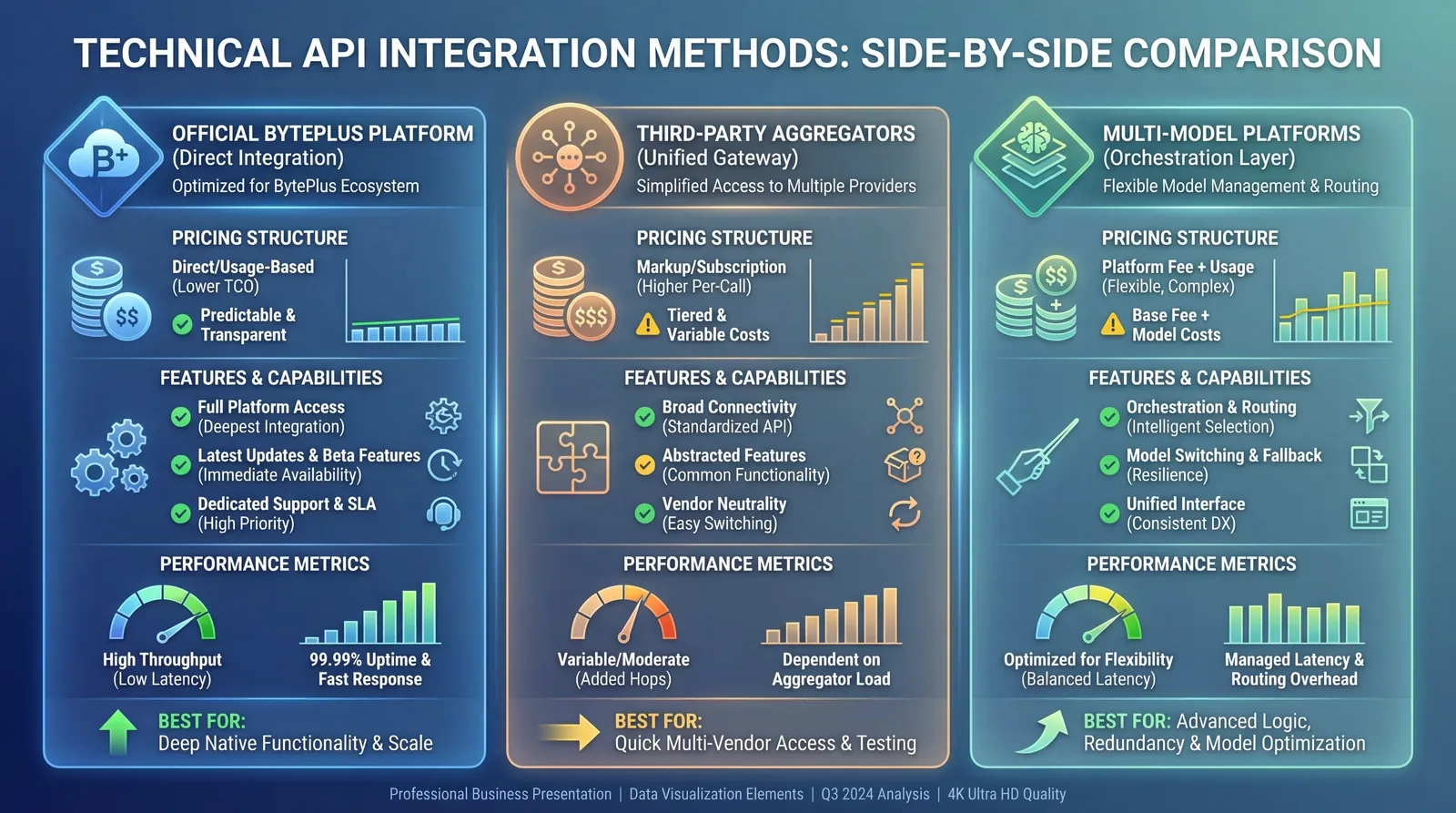
2. Access options (choose your integration path)
Option A — BytePlus ModelArk (official, direct)
Good for direct official access. You'll use ModelArk base URL + API key auth, and call the Image Generation API directly.
Option B — EvoLink (unified gateway; recommended for multi-model workflows)
Good when you want one API surface across multiple image models.
3. EvoLink integration (Seedream 5.0 Lite on EvoLink async workflow)
This section follows EvoLink's Seedream image-generation pattern: Submit → Poll → Save.
3.1 Authentication
All EvoLink APIs use Bearer token auth:
Authorization: Bearer YOUR_API_KEYGet your API key from the EvoLink dashboard (API Key Management).
3.2 Step-by-step: Submit → Poll → Save
Step 1 — Submit an image generation task
POST https://api.evolink.ai/v1/images/generations
size: ratio (e.g.,16:9) or pixels (e.g.,2048x2048)quality:2Kor4K(works with ratio-style size)
curl --request POST \
  --url https://api.evolink.ai/v1/images/generations \
  --header 'Authorization: Bearer YOUR_API_KEY' \
  --header 'Content-Type: application/json' \
  --data '{
    "model": "doubao-seedream-5.0-lite",
    "prompt": "A clean product poster of a solar street light, studio lighting, white background, crisp typography, realistic materials.",
    "size": "16:9",
    "quality": "2K"
}'You'll receive an async task object (example):
{
  "created": 1757165031,
  "id": "task-unified-1757165031-seedream5d",
  "model": "doubao-seedream-5.0-lite",
  "object": "image.generation.task",
  "progress": 0,
  "status": "pending",
  "task_info": {
    "can_cancel": true,
    "estimated_time": 45
  },
  "type": "image",
  "usage": {
    "billing_rule": "per_call",
    "credits_reserved": 3.0,
    "user_group": "default"
  }
}
Seedream 5.0 Lite note: the correct model name isdoubao-seedream-5.0-liteas shown in the EvoLink documentation.
Step 2 — Poll task status
GET https://api.evolink.ai/v1/tasks/{task_id}
curl --request GET \
  --url "https://api.evolink.ai/v1/tasks/task-unified-1757165031-seedream5d" \
--header 'Authorization: Bearer YOUR_API_KEY'{
"created": 1756817821,
"id": "task-unified-1756817821-4x3rx6ny",
"model": "gpt-4o-image",
"object": "image.generation.task",
"progress": 100,
"results": ["http://example.com/image.jpg"],
"status": "completed",
"task_info": { "can_cancel": false },
"type": "image"
}Step 3 — Save results promptly
3.3 EvoLink request parameters (practical reference)
Below is a consolidated parameter guide aligned with EvoLink's Seedream 5.0 doc.
Required
model(string) — Example:"doubao-seedream-5.0-lite"prompt(string) — Describes the image you want to generate, or how to edit the input image. Limit: 2000 tokens.
Common optional
-
n(integer, 1–15) — Max number of images to generate.- To generate multiple images, you can also put "generate 2 different images" into the prompt.
- Reference image count + final generated image count ≤ 15.
- Pre-charge may be based on
n, while final billing may follow actual generated count.
-
size(string) — Two modes:- Ratio format:
auto,1:1,2:3,3:2,3:4,4:3,4:5,5:4,9:16,16:9,21:9— Works withqualityto automatically choose resolution. - Pixel format:
WidthxHeight(e.g.,2048x2048,2560x1440,4096x4096) — Default:2048x2048. Pixel range: 2560x1440 to 4096x4096. Aspect ratio range: 1/16 to 16.
- Ratio format:
-
quality(string enum) —2Kor4K. Works with ratio format size. -
prompt_priority(enum) —standard(higher quality output, longer processing time). -
image_urls(array of image URLs) — For image-to-image / image editing workflows. Limits:- Up to 14 input images per request
- Each image ≤ 10MB
- Formats:
.jpeg,.jpg,.png,.webp,.bmp,.tiff,.gif - Aspect ratio (w/h) range: 1/16 to 16
- Total pixels ≤ 6000×6000
-
callback_url(string, HTTPS only) — Webhook called when task is completed/failed/cancelled (after billing confirmation).- HTTPS only
- Internal IP callbacks prohibited
- Timeout 10s; retries up to 3 times (1s / 2s / 4s)
- Callback body matches the task query API response format
4. Prompting best practices (Seedream-style)
Seedream responds best when you provide "designer-like constraints":
4.1 Layout and composition
"Poster layout, headline at top, safe margins, centered hero product, empty lower-third for copy""Front-facing, balanced symmetry, minimal background"
4.2 Typography (keep text short)
- Specify hierarchy:
"1 large headline + 1 short subhead + 2 bullet lines" - Specify clarity:
"sharp readable sans-serif, high contrast, no stylized distorted text"
4.3 Reference images (brand consistency)
image_urls for:- brand style guide reference
- product photo reference
- character reference (if consistent character is needed)
Remember: reference images + generated images ≤ 15.
5. Production reliability checklist (EvoLink async)
429: exponential backoff + jitter5xx: retry up to 3 times (2s → 4s → 8s)
- Start with 2–3 seconds interval for first 20s
- Then 5–10 seconds interval
- Stop after a reasonable timeout and mark as failed gracefully
task_id- Final
results[]URLs - Your prompt + params (for debugging reproducibility)
6. Cost control strategies (practical, model-agnostic)
- Use
2Kby default; reserve4Kfor final assets. - Keep
nsmall and iterate prompts instead of brute forcing. - Cache by hash of (
model+prompt+size+quality+image_urls) to avoid duplicates. - For high-volume jobs, use
callback_urlto avoid heavy polling.
Conclusion
Seedream 5.0 Lite is best framed as a reasoning-forward image model with optional real-time search enhancement for time-sensitive generation. For developers, the cleanest production pattern is:
- Pick your access path (ModelArk direct vs EvoLink unified),
- Implement a stable async workflow (Submit → Poll/Callback → Save),
- Treat advanced features as "capability-level" unless the official API schema is explicitly documented.
Ready to Get Started with Seedream 5.0 Lite on EvoLink?
model field.- 🚀 Instant Access — one key, one endpoint
- 🔧 Unified API — consistent schema across models
- 📊 Task + usage visibility — predictable async workflow
- 🛡️ Production-ready — callback support and safe constraints
- Sign up at evolink.ai and get your API key
- In your dashboard, open Models and find Seedream 5.0 Lite
- Call:
curl --request POST \
  --url https://api.evolink.ai/v1/images/generations \
  --header 'Authorization: Bearer YOUR_API_KEY' \
  --header 'Content-Type: application/json' \
  --data '{
    "model": "<SEEDREAM_5_0_LITE_MODEL_NAME_FROM_EVO_LINK_DASHBOARD>",
    "prompt": "A clean product poster of a solar street light, studio lighting, white background, crisp typography, realistic materials.",
    "size": "16:9",
    "quality": "2K"
  }'
Then query:
curl --request GET \
  --url https://api.evolink.ai/v1/tasks/<task_id> \
  --header 'Authorization: Bearer YOUR_API_KEY'

